
Udemy Dual Subtitles - Subtitle Translator
Extension Actions
- Extension status: Featured
- Live on Store
Dual subtitle translator for Udemy. Bilingual subtitles in 50+ languages. Supports Udemy Business, course preview & fullscreen.
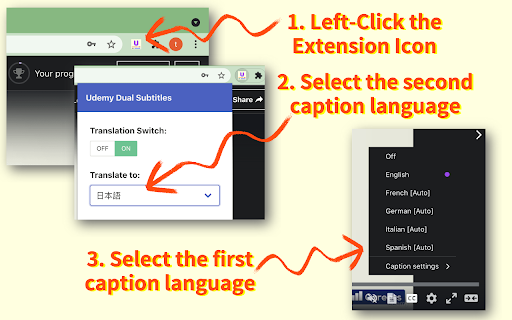
Udemy Dual Subtitles — the most popular Chrome extension for bilingual subtitle translation on Udemy. Translate Udemy course subtitles into your native language and display two languages at the same time. Over 30,000 learners worldwide use this tool to watch Udemy online courses with dual language captions. Actively maintained for 4+ years with 40+ releases.
━━━━━━━━━━━━━━━━━━━━━━━━━━━━━━
🌟 WHAT IS UDEMY DUAL SUBTITLES?
Udemy Dual Subtitles is a subtitle translator that turns any Udemy course into a bilingual learning experience. It takes the original Udemy captions and adds a real-time translated subtitle underneath — so you can read both languages simultaneously while watching the video.
No more pausing to look up words. No more switching between tabs to use a dictionary. Just press play and learn in two languages at once.
━━━━━━━━━━━━━━━━━━━━━━━━━━━━━━
⭐ KEY FEATURES
✅ Dual Bilingual Subtitles
Display translated subtitles alongside the original Udemy captions. See both your native language and the course language on screen at the same time. The original text and translated text appear as two lines — easy to compare and follow.
✅ 50+ Languages Supported
Translate subtitles into over 50 languages — one of the widest language selections among all Udemy subtitle tools. Covers European, Asian, Middle Eastern, African, and South Asian languages. See the full list below.
✅ Real-Time Subtitle Translation
Translated captions appear instantly as the video plays. No delay, no buffering — just seamless bilingual subtitles synced perfectly with the course content.
✅ Customizable Subtitle Styles
Full control over subtitle appearance: font size, text color, background color, font weight, and opacity. Make the dual subtitles comfortable for your eyes. You can even hide the original subtitles and show only the translation.
✅ Download & Export Subtitles
Export subtitles in SRT (with timestamps) or TXT (plain text) format. Choose from three export modes: original only, translated only, or bilingual side-by-side. Great for offline review, note-taking, or building a vocabulary list from course content.
✅ Udemy Business Compatible
Works perfectly with Udemy Business (corporate/enterprise) accounts. If your company provides Udemy Business for employee training, this extension works the same way.
✅ All Udemy Page Types Supported
Compatible with all Udemy page layouts — the classic version, the new Beta version, and course preview pages. We continuously adapt to Udemy's platform updates so you never lose access to dual subtitles.
✅ Fullscreen Support
Dual subtitles remain visible in fullscreen mode. No compromise between an immersive viewing experience and bilingual captions.
✅ Smart Language Detection
On first install, the extension automatically detects your browser language and sets it as the translation target — no manual configuration needed. It also intelligently detects which subtitle language is currently active on the video player.
✅ Auto-Save Settings
Your language preferences and subtitle styles are saved locally and persist across lectures and sessions. Open any new lecture and your dual subtitles appear automatically — set it once and forget.
━━━━━━━━━━━━━━━━━━━━━━━━━━━━━━
🎯 WHO IS THIS FOR?
👨🎓 International Students
Studying on Udemy but the courses are in English (or another language you're not fluent in)? Dual subtitles let you follow along in your native language while still seeing the original text — perfect for technical courses in programming, data science, web development, design, and more.
👩💼 Working Professionals
Taking Udemy courses to upskill but the content is in a foreign language? Don't let language be a barrier. Translate course subtitles in real time so you can focus on the subject matter, not on deciphering every word.
🌍 Language Learners
Learning a new language through immersion? Dual subtitles are one of the best tools for language acquisition. Watch real-world course content with both your target language and native language captions, and pick up vocabulary and expressions naturally.
🏢 Udemy Business Teams
If your organization uses Udemy Business for employee training, Udemy Dual Subtitles helps multinational and multilingual teams get the most out of every course — no matter what language they speak.
📱 Casual Learners
Just want to enjoy Udemy courses without the language struggle? One click and you have bilingual subtitles on any course that has captions enabled.
━━━━━━━━━━━━━━━━━━━━━━━━━━━━━━
📖 HOW TO USE
Getting started takes less than 30 seconds:
Step 1: Install the extension from Chrome Web Store
Step 2: Open any Udemy course and start playing a lecture
Step 3: Make sure the official Udemy subtitles (closed captions) are turned on
Step 4: Click the Udemy Dual Subtitles extension icon in your browser toolbar
Step 5: Select the language you want to translate subtitles into
Step 6: Toggle the translation switch ON
That's it! Bilingual dual subtitles will appear on the video immediately. Your settings are remembered, so next time you open any lecture, dual subtitles activate automatically.
━━━━━━━━━━━━━━━━━━━━━━━━━━━━━━
🌐 SUPPORTED LANGUAGES (50+)
Udemy Dual Subtitles supports translation into over 50 languages, covering European, Asian, Middle Eastern, African, and South Asian language families. Popular choices include:
• Spanish (Español) • Chinese (中文) • Japanese (日本語) • Korean (한국인) • French (Français) • German (Deutsch) • Portuguese (Português) • Arabic (عربي)
...and 40+ more languages. The extension interface itself is also localized in 31 languages, so you can use it in your preferred language.
━━━━━━━━━━━━━━━━━━━━━━━━━━━━━━
❓ FREQUENTLY ASKED QUESTIONS
Q: Do I need a Udemy Pro or paid account?
A: No. Udemy Dual Subtitles works with any Udemy account — free or paid — as long as the course has subtitles available.
Q: Does it work with Udemy Business?
A: Yes! Fully compatible with Udemy Business (corporate/enterprise) accounts.
Q: Why don't I see the dual subtitles?
A: Make sure the official Udemy subtitles (closed captions) are turned on first. Udemy Dual Subtitles translates the existing captions — it cannot generate subtitles for courses that have no captions.
Q: Can I translate from any language to any language?
A: The extension translates whichever subtitle language is currently active on the Udemy player into your chosen target language. So yes — any available source language to any of the 50+ target languages.
Q: Does it work in fullscreen?
A: Yes. Dual subtitles are fully visible in fullscreen mode.
Q: Can I customize how the subtitles look?
A: Yes. You can adjust font size, text color, background color, font weight, and opacity. You can also hide the original subtitle and show only the translation.
Q: Can I download the translated subtitles?
A: Yes. You can export subtitles in SRT or TXT format — original, translated, or bilingual.
Q: Does it slow down the video or cause lag?
A: No. The extension uses smart incremental translation — it only translates subtitles near your current playback position, not the entire course at once. This keeps performance smooth.
Q: Does it work on Edge or other Chromium browsers?
A: Yes. Any Chromium-based browser (Chrome, Edge, Brave, Arc, Opera, Vivaldi) can install and run this extension.
Q: Is my data safe?
A: Yes. Udemy Dual Subtitles does not collect or sell your personal data. Your subtitle preferences and settings are stored locally on your device.
Q: Does it work on the Udemy course preview page?
A: Yes. The extension supports course preview pages as well as full lecture pages.
Q: What happens when Udemy updates their website?
A: We actively track Udemy's platform changes and release updates promptly. The extension has been maintained for over 4 years through multiple Udemy redesigns.
━━━━━━━━━━━━━━━━━━━━━━━━━━━━━━
🏆 WHY 30,000+ LEARNERS TRUST US
• 4+ years of continuous development since January 2022
• 40+ version releases — actively maintained and updated
• Compatible with every Udemy page version (Classic, Beta, Preview)
• Featured on Chrome Web Store
• 50+ translation languages — one of the widest selections available
• Fast response to Udemy platform changes — we ship fixes within days
• Manifest V3 — built on the latest Chrome extension architecture
• Privacy-first — no personal data collection, no tracking
━━━━━━━━━━━━━━━━━━━━━━━━━━━━━━
🆕 WHAT'S NEW (HIGHLIGHTS)
Version 4.3.0:
• Support for Udemy's new preview page layout
• Improved caption language detection accuracy
Version 4.2.0:
• Adapted to Udemy's new page style changes
Version 4.0.0:
• Full support for Udemy's new Beta version
We actively maintain this extension to keep up with every Udemy platform change — so your dual subtitles always work.
━━━━━━━━━━━━━━━━━━━━━━━━━━━━━━
💡 TIPS FOR THE BEST EXPERIENCE
🔹 Always enable official Udemy subtitles first — the extension translates existing captions, it does not generate new ones.
🔹 If a course offers multiple subtitle languages, choose the one closest to your translation target for best accuracy.
🔹 Use the options page (right-click the icon → Options) for advanced subtitle style customization.
🔹 The extension remembers your settings per device — just set it once and forget.
🔹 Works great for building vocabulary: download the bilingual subtitle file after watching a lecture and review it offline.
━━━━━━━━━━━━━━━━━━━━━━━━━━━━━━
📬 SUPPORT & FEEDBACK
Have a question, found a bug, or want to suggest a feature? We'd love to hear from you!
📧 Email: [email protected]
🌐 Website: https://udemydualsubtitles.com
If you find Udemy Dual Subtitles helpful, please leave a rating and review on the Chrome Web Store. Your support helps other learners discover this tool and motivates us to keep improving. Thank you!
Latest reviews
- Game Snow (เกม สโนว์)
- very good
- Mark Zhao
- The only one that works with Udemy Beta—excellent job!
- Mihailo Tanasković
- Support team is very professionally! All praises! Greetings from Serbia!
- Thu Ngân Nguyễn Hoàng (Tojikato Nakitoji)
- good
- Aria Mehrafarin
- Practical and excellent
- Johnny SylDev
- thank you
- turbo digital
- It works great and saved me tons of time.
- Rizky Agung Mahendra
- just 30 min/month for free, holy moly
- Mhmood Al-siraj
- not free
- Nguyen Tien Dat
- nice
- Ben 10
- Great extension! It works perfectly and the support team was very helpful in resolving my issue quickly. Highly recommend!
- Di Sol
- A convenient extension for translating all courses from Udemy. And also the support service is working well and friendly. It helps to solve any problems! I recommend it to everyone.
- Su Su
- i want to cancel subscriptions and found the webpage related to management payment and subscription is missing with 404, how can i cancel auto subscriptions
- James Thanawat
- Excellent tools and great support. Quick response after contacting for help.
- Mark Zhao
- Excellent tool! Save me a lot of time!!
- Hig Lition
- Great for my learning! Thanks!
- jinlong li
- Charges are deducted and no place to cancel subscriptions can be found
- Tomas Ramoska
- Very good
- Haruo Kutsuna (haruchan325)
- I'm mostly satisfied, but how can I change the position of the subtitles?
- Berke Kösali
- Money dog
- Saindo da Zona de Conforto
- Perfeita, no meu caso funcionou perfeitamente. Muito bom.
- Miroslav Stránský
- Perfect app, I recommend it!
- Miroslav Stránský
- Perfect app, I recommend it!
- Emirhan Yac
- They was so helpful for me i'm using for a month and i'm happy
- VanHoang
- Tuyệt Vời
- O Z
- Es lo mejor, ahora podre hacer muchos cursos que antes no podia por la limitante del idioma.
- Ahmed Darraj
- ممتاز جدا
- Moisha Liberman
- Great plugin, useful support!
- Moisha Liberman
- Great plugin, useful support!
- Kirill
- It works!
- Kirill
- It works!
- Andrei Golovachev
- SUPER!
- Andrei Golovachev
- SUPER!
- Şakir Er
- Çok faydalı ve kullanışlı...
- Vítor Rodriguez
- Essa extensão me salvou, valeu cada centavo que gastei nela!!
- x-discus Xthai
- good job good program
- x-discus Xthai
- good job good program
- mehdi hasanzadeh
- It was very useful for me, thank you.
- mehdi hasanzadeh
- It was very useful for me, thank you.
- Xuân Tân Phạm
- Excellent app, I highly recommend!
- Xuân Tân Phạm
- Excellent app, I highly recommend!
- Jay Zhdanov (Tureckiy)
- Просто супер. Хоть английский понимаю хорошо, но купил не раздумавыя! Теперь можно и индусов номально слушать))
- Huy Phạm Văn
- Chức năng tạo và tải về tập tin phụ đề SRT rất tuyệt vời. Xứng đáng 10 sao
- Gabriel Crespo
- THE BEST! TY
- Gabriel Crespo
- THE BEST! TY
- Ron itzhaki
- עובד מצויין, מתרגם ממש כמו הגוגל טרנסלייט (לפעמים מפספס בתרגום בגלל סלנג). התירגום האוטומטי של יודמי גם לנאגלית לפעמים לא משהו אז בכלל זה יכול להפוך ללא מובן. בסה"כ שווה את העלות.
- gPLAY
- best
- gPLAY
- best
- Pavel Nitschl
- TOP!
- Pavel Nitschl
- TOP!