
Tabs Outliner
Extension Actions
- Extension status: Featured
- Live on Store
The Next Generation Session Manager; A Really Working Too Many Open Tabs Solution; And Your Browsing Notebook.
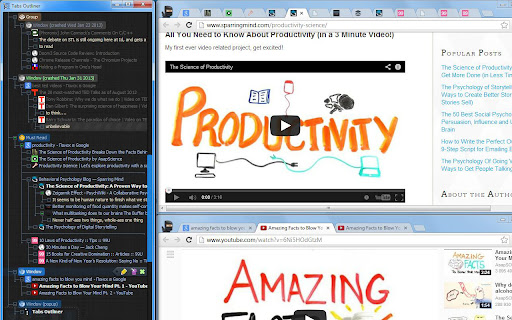
Tabs Outliner is a powerful fusion of a tab manager, a session manager, and a tree-like personal information organizer. It features built-in tools designed to drastically reduce your open tab count by allowing you to easily annotate and "close-save" windows and tabs within their original context.
Most importantly, it allows you to interact with these saved tabs practically in the same way as with open ones, freeing up valuable system resources.
A Lifesaver for Cognitive Overload & ADHD
Beyond just managing links, Tabs Outliner acts as a secondary brain. For people with Attention Deficit Hyperactivity Disorder (ADHD), or anyone who frequently experiences information overload, this extension is a game-changer. It drastically reduces mental load by allowing you to visually organize and safely tuck away your workflow without the anxiety of losing your train of thought. You can clear your screen to focus on the task at hand, knowing everything else is perfectly preserved exactly as you left it.
It also provides one of the most reliable ways to recover from crashed sessions — an unfortunate reality for power users who naturally accumulate hundreds of open tabs.
= FEATURES AND CAPABILITIES =
☀ Complete Overview - Get a bird's-eye view of all your open and saved tabs and windows, complete with your custom-added notes and marks.
☀ Flexible Tree Structure fully editable by Drag-and-Drop - Organize everything in a fully editable hierarchical tree into logical hierarchies and delimited groups. Unlike other tools, every node can be a parent to any other node, and all items can be freely reordered to specify priority or importance. This works not just with saved links, but with your currently open tabs and windows!
☀ One-Click Close & Save - Preserve any tab or window "in place" within its original context in the Tree with a single click. Saved items can be freely mixed with open ones. Because the Tabs Outliner window is designed to be kept active for observing your workspace, saved items never fall out of focus (a common issue with tools that banish tabs to separate lists). This makes the actual act of closing tabs to free up resources feel safe and mentally effortless.
☀ Innovative Tabs Outlining & Organizing - Annotate windows and tabs, add comments, summarize main ideas, or create to-do lists. Text notes can be dragged and dropped directly from web pages into the Tree.
☀ Tree-Style Tab Relations - Inspired by the famous Firefox extension, this feature automatically relates newly opened tabs to the tab they were opened from. This builds a strong, visual context for all your items and perfectly maps out your browsing trail.
☀ Intelligent Crash Recovery Done Right - No more panic after a browser crash or sudden system restart. Forget the default Chrome "all or nothing" choice—where you either lose all your tabs or reopen all the mess there was before crash and freezing your PC trying to load them all at once. Tabs Outliner lets you reopen only the windows or individual tabs you need NOW. Everything else remains safely saved in the exact context it was in before the crash, consuming zero resources until you are ready for it.
☀ Tabs List Exporter - Easily export and share an annotated list of your tabs via Google Docs, Word, Evernote, email, or messengers. Entire window hierarchies can be exported with a simple Drag & Drop, or you can save your entire tree as an HTML file (Ctrl+S in the main window).
☀ One-Click Procrastination Stopper - Instantly close-save all open tabs and windows while preserving their full structure and context. Regain system performance and mental clarity in seconds, and return to your work with a clean slate.
= PAID FEATURES =
Everything mentioned above is absolutely free to use. However, to support the ongoing development of the project, there are additional pro features available for a small, one-time payment. (Free users will only see an unobtrusive reminder about these features once every few weeks).
☀ Keyboard Shortcuts & Clipboard Support - Unlocks a whole new level of speed and efficiency for power users to navigate, edit, and manipulate the tree.
☀ Frequent Local Backups - Access automatic local backups saved every few minutes—perfect for restoring accidental deletions or reviewing recent changes.
☀ Automatic Daily Google Drive Backups - Not only this secure your data this also enables possibilities to access your tree remotely from some other computers
Note: These paid features are completely optional, and the core application is highly effective without them. The tree constantly saves all changes locally, and manual backups or data exports can be done at any time for free.
Latest reviews
- Peter MacDonald
- I upgraded to the paid mode of the extension and it worked fine for a bit but I ran into an issue where it just showed a blank screen. I fixed the issue by uninstalling and reinstalling the extension but it no longer recognized me as a paid user. I emailed the developer at both of his emails (I waited awhile between the emails to give him a chance to respond) with proof of purchase via my credit card and PayPal receipts but I never received a response. I will now be disputing the charge. What's strange is that if I click on "Buy Paid Mode License Key" the "Current Chrome Profile Serial Number" is exactly the same as my original serial number however it doesn't recognize me as a paid user.
- DBA Paulo Galo
- Hi Vladyslav. Glad to see you back in action. Hope you are doing well. Woohoo!!! I just noticed a new version (1.4.167) has been released. I can hardly wait to see what is in this update!
- kevin martin
- While it does create a nice, scrollable list of all of the tabs it does so at a high cost of memory and cpu power.
- Thomas Hearty
- I wish my employer would get over their security concerns about this app cause I have never found a tree style app that can organize my tabs and therefore my thoughts like this.
- SEVEN PLAY
- Why google exclude it from search? One of the best extension. Thanks developers!
- Yuvaraj S
- Resinstalling it starts working again.
- Qiuchan Wang
- I've used this open extension many years, and it's very convenient to use and liberating after edge updated tabs extensions data was wiped and subsequently tabs stopped showing in the extension tho if you need it there is a manual gdrive sync
- SOMA
- Stopped working... no longer shows your history or lets you reload your previous tabs.
- Yarin Kessler
- The best extension there is. It stopped working for a while but now looks like it's back - thank you to whoever made that happen!!
- Eijiro Sumii
- Workaround for the "windows not opening" (on multiple monitors perhaps) and "FFv3" (the only one backup label) problems: 1. Open Chrome's DevTools (hit F12) on Tabs Outliner. [It seems necessary to redo (only) this step every time Chrome is restarted.] 2. Click "Sources" tab. 3. In "treemodel.js" (under "background_v3.js" -> "egg..." -> "tree/js"), before "chrome.windows.create(createProperties, restoreSavedWinCreationDone);" (around line 1070), add: createProperties.left = 0; createProperties.width = 0; createProperties.top = 0; createProperties.height = 0; 4. Save the change (hit Ctrl-s), right-click "treemodel.js", and (left-)click "Override content". 5. In "background-backup.js" (under "background_v3.js" -> "egg..." -> "backup"), after "'machineLabel': " (around line 158), change "FFv3" to whatever backup label you want for the present environment. 6. Save the change (hit Ctrl-s), right-click "background-backup.js" and (left-)click "Override content". For me, the above solves all the major problems and Tabs Outliner now works _better_ than before (I was suffering from "windows not opening" for _years_). Thanks to someone for suggesting this in the Tabs Outliner Support Group (which seems deleted now). P.S. I find it nice enough that the author decided to spend his time at all to catch up with Google's arbitrary decision to make old Chrome extensions unusable. Although I tried many other options, I still cannot find any good alternative to Tabs Outliner (including the one advertised---spammed, I would say---in the previous "support" group).
- Hector Townsend
- Very bugged, all days there's nodes who simply stop working, no matter how much I click on them it's like they don't exist, and stopped the drop out in the list. Miss the 2021's version
- V R
- This should not be "Featured" by the chrome web store any more, because it is now defunct. If you click the link right next to the featured label, you'll get a warning from chrome that the website is trying to steal your information because it's not matching up with what it's supposed to be. It's honestly tragic. I used to be unable to live without this extension. I used it every day, excessively. It was my excuse to be a tab hoarder, to be honest. I think Google is to blame for it not working anymore, but they're not at fault for the developer no longer answering emails or responding to reviews. That's on him. He should have been upfront and warned us to back up our data to a plain text or markdown file, well before the changes occurred in the chrome API. Chrome has now limited a LOT of extremely useful extensions and they didn't replace them with their own built-ins or anything. We can't block ads as well, we can't manage our tabs now (their silly little tab window collections thing is just dumb), and if it weren't for everything syncing everywhere through google, I'd just switch back to Opera GX. Speaking of Tabs Outliner worked on it and Firefox last time I checked, so you might want to check that out. Maybe you can save your data that way. Good luck. Please update your reviews if you find something that can replace this. It was glorious, once.
- Max
- Fantastic minimalist extension that I simply cannot live without and all of the alternatives are clunky and bloated. Sadly however the development seems to have totally stopped for around a year and now there are some unresolved issues, mostly due to changes made that were required to work with the latest Chrome infrastructure. Unfortunately some of these can cause some serious issues. As the author is based in Ukraine one hopes that the author has not fallen prey to the current situation there and will be back to continue development. Sadly I fear from the lack of any responses whatsoever for such a long time that he may not return to work on this extension. A huge loss on all fronts.
- Saskia Hopkins Middleton
- I used to love this extension, it's incredibly useful when it's working well, and it was worth it to upgrade to the paid version for extra features. However sadly it seems like perhaps the developer isn't keeping it up to date any more, so it's developing bugs, plus it seems to have "forgotten" that I'm supposed to be on the paid version which is incredibly frustrating. I hope the developer is OK, I notice in the app settings it says he's in Ukraine, so he probably has more important things to deal with than keeping an app up to date! Fingers crossed he is able to return to maintaining this app to fix the problems, it'd be a shame to lose what was otherwise a good app, with features I haven't been able to find elsewhere yet.
- Cuje
- I used to love this extension and purchased it but now it is non functional you cannot reopen tabs by clicking or using keyboard features it some how logged me out and now I cannot use any of the paid features and they do not respond to email reluctant to purchase again since it doesn't seem to work when I tested on another profile either and I have never received any replies to the support email listed I have lost so much data very sad frustrating
- gina jota googlemail
- ok ok :-)
- Shadenium
- Lost all my saved tabs several times. Now is the 3rd time since 2017. Just blank window again. I can't take it anymore. They also removed "Don't create tree structure" option. I don't want tree structure, bring the option back if you ever plan on working on this extension again.
- Эйрик Торвальдссон
- Great idea but poor execution. I just did to "save and close" how the manual suggested and when I tried to open the window again it cloned half of my tabs to open them twice and opened closed tabs too.
- Charles LaBrec
- This extension has one of THE best features of any extension out there, to the point where I can't imagine switching browsers to one that won't support it. However, my score reflects that it seems to have fallen out of active support and updates, and many features no longer work as well as they did--in fact, a number no longer have a settings toggle for them like they used to before last year's (somewhat forced by Google) update. Two or so years ago, I'd have given it 4/5 stars. Backups (I'm a paid user) have a number of issues. The "tag" you can put on backups seem to be stuck to a value I used to use on a separate computer, so changing it does not change the tag on new backups. This means I can't distinguish between backups from a number of other systems I use. I had to resort to putting a label in the my tree to identify it. They also no longer seem to backup locally on any regular schedule. Also, when viewing a backup, groups cannot be expanded or collapsed. Luckily, I can drag to the active outliner window though. Next, the option to not tree out tabs but just store linearly under a window is gone. As well as the option to restore windows and the outliner window sizes and locations. I've also noticed that after restarting a system after hibernation, the old outliner window goes unresponsive, and a new one will usually open automatically, in the wrong location and size that is. These are the biggest issues I've had since the update almost a year ago, and they do significantly get in my way, which is why I have downrated the extension. Restoring the above to what it was before would restore my rating to its former value. Somewhat related to the lack of support is that my license got corrupted once a couple/few years ago, and I couldn't find the email with my license, so I was stuck. I had to buy a new one because I never got any response from the author. And on the issue of paid licences, you should note that a license is tied to a given user profile, so if you use multiple user profiles for yourself (e.g., I have a "home" and "work" profile), if you want to get paid features, you have to pay for each one. One QoL addition I'd like to see, if this ever goes back into active updating, is that it would be nice if I could open a new window under a group using a kbd shortcut or some other mechanism. Right now, to do so you have to open the window normally, which puts it at the end of the outliner list, then drag it up and into the group you want. For a short list, this is fine, but it's tedious when you have a very long list of groups and windows under them. Another QoL addition is one I encounter at work a lot since we use an SSO system that is less than great. So I open a window and don't noticed that some tabs have redirected to the SSO page (or sometimes even redirect to an error page). If I don't login to that page quick enough, that page because useless since it won't let me refresh to try again. And since it was a redirect, there no page history to go back to (and even if there was, technically the page I was on is no longer the one I'd go back to since it was a redirect. I end up having to use a new window to SSO login, then restore the window/group from an outliner backup. It would be nice if outliner could somehow save some history itself when it sees a redirect so I could go "back" from that history. While I my issues here are really more due to the really poor SSO implementation at work, if outliner could mitigate this, that would be an almost instant 5* rating :)
- Troy Acott
- I love Tabs Outliner, super useful for complex nested trees full of many windows and huge numbers of tabs. Easily close and reopen whole windows with all their tabs, it's an incredible bookmarking storage and window/tab navigation system. Only problems are can't do backups in Brave because it won't let you pay for a license in Brave, and you have to close all windows before rebooting the browser or it will randomly organize your whole tree structure upon reopening things as the browser reloads. Let me charge a card without logging into Chrome when I'm in the Brave browser, or let me transfer my paid license some other way from Chrome.
- Joe Arguedas
- brilliant. Cannot live without it.
- Ankit Malik
- If your working i a workspace that needs managing 500+ tabs.... THIS IS A GODS TOOL!!!!!! For me was a 3 month learning curve.....BUT DAMNNNNN CANT IMAGNE A MORE POWERFULL TOOL THEN THIS!!!!!!!! DEVELOPER🙏🙏🙏Please don't drop out and keep this alive I will but premium 5 more times just don't let this project die.....Tried every SINGLE alternative out there, this is the BOMB!
- bluelovers ka
- hope can support chrome tab groups
- Damien Theo
- I can't re-open my tabs or window with double click. This is one of the basic functions I need and it doesn't work. Sometimes it would but I couldn't figure if I had to have the cursor positioned a specific location or what the trick was. Led to cursing at the computer and that's unnacceptable. Holding Ctrl or Shift didn't work either. Really disappointing because the organization options are great.
- Mike S
- DO NOT GET THIS EXTENSION! It no longer works and all those saved tabs over the years appear to be gone. DO NOT WASTE YOUR TIME!
- Eric Shields
- Sadly, this extension is no longer maintained. The author is in Ukraine, as I understand it, and thus I'm sure this is VERY low on their current priority list. It is an incredible tool! Unfortunately, more recent updates to Chromium (I use Brave) have broken much of the interface and have, in some cases, resulted in a total loss of tabs. I wish I'd known that I could recover the JSON, as another reviewer described! What I am doing, however, is slowly working on a local copy of the extension where I "fix" the most broken bits and enable both the ability to actually buy it (which I've been trying to do for years, lol) and the connection to Google Drive for backups. If I can get it fairly stable, I may post it to the store as a fan update.
- Hebert Caballero
- Good extension, but, sadly, it is not evolving with the times. 1) It is a good way to keep a record of the past, beyond the default browser history, but now that method feels outdated. 2) It becomes hard to maintain over time. 3) It makes your system slow as it keeps collecting and collecting stuff. 4) It requires you to use Chrome for the paid features, cannot be done in other chrome-like browsers. 5) When it fails, you lose your tree. Period.
- Charlie
- No longer works and this extension doesn't seem to be maintained by the dev anymore. I had saved thousands of tabs and the UI is just a blank page now. There doesn't seem to be a way to restore the saved pages. Don't get this extension unless you are prepared to lose everything you saved.
- Brandon
- Please update the extension I lost the majority of my tabs because I couldn't backup due to using Brave browser and now it doesn't load at all with new manifest v3. PLEASE FIX.
- Todd A
- This has been, and still is for me, a great app. For those of you wondering where the developer is, he is from Ukraine. I haven't seen a post from him in a very long time
- Onkel Morra
- UI looks like a 90s website and most of the useful features are locked behind a paywall.
- Joel Perry
- I have always told everyone to use Tabs Outliner, I cannot even recall how long I've used it. I can't recommend it enough. please donate so it doesn't go away! (I am not affiliated with, nor even know who the author is.) If you have never used it before, the short version is that Chrome retains every tab you have open when you close a window without closing the tabs one by one, or reboot with chrome running. Tabs Outliner allows you to see that "cache" of webpages, rename them, organize them, close them and reopen them later and even move them to different chrome windows. Some of this functionality is built into chrome, but this extension puts it all in one web page to easily view every page you have open and manage them as a group or separately. With everything that can be done in a web page now, effective utilization of Tabs Outliner will allow you to manage your open (and closed) webpages to minimize performance issues and optimize your time, by removing tabs you don't need now. but keeping them ready to be reopened exactly as they were when you need them.
- David Matten
- current review (updated Feb 2025): This extension is now seriously broken. I have been using the Paid version for 10y. Now the Tabs window goes stale, unable to reopen suspended tabs. You have to kill and reopen the tabs window. And left behind are handfuls of duplicate ghost tabs within the same tree. I can't imagine anyone new paying for it in this state. I give it two stars only because it has some [diminished] utility to me because I know how to manage around the new bugs. But a new user would just uninstall it. It's a pity if the project is truly abandoned. It was great while it worked. If the publisher doesn't want to maintain it anymore, hopefully they release it so it can become community maintained. old review (2015): exceptionally useful, especially for searching tabs & avoiding bookmark hell
- David Matten
- current review (updated Feb 2025): This extension is now seriously broken. I have been using the Paid version for 10y. Now the Tabs window goes stale, unable to reopen suspended tabs. You have to kill and reopen the tabs window. And left behind are handfuls of duplicate ghost tabs within the same tree. I can't imagine anyone new paying for it in this state. I give it two stars only because it has some [diminished] utility to me because I know how to manage around the new bugs. But a new user would just uninstall it. It's a pity if the project is truly abandoned. It was great while it worked. If the publisher doesn't want to maintain it anymore, hopefully they release it so it can become community maintained. old review (2015): exceptionally useful, especially for searching tabs & avoiding bookmark hell
- CL Chambers
- I've used and loved Tabs Outliner for years, but a few days ago, for no reason at all, I lost everything. Years of saved tabs, and hundreds of important ones for every aspect of my life...all because I was apparently naive enough to assume that I didn't have to *manually* save my sessions on my own to some separate drive as an html file for a more solid safety net, since avoiding such a mundane process was precisely WHY I got a tab manager extension in the first place. What's the point of having a tab manager that doesn't truly "save" and back up your tabs? Unless you pay for it suddenly when it was a free extension at the start, that is. Silly me, I wasn't aware of this at all because the UI layout design informing a user of this in both the Tab Outliner window itself and where the "extension options" link goes are both confusing, convoluted car crashes to look at and an ADHD person's worst nightmare. So my eyes have literally just blocked the massive "explanation" text out for YEARS after skimming it once at the very start, back when it was still free. And so of course I never read any of the new "fine" print (ie. same scrolling wall of text that still hurts to look at for too long) about the paid features introduced for actual reliable backing of your data. But it also just doesn't make sense. Nothing at all unusual happened prior to this loss of years worth of tabs--no hard disk fail, nothing. I have no idea why this happened, as there's no rhyme or reason to it doing this when it worked perfectly all this time--I simply momentarily exited the tabs outliner window itself for a moment, but when I clicked on its shortcut that I keep next to my browser tab in chrome...everything was just gone. Everything. Where did my tabs go, when my browser didn't even crash? And I can't find any way to contact anyone for help--even for a real confirmation that no recovery is possible. So I feel stuck in limbo not quite knowing if everything is gone forever or not, and nervous to troubleshoot in case I end up causing something irreversible where there was a chance for recover data. I can't seem to find any answer from the developer online that isn't last dated around 11 years ago and yet informing other people who experienced the same sudden loss of data with just an "sorry, should have saved it manually, oh well." Has the developer been involved with it in any way since, especially if this was an issue other people experienced too? If there's truly no solution for this, and given what it's done to my years of data out of nowhere, I can't use this extension nor recommend it to anyone anymore, even though I was a truly avid proponent using it everyday for years...and despite willing to have paid for the "backup safety" upgrade, had my eyes been able to digest this extension's clipart and bullet pointed "table of contents".
- Walt Mecleary
- I have been using for at least 7 years - paid version, I bought early on to hopefully keep the project going. It saves me tons of time for managing development web teams. I have many nodes setup, some are my permanent "go to" everyday nodes for my tickets and project management, some for ongoing projects that might be temporary, some for our company internal documents. As far as people say it is not working, I am using on mac with Chrome Version 132.0.6834.160 (Official Build) (x86_64) - Feb 2025 - Still works for me. I think there is a free version - see if it works for you or maybe there is an extension conflict, I keep my extensions to a minimum these days. If it works think about supporting the project and backing up your nodes to the cloud. You have to take the time and get used to using it. It is not without a learning curve. There is a proper shutdown method I use, not sure if it has been addressed. I make sure to close each browser manually before shutting down Chrome. Else if you shutdown chrome with all browsers open when you reopen tabs outliner will say (tab crashed on date) next to the node next time you start Chrome - I also try to remove un-needed tabs in my everyday nodes, else they can get pretty deep fairly quickly. With a higher monitor resolutions I always have the tabs outliner tab set real narrow to the far left of one of my screens, when I need to get to one of our servers I go to the node I created for that server(no need to remember the IP address, then I can can quickly open up My Zoho node to check my teams tickets. If I need to update our company documents I open My G-Docs node. Easy Peasy. No more bookmarks to scroll though. I do still bookmark the occasion site, more for personal items. And when I do research on any topic I save the browser session with all the tabs as a node if I want to get back to researching that topic or need to reference that research later I have it. And the pro version backups to my Google Drive. I think it is brilliant. The little UI interface looks a bit dated.... but form follows function in my book. It works for me, your mileage may vary....
- AAA3BR
- I'm testing it yet, but in this few days my first impression is very good.
- Paul Dowsett
- I paid for this extension, because I loved it. Sadly, it's currently broken, and seems unmaintained. When I click on the Tabs Outliner (TO) icon in the toolbar, the window appears empty, apart from the TO icons at the bottom.
- Jeff Mercado
- tldr; extension is mostly abandoned at this point, but you can recover your saved data in full Unfortunately, it seems like neglect is preventing this extension from being truly the greatest extension. The extension has mostly been coasting for years on being a great tool and hasn't made any serious evolutions since. If it hasn't reached you yet, the more recent chrome updates effectively breaks this extension completely and I have no confidence this will be fixed. Apparently in my case, slowly features (such as local backups and Google drive backups) have been failing. Last drive backup goes back a year, local backup ~6 months... so it seems all is lost and the UI still doesn't load up. Looking at the extension code, it looks like it was refactored for manifest v3, but it's unclear to me how the update broke it. I'd suggest looking for other ways to manage your tabs from now on. With that said, if you are a current user and need to recover your tabs, the backups are a good start, but depending on when it broke for you, it might not be current. You can however recover the tree state as json and you can pick through that. Fortunately it will be in local storage under the key: onViewClose_lastSessionSnapshot 1. Open the extension (it will be blank) 2. Press F12 to open devtools 3. In the console tab, make sure the context (the dropdown on the top left) is set to "top" 4. Enter the command: console.log(localStorage.getItem('onViewClose_lastSessionSnapshot')) This will dump the json (which should be significantly large) to the console which you can copy to file and recover your data.
- M A
- It has a very good data model even though the UI looks clunky. If the developer teams with a UI designer and a good growth lead, this can be turned into a significant product with a ton of revenue I am sure. Only request to the developer for now is to keep it updated as chrome changes versions and code standards.
- Uthai Thani
- A FIX.... I created a small partial fix for the error that suspended tabs / windows cannot be reopened. You can see the error I got below. If you have the same error in order to (kind of) fix you need to do the following... 1. open the 'Manage Extensions' page and go to the tabs outliner extension 2. click on the 'developer mode' at the top right 3. click on the 'Inspect views service worker' which appeared in the tabs outliner extension box , this will open a DevTools window. 4. Go to 'Sources' and find using ctrl+F the following line of code (currently it is on line 1070 but it might change) - chrome.windows.create(createProperties, restoreSavedWinCreationDone); 5. Replace it with the following code: try { chrome.windows.create(createProperties, restoreSavedWinCreationDone); } catch(error) { createProperties.left = 0; createProperties.width = 1000; chrome.windows.create(createProperties, restoreSavedWinCreationDone); } 6. Press ctrl+S to save. 7. Now try to open old suspended tabs and windows (They might not open at the size and locations they used to before) I hope that helped. Good luck! ------------ 3/10/24 Still having issue with opening tabs and windows, probably problems with the multiple display calculations. ------------ Any fixes of the following error expected and when? still can't recover suspended tabs. when trying to open suspended tabs / windows, I keep getting: "Error handling response: TypeError: Error in invocation of windows.create(optional object createData, optional function callback): Error at parameter 'createData': Error at property 'width': Value must be at least 0. at chrome-extension://eggkanocgddhmamlbiijnphhppkpkmkl/tree/js/treemodel.js:1070:32" Also after the beginning of the issues I backed up the chrome profiles just in case, and actually the extension data disappeared. so need to recover, but can't find in the profiles where are all the extension tabs are kept. Nice extension but after the update few weeks ago there were issues, and even after the update two days ago there are errors
- Jennifer Winer
- I've used Tabs Outliner every day for years. It's a fantastic way to save tabs across time & multiple devices. I use it to save state on the many different projects I'm working on at the same time. It breaks at least once a year, and the developer doesn't do a great job of communicating issues or helping folks fix things. But, I've always found a way to fix it, so if you're somewhat technical you should be able to fix it. Eventually. Probably. YMMV? Overall, I love this extension and would personally rate it 5 stars. It's buggy, and occasionally stops working, but for a reasonable one time fee it's had quite a positive impact on my life.
- Functional Health Team
- I've been using this extension for nearly 10 years. I paid early on supporting the develop because it is extremely useful. This vey low review is because the developer has neglected to respond to questions I have submitted for support from them, even though I can see that they viewed the emails. They are simply choosing not to support me and I find this unacceptable.
- Eric
- Edit 2: ONCE AGAIN, EVERYTHING LOST. BACKUP DOES NOT WORK. NOTHING. DEVELOPER HAS DELETED THE ONLY DISCUSSION GROUP WITH PEOPLE WHO HAVE HELPED EACH OTHER IN THE PAST. NEVER REPLIES TO EMAILS. CORRUPT BEYOND REASON. AVOID THIS EXTENSION AT ALL COSTS. ONCE REGULAR USER NOW WILL NOT TOUCH WITH TEN FOOT POLE. YOU WILL, AND I REPEAT, YOU WILL ABSOLUTELY LOSE EVERYTHING IF YOU RELY ON THIS EXTENSION. EDIT: AGAIN, TODAY I LOST EVERYTHING I'VE BEEN SAVING SINCE THE UPDATE. I DID NOT CLOSE ANYTHING. IT'S JUST LOST. ORIGINAL REVIEW: LOST EVERYTHING ON THE UPDATE. YEARS OF MY LIFE AND WORK DELETED. DEVELOPER IS INCOMPETENT BEYOND BELIEF. NEVER EVER USE THIS EXTENSION. I've tried everything that's been suggested by other people here and more, multiple times, yet nothing works. Also, entire windows that seem to be open in tabsoutliner are not open in my browser, and I cannot click any of them. It does nothing. Also, dozens of empty "loading" tabs at the bottom of every window in TO, which cannot be closed, just loading with their circle spinning. Utterly ridiculous. Developer should NEVER have pushed this update if it was so utterly broken. The developer has been MIA for many years since before the war in ukr even began, to the strong dismay of many many people who purchased a license but were repeatedly ignored and never got support. Now all of a sudden when developer may lose money because of the manifest v3 update, he appears out of nowhere. RIGHT. We all know what your true priorities are, Vlad. Thanks for literally nothing. To you people who just want to stop "negativity," please consider how naive you are being. You are not a "miracle," Vlad, you are incompetent and you should refund everyone's money. You should also probably be sued for your incompetence.
- Jace V
- I've been using this extension for 10+ years, across multiple browsers. It's fantastic. It's not a glorified tab switcher like so many other extensions are. Tabs Outliner lets you organize tabs and windows that belong to different tasks or research topics, rename anything so you remember what it is and why you saved it, and add notes either as part of a saved tab node or directly to its own node. All of this without the "out of site, out of mind" problem that bookmarks have (or the organizational limits). Read through the options and the help section. (Something the reviewer below me clearly didn't do, since there's an option to change the single/double-click behavior along with an explanation for the default behavior). Yes, browser updates sometimes break extensions, including this one. Blame how Chrome handles local storage, and back up anything important before updating. If you can afford it, the paid version has automatic backups. If not, click the question mark in the extension window to find the help section, where there are directions for manually exporting your tab tree.
- Yahusha ben Moshe EliYahu
- I've been a paid user of tabs outliner for.... I forgot how many years now. But apparently this "upgrade" the other day (aug 2024) didn't go as planned or something. I've waited multiple days now, as on one system it shows Nothing except the menu at the bottom. No tabs on the list at all, even the current tabs open. On my other system it shows tabs in the list, some seem to save but others don't. And instead of my system name it shows it as "ffv3" or something close to that. And it looks like this has been happening to a bunch of us from the comments here. Like I said, used it for years. Its a great tool with nothing else that comes near its particular set of features and functionality. Especially when I move back and forth between systems at different locations. But they've had some issues from time to time. One other issue its had is if you're a paid user, and even with it being connected to your google drive/google account, for some reason if you remove/uninstall it from chrome and then reinstall it, you have to pay for it again to get the paid features back. Thought maybe they had fixed that... took a chance to see if that would "fix it" what it was doing this time. Well, it didn't fix it, and it shows the "upgrade now" again... Hope they get both of these issues fixed soon. Lost all my tabs on this system that I'm currently using. -> EDIT: Well another week has passed, they still haven't fixed it. And this computer still wants me to "upgrade to paid"... again. Which I'm not paying for it again, have done so everytime I wiped a computer and reinstalled windows. Or uninstalled/reinstalled chrome. Or uninstalled/reinstalled the app itself. Also had to always pay for it again on each computer I used it on. From here forward, IF they ever get it fixed, I will no longer rely on Tabs Outliner to save important groups/subjects of tabs, especially when it comes to my online work. I'm going to have to try to open each set of tabs on the list, and save them to different folders in chrome bookmarks. Can't afford losing that info, and I need to access those links on my other computer. sad to see what was such a useful tool, go to waste. ----------------- EDIT / UPDATE: Well its nice to know that I can go to my email I got when I paid for Tabs Outliner and click that link to "re-activate" the paid mode. I searched for that email, and found I have bought Tabs Outliner 4 times since 2017. In any case, some saved windows still won't open. I have to open each link in a "new window/last window". Then delete the original window and replace it with the new one. Also machine names/labels does not work, both of my systems at two locations both save the backup file as "FFv3". ----------------- UPDATE 12/6/24 Well it basically works now. But it still won't open/restore windows at times. I have to close Outliner and reopen, then it usually works. Really annoying that FFv3 is what ALL backups are named. Doesn't matter what label I use, or what computer. They are all just FFv3, which means it is hard to keep track of what backup is from which of the computers that I use, Personal, my Work computer (which I own), or my laptop. Really wish they would fix this. I'll bump my rating from 1 star to 2 stars, because it does "mostly" work. But still needs fixed.
- Anonymous
- I used to love this extension, but it stopped working some months ago. Double-clicking on a closed tab does nothing. Many other recent reviews also indicate that this extension has died.
- Isaac Lewis
- This is really janky and kinda clunky. It's a completely separate window, and one of the really annoying parts is, you have to double click on the tab you want to get it to open. I mean, it works in the most basic sense, but I get the feeling whoever made this either isn't comfortable with the tools they used to make this, or they fully lack any understanding of how or why different people might want to use tab trees. Even something as basic as integrating the window into Chrome isn't done.
- Paul Edison
- I've used Tabs Outliner for a while and really appreciate its unique approach to organizing and managing tabs. The tree-style structure is incredibly helpful for keeping everything in order, especially for heavy tab users. However, it seems like the extension hasn't been updated in a while, and I’ve run into occasional bugs. Recently, I started exploring VertiTab as an alternative. It also supports tree-style tabs, but with additional features like cloud sync and automated snapshots, which have been a game-changer for me. I’d still recommend Tabs Outliner for anyone looking for an innovative way to manage tabs, but it’s worth checking out VertiTab if you’re looking for something actively maintained.
- Jondeir Junior
- amazing! please keep it up, it's just amazing!