
Page Notes
Extension Actions
- Extension status: Featured
- Live on Store
Attach notes to any webpage — they're right there when you come back. Syncs via your own Google Drive. No third-party servers.
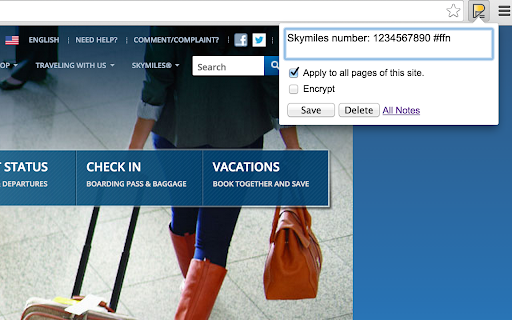
Page Notes — notes that live where you need them
Attach a note to any web page. When you come back, it's right there — no searching, no switching tabs. Perfect for login hints, tracking IDs, project context, or anything you'd otherwise forget.
SMART & LIGHTWEIGHT
Create notes scoped to a specific URL (one article, one order page) or an entire domain (everything on amazon.com). Use #tags to organize notes across sites, and spot pages with notes instantly — the icon changes color when there's a note waiting.
YOUR DATA, YOUR RULES, NO LOCK-IN
Page Notes never sends your data to third-party servers. Notes live in your browser by default, or sync to your own Google Drive for cross-browser access. For sensitive notes, enable client-side encryption with a passphrase that's never stored anywhere.
WORKS EVERYWHERE
Syncs across Chrome, Edge, Brave, and all Chromium browsers — plus Firefox. View and edit notes on mobile via the web app at pagenotes.app.
LINKS & SUPPORT
• FAQ: pagenotes.manugarg.com/faq
• Bugs & feature requests: GitHub Issue Tracker (Store review replies don't work!)
• Firefox Add-on: addons.mozilla.org/firefox/addon/mg-page-notes
• Privacy Policy: pagenotes.manugarg.com/privacy.html
LEARN MORE
• Blog: https://medium.com/@manugarg/10-000-users-for-page-notes-1f75786c2a41
• Website: https://pagenotes.manugarg.com
Latest reviews
- Douglas Bailey
- Very handy extension for keeping notes on a web page. I find this essential so I can remind myself what to check when verifying that a page includes my updated content. My only complaint is that the delete button for the note is now hidden behind a click on an edit icon, where it used to be directly accessible from the note. I'd prefer having the ability to delete without this extra click.
- Don Mayer
- Useful!, also nice feature that you can see all notes on a separate web page.
- Aleksandr Beloborodov
- Awesome! gdrive sync+. yes, for 90% sites only single textarea is enough, but waiting for list of notes
- Vadim Zhivotovsky
- There is for Chrome and Firefox single extension, it's very convenient. Author answers the tickets
- Federico SP
- So for example if you are booking for a hotel and then you change the date for a room that you found, you don't see the note anymore for the same room because the link changed and there's no way to make the link associated with the note less specific, even if it is the same room.
- Yang Jiao
- On first use, the extension seems to have janky behavior with URL parameters such as that used by https://chromewebstore.google.com/detail/page-notes/omjdheidbhoghpfdnndkgoelfiogjfla (the extension install page) where the addition of a tracking(?) parameter by the website unlinks the note. I expect this to be a huge issue with YouTube videos that adds the t= parameter automatically in some contexts and steam workshop pages with the searchtext= parameter, for example. Ideally, this extension should have the ability to differentiate between the webpage portion of the URL and state parameters as an option like the choice to note as website. Edit: just the option of a note to accept [url] and everything with extra url elements would be nice, and seems easy to implement with regex.
- Stan Shmulevich
- Amazing tool. The simplicity and utility of it at same time is almost unreal - like a swiss army knife... no better - It's like a crowbar! A bent, rust speckled hunk of iron that has zero bells, no ergonomic bs, just a hooked end and a mean claw screaming 'f. you problems!' ...pry open crates, hammer nails, smash windows, dramatic exits and entries - this is a total crowbar for tasks / notes / mini ticketing system for chrome-run systems.
- Richie Madden
- Page Notes has become an essential part of my workflow for keeping lightweight notes tied to specific pages, and the Google Drive sync is especially valuable for working across devices. I did run into a sync issue when using the Comet browser because Comet was incorrectly identifying itself as Chrome, which confused the sync authorization. What impressed me most was the developer’s responsiveness: after reporting the problem on GitHub, there was quick follow-up, clear communication, and a working fix landed within just a few days. That kind of support gives a lot of confidence in relying on this extension long term. If anyone else is seeing sync problems in Comet, be sure to open Page Notes’ Advanced Settings and turn “Use non-Chrome behavior for sync authorization” to YES. That one change immediately resolved the sync issue for me, and everything has been rock solid since.
- Basti Sebimm
- Great extension for making quick notes - AND syncing them to google drive. It's working fine with Vivaldi, too. Btw - great support from the developer, fixed a small problem within days.
- Lucas Lopes Pultz
- Exactly what i need!
- Hesse Sun
- Thank you, this is a very good product. One small suggestion: it would be better if the pop-up could be moved after it automatically appears, as it often obscures some things.
- Caden Knebel
- Finnaly a single app that can create the perfect pop up in a window. Side-note: make sure to edit settings if that is what you're wanting to do. Great plugin!
- Liam
- Allow changing note' URL Add a settings button when clicking the extension icon, took me very long to know that I can show note when opening sites
- Boris Popovich (Matija Flutes)
- Just started using it. It's very helpful. Thanks! If there was a way to position it where you want it on the screen, it would be even better. I installed on Yandex as well but can't find a way to add a keyboard shortcut like in Chrome. I am using MacOS Monterey
- Sorin Leucuta
- This is particular useful on the classified / bidding portals where you can leave yourself notes for later, so you don't read the entire description and watch all the pics all over again every time. Manu, you can consider adding timestamp to the entries - it can be done easily.
- yu liu
- Its functionality is convenient, but every update results in significant version incompatibility. When I use the old version of Chrome and it automatically updates, it brings endless troubles and bugs. There are really, really many bugs, such as inability to sync, inability to change icons, and so on. In short, it's very troublesome. Of course, it will be normal after upgrading chrome.
- Jai Tiwari
- Good extension. Does what is says.
- Paul Braspenning
- Simple, productive, easy to use and it syncs!
- Liam
- Allow changing note' URL Add a settings button when clicking the extension icon, took me very long to know that I can show note when opening page
- Charlie Moss
- What an absolute hidden gem. Definitely worth 5 stars. Just a couple of suggestions. It would be handy to be able to change the colour of the popup. At first, it would not sync on Vivaldi. It required changing "Report Browser Brand as" from Chrome to Vivaldi in the browser network settings. Maybe that could be fixed.
- Ron McLemore
- Really works. Lately have a message "sync is not happening". Any idea what that means?
- PC User
- hi, i have a old pagenotes.csv file and i have encrypted texted from your export. how can i decrypt it manually? i tried a AES online tool but that didnt work. please put instructions on your app description for others to find too!
- Jake Z
- Does what it says it does. 5 Stars if the pages could support basic markdown/text formatting!
- RJ
- Thank you for developing this extension 🙏🙏
- Jim Sneeringer
- Works great. I would like to put the notes in the middle of the page, but I understand that would be difficult to program. However, you can use the Highlighter extension to mitigate this; find it on Google Play.
- Aybars Oruç
- Perfecty fine!
- A CM
- Essential App!
- Alexander K.
- Love that extension...already using it heavily to always have notes on the respective web pages. What I would love to see, is that my note is always shown as soon as I am on that page.
- AC Martin
- I love this app, it's the best app that i tested to leave notes into already visited sites. It allows to save the user experiences. It would be grate being able to also post also publically, read and vote to public comments of other users of this GREAT APP ⭐⭐⭐⭐⭐
- Arabinda Ghosh
- Nice and simple. UI design improvements would be appreciated.
- Stephen Bayer
- The current version of the app wont sync with google drive, it pops up and gives error 400. Other than that it is great.
- Epsilon Empirical
- This works great! It would be great to have an option to make a note an "alert" that pops up somewhere with your note when you visit the website again
- Uday Saroj
- Saves the day, sometimes. Though, it would be great if the extension automatically pop-loaded page notes during a(ny no. of) URL revisit(s).
- Dev Dhamele
- Exactly what I needed. It works. I am using Opera GX but it's chromium based so Chrome extensions work in Opera GX too. I can save notes for any specific website. it does just the thing it said. Excellent. Even if you don't think you need it, You probably do. What I like the best about this is that I can sync this to Google Drive. Text barely takes any data.
- Veeresh Devireddy
- It is failing again, without any errors and the valuable notes are getting lost instantly!! I request you to please do through testing, in all varieties of domains, sites, etc. and confirm. Just today, I tried to save some notes on this domain (https://topmate.io/), and got lost within seconds! I don't understand its rocket science here. Just store it in the local storage first, display later, and sync further. All other hacks (reset, reinstall, resync) not working.
- he who exist
- hey @KempTastic, you're looking real silly about now (likely the norm for somebody so emotional), good solid app - everybody please disregard the 1 star review that frankly should be removed. Please report it future web surfer if you still see it - let's not scare away all the extension devs. We all play a role.
- N D
- A very useful extension. Thank you.
- Kemp Tastic
- Only looks at top level domain. Wanted to use this to take notes on eBay listings but despite making multiple notes on separate listing pages, the extension only looked at "ebay.com" so all my notes overwrote each other and despite taking at least 30+ notes, I only have 1 currently visible to me. Colossal waste of my time and effort. Feel scammed out of my time.
- Kemp Tastic
- Only looks at top level domain. Wanted to use this to take notes on eBay listings but despite making multiple notes on separate listing pages, the extension only looked at "ebay.com" so all my notes overwrote each other and despite taking at least 30+ notes, I only have 1 currently visible to me. Colossal waste of my time and effort. Feel scammed out of my time.
- Owen Johnson
- Simple, easy, and utilitarian. Exactly what I was looking for.
- Owen Johnson
- Simple, easy, and utilitarian. Exactly what I was looking for.
- Kelly Peterson
- This is amazing! It's nothing fancy, but it's super helpful and much needed! It's extremely simple to set up and use. There is another Notes Extension for Chrome that has more ratings and it says that it's the only extension that can take notes on a page without needing a pop up window - NOT TRUE! This one does not need a pop up window!!!! Highly recommended!!
- Kelly Peterson
- This is amazing! It's nothing fancy, but it's super helpful and much needed! It's extremely simple to set up and use. There is another Notes Extension for Chrome that has more ratings and it says that it's the only extension that can take notes on a page without needing a pop up window - NOT TRUE! This one does not need a pop up window!!!! Highly recommended!!
- Scarlet
- Hello, I just want to thank the person who made this. I was thinking just now how useful an extension like that could be, searched it up and here it is, so thank you!
- Scarlet
- Hello, I just want to thank the person who made this. I was thinking just now how useful an extension like that could be, searched it up and here it is, so thank you!
- mori yuji
- ドメイン毎にメモを管理することができるシンプルなツールでとてもいい。メモをポップアップで確認する場合、視認性をよくするためにフォントやフォントサイズの変更ができるとうれしい。Very nice simple tool to manage memos by domain. It would be nice to be able to change the font and font size for better visibility when viewing memos in a pop-up window.
- PEDRO
- SIMPLE AND EFFECTIVE. JUST WHAT I NEEDED
- PEDRO
- SIMPLE AND EFFECTIVE. JUST WHAT I NEEDED
- Shikha Priyadarshini
- I really like the idea of this extension. The only problem that I am facing right now is that, it is not syncing with Google Drive. I would request the developers to please fix this issue. Updated on 11.03.2023 : I tried the updated version on MS Edge, and now it is syncing with Drive. Thanks to the Developer.
- Shikha Priyadarshini (शिखा प्रियदर्शिनी)
- I really like the idea of this extension. The only problem that I am facing right now is that, it is not syncing with Google Drive. I would request the developers to please fix this issue. Updated on 11.03.2023 : I tried the updated version on MS Edge, and now it is syncing with Drive. Thanks to the Developer.