
Todaily (for JIRA)
Extension Actions
Avoid Wasting Time on Daily Standup Meetings using JIRA
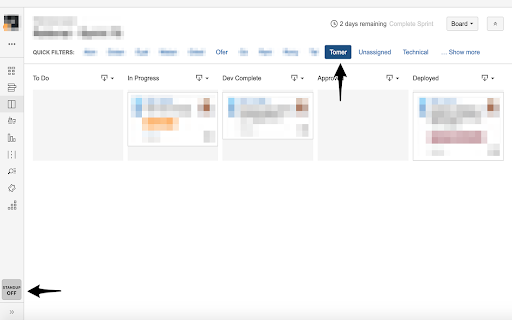
Is your daily stand-up a daily waste of time? do you use JIRA system with the quick filters board per member view? Todaily is a unique Chrome extension that avoids time waisting and makes your Daily Stand-ups effective.
1. Refresh your JIRA board page. (domain should have jira subdomain, for example: "jira.mycompany.com"
2. Note a new button "STANDUP ON/OFF" on the bottom left of the screen. (ON by default)
3. Click on any of the members name (see screenshots)
4. That's it, you should see a countdown :)
NOTE:
- You can use the "STANDUP" button to easily turn on (or off) the extension when your on a stand-up.
- You can edit the Settings via the Chrome Extension icon in your toolbar. (and set your favourite countdown, colours, texts etc)
VIEW DEFAULT SETTINGS:
- Right click the toolbar icon, and select "OPTIONS"
ENJOY!