
Regla de Lectura
Extension Actions
- Live on Store
Utiliza la aplicación 'Regla de Lectura' para guiar y mejorar tu experiencia de lectura con una línea guía que te ayuda a mantener…
Presentando Línea de Lectura: ¡revolucionando tu experiencia de lectura! 📕
🚀 Consejos de inicio rápido
1. Haz clic en "Agregar a Chrome" para instalar la extensión de manera fluida en tu navegador.
2. Abre cualquier página web o documento donde quieras mejorar tu experiencia de lectura.
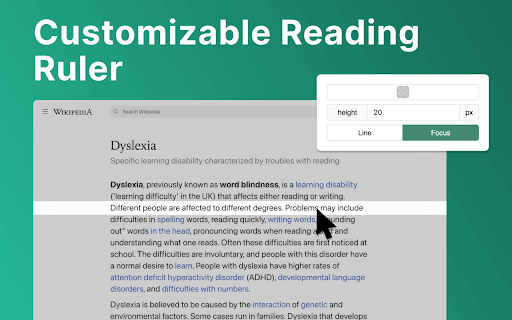
3. Ajusta el color, altura y opacidad del regla de lectura según tus preferencias.
4. Mueve la regla de lectura con el cursor del mouse para enfocarte en líneas o párrafos específicos.
5. Sumérgete en tu material de lectura con mayor claridad y enfoque, cortesía de la ayuda de lectura.
💎 Mejora tu viaje de lectura con la regla de lectura
Línea de lectura sirve como tu compañero de lectura de confianza, ofreciendo una variedad de funciones para satisfacer tus necesidades de lectura únicas. Ya seas estudiante, profesional o simplemente disfrutes sumergirte en un buen libro, la regla de enfoque está aquí para elevar tu viaje de lectura.
⚙️ Guía de lectura personalizable
Aquí están las opciones de la regla de lectura que puedes personalizar fácilmente en la configuración de la extensión:
✴️ Color y opacidad. Cambiando el color de la regla de lectura se mejora la legibilidad en sitios web con diferentes fondos.
✴️ Altura de la regla. Al establecer la altura de la guía de lectura, el usuario puede adaptarse a diferentes tamaños de fuente y espaciado de líneas para una experiencia de lectura óptima.
✴️ Modo de lectura. Línea de lectura ofrece dos modos de lectura: línea y enfoque. Estos modos especializados ofrecen soluciones a medida para mejorar tu experiencia de lectura.
✨ Integración y accesibilidad perfectas
💡 Línea de lectura se integra sin problemas en tu navegador Chrome, garantizando accesibilidad y facilidad de uso para usuarios de todos los niveles de habilidad.
💡 Habilita o deshabilita la extensión con un solo clic, dándote control total sobre tu experiencia de lectura.
💡 Diseñado pensando en la inclusividad, la línea de lectura prioriza la accesibilidad, convirtiéndola en una herramienta valiosa para personas con diversas necesidades de lectura.
🛠 Características futuras
1️⃣ Modo de enfoque. La función de modo de enfoque mejora la concentración al resaltar una sola línea de lectura, ideal para la dislexia. Utiliza la regla de lectura para guiar la atención del lector, haciendo la línea de lectura más clara y minimizando distracciones, mejorando así la legibilidad para los usuarios disléxicos.
2️⃣ Soporte para PDF. Integra sin problemas las funciones de la regla de lectura en archivos PDF, ofreciendo una experiencia de lectura consistente en diferentes formatos y plataformas. Ya sea que estés estudiando documentos académicos, revisando informes o disfrutando de la lectura de ocio, la ayuda de lectura estará allí para proporcionar un apoyo y asistencia invaluables.
❓ Preguntas frecuentes
📌 ¿Qué es la línea de lectura?
La línea de lectura es una extensión de Chrome diseñada para mejorar tu experiencia de lectura al proporcionar una guía de línea personalizable para ayudarte a navegar a través del texto. Una vez instalado, el lector de ayuda añade una regla de lectura virtual a la ventana de tu navegador. Puedes ajustar su color, altura y opacidad para adaptarlo a tus preferencias.
📌 ¿Puede ayudar con desafíos específicos de lectura?
Sí, la línea de lectura ofrece modos especializados como asistente de dislexia y línea de enfoque para ayudar a las personas que enfrentan dificultades de lectura.
📌 ¿Es fácil de usar la línea de lectura?
¡Absolutamente! La línea de lectura cuenta con una interfaz intuitiva y se puede habilitar o deshabilitar con solo un clic, lo que la hace accesible para usuarios de todos los niveles de habilidad. El lector de ayuda se puede desactivar o volver a activar fácilmente con un solo clic, dándote control total sobre tu experiencia de lectura.
📌 ¿Puedo personalizar la apariencia de la guía de lectura?
Sí, puedes personalizar el color, la altura y la opacidad de la regla de lectura para que coincida con tus preferencias y entorno de lectura.
📌 ¿Funciona la línea de lectura en todos los sitios web?
La regla de lectura es compatible con la mayoría de los sitios web y documentos basados en la web, proporcionando una experiencia de lectura consistente en diversas plataformas.
📌 ¿Cómo puede mejorar la guía de lectura mi velocidad y comprensión de lectura?
Al proporcionar una guía visual y minimizar las distracciones, la regla de lectura ayuda a los usuarios a enfocarse en el texto, lo que conduce a una mejora en la velocidad y comprensión de lectura.
📌 ¿Es adecuada la línea de lectura para estudiantes?
Sí, la regla de lectura es una excelente herramienta para estudiantes, ayudándoles a mantenerse concentrados mientras estudian, investigan y leen textos académicos.
Latest reviews
- J
- It simply does what it says it does. Good for focus, video presentations, dyslexia. The color filters are nice.
- Mark Thornton
- It provides a line to help me read documents as promised, and let me say it is one heck of a line.
- Luis Arellano
- Very good help to keep track while reading. Thank you!
- Michelle Vega
- This is amazing, thank you so much. It truly helps me focus, and it's user-friendly.
- Angus Kelly
- The simple ideas are usually the best, so glad somebody has actually taken time to develop this. Very useful.
- daniel burnell
- This is a user friendly and straightforward ruler/highlighter that has certainly helped my concentration and eye strain. What a great accessaibility feature!
- Maya
- Go-to for reading accessibility.
- Carla Bamesberger
- Works in PDF viewers! This reading ruler is straight-forward and easy to use. It's the only one I have found so far that works when I am viewing an un-downloaded PDF file in my web browser. Like many other rulers, unfortunately, this one does not behave properly when using an in-browser spreadsheet, which is really where I need a reading ruler.
- Otto Lee
- its good
- Giada :p
- Helps soooooo much. A literal godsend for me and my eye tracking issues. I do like a lot of other reviews wish they were able to add a PDF function but other then that I love it
- Emily Rose
- SO helpful for reading on my computer with my dyslexia.
- ADRIANA ZORAYA FLÓREZ SANDOVAL
- It is an excellent tool: easy to use and perfect for reading without distractions and with comfort. I really recommend it! However, I usuallly read PDFs, and it doesn't work there. Please fix that; I love it! Having a good experience across different formats would make it fantastic.
- Rimas Dodriguez
- very good and easy to use :D
- Spiderman 36
- Really helpful and almost exactly what I was looking for. I do a lot of reading for my major and this has helped me stay focused on my studies. One thing that does bug me is that it doesn't work on PDF documents, which I also have to read a lot of. I hope that there will be a feature for PDF compatibility in the future! Other than that, it's a great extension
- Xiao Hofer
- This is beautiful and exactly what I needed! my online textbooks drive me crazy and I've been trying to come up with ideas to help me read them. I was using physical pieces of paper, the blue highlight option, even text-to-speech, and none of them were effective enough to combat being very annoying (or embarrassing) to use. Using a colored strip of paper is what I do for my physical textbooks (it also serves as a good bookmark), and I was thinking about somehow making my mouse into something like that to put under the line of text. I can't code so it was pretty hopeless, but this is pretty much exactly what I wanted. It works amazing and I wish more people knew about it!
- Afshin Zolfaghari
- Best ever chrome extention for ADHD people. finally i feel comfortable and focused while im doing my job. im using it on every site and not only for reading text.
- Michael Hyde
- Perfect - thank you!
- Junaid Arif Farooqui
- Why Dyslexia of all things in the extension preview? 😭
- Johan Widén
- Very useful. But I would like it to have some (user configurable) keyboard shortcuts: - To activate/deactivate the reader line on a web page. - To move the reader line up or down on the web-page, without scrolling.
- Jason Soto
- Really helpful Chrome extension. Allows for one to focus on the text.
- angel frances
- really helpful when in-depth reading is involved. no other comments, just anticipating a seamless activation for each site. amazing, amazing
- kristopher Wilder
- Highly customizable. helps me focus a little easier on blocks of text. I would like to see the activation changed from on on switch in the apps drop menu to just automatically opening.
- Katherine Koziar
- I usually don't give five star reviews because there is often room for improvement, but this extension does exactly what it says. It is easy to use, easy to adjust, and helps my eyes from not wandering. I wish there was a feature like this on all reading devices and apps.
- gabriella
- helpful and really easy to use
- Mahaveer Rajpurohit
- very helpful
- Abigail Diehl
- Super helpful with my Visual Snow. I wish I could lock the line in place when I need to move back and forth between monitors. Contact me if you want a Beta tester for that!
- Felix Liu
- Super useful and easy to use. Definitely a 5-star extension.
- Tracey Bye
- Exactly what I needed. Very useful app. Easy to open/close as needed.
- The Postman
- Very NICE!
- Robbie Palmer
- Looks solid
- Kevin
- It's nice and works well, but it does not do anything when opening a pdf
- Gabriel Young
- I works as intended
- Stefan Oana
- Such a useful app! Thanks, Kamil.
- William Alexander
- Exactly what I was looking for!
- Roger Manea
- does the job perfectly and very simple to use
- Lindsay Sullivan
- I love this, it helps me so much.
- Kelly Blane
- fantastic extension for academics---it works with paperpile (reference manager) too!
- SUPRIYO GORAI
- but how to use it on pdf or document please help
- Kaylee
- Exactly what I was looking for, thank you!
- Hữu Thịnh Nguyễn
- This is a very useful tool!! Thank you so much for making it!
- Liam Shanny
- Very promising idea! I double click and highlight text when reading on a browser constantly. Something like this could make reading much more enjoyable for me. I was hoping it would snap the highlighter to whatever line the cursor was hovering over though. Maybe something a potential optional feature down the line? It would remove the need to ever adjust the highlighter height, and make it so the line doesn't have to span across the entire window. Also once you have the bounds of lines of text detected you could toggle the highlighter automatically whenever the cursor is hovering over multiple lines of text only.
- Joaquín Alverde
- I always thought of it as I use a pencil or ruler with books. Never thought this could help me a lot while reading lots of data on the computer. Simple and very useful. Love it!
- Ifaz Abrar
- Never thought of something like this. Simple and no bugs so far, except for the fact that I had to install it twice for it to actually work. Nonetheless, good stuff.