
વાંચક લીન
Extension Actions
- Live on Store
રીડર લાઇન એપ્લિકેશનનો ઉપયોગ કરીને તમારી ફોકસ રાખવા અને રીડિંગ રૂલર સાથે તમારી અનુભવ યોગ્ય બનાવવાનું મદદ મળશે.
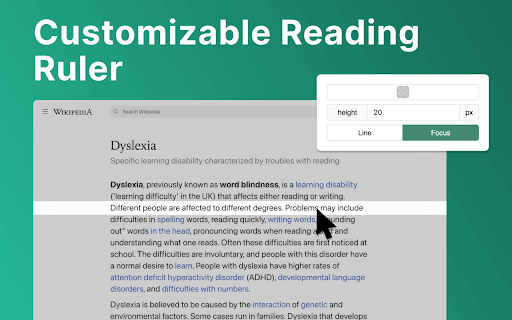
રીડર લાઇન પરિચય: તમારી વાંચન અનુભવને રેવોલ્યુશનીન્ગ કરતી હંગામા! 📕
🚀 ઝડપી શૂરુ ટીપ્સ
1. "ક્રોમમાં ઍડ કરો" પર ક્લિક કરવાથી વધુ અનુક્રમણ તમારા બ્રાઉઝરમાં સ્થાનાંતર કરવામાં આવશે.
2. કોઈપણ વેબપેજ અથવા દસ્તાવેજી ખોલો જ્યાં તમે તમારા વાંચન અનુભવને વધારવાનું ઇચ્છો છો તેમાં.
3. રીડ રૂલરની રંગ, ઊચાઈ અને અસ્ਪષ્ટતાને તમારા પસંદગીએ સુયોજિત કરો.
4. વાંચન રૂલરને તમારા માઉસ કરઝરથી સ્પષ્ટ લાઇન્સ અથવા દઢ પર ફોકસ કરવા માટે ખાતરું કરો.
5. વાચનની મદદથી તમારું વાચન સામગ્રીમાં પ્રવેશ કરો અને સ્પષ્ટતાથી અને ફોકસ થી મત્સાર કરો!
💎 રીડર રૂલર સાથે તમારું વાચન પ્રવાસ સુધારો
રીડર લાઇન તમારા વિશ્વાસયોગ્ય વાચન સાથી તમારા અનોખા વાચન જરૂરતોને સારવા માટે છે, સ્ટૂડન્ટ, પ્રોફેશનલ અથવા ફક્ત એક ચંદ કિતાબને સ્નેહમાં ડૂબીને આનંદ માણવા વિચારવાનો તમારો પાર્ટનર છે.
⚙️ કસ્ટમાઇઝેબલ વાચન ગાઈડ
અહીં મળતી રીડ રૂલરની વિકલ્પો છે જે તમે સુધારી શકો છો:
✴️ રંગ અને અસ્પષ્ટતા. વાચન રૂલરનો રંગ બદલવાથી વેબસાઇટ્સ પર પ્રદર્શન વધારવાનું સરળ થાય છે.
✴️ રૂલર ઊચાઈ. વાચન ગાઈડની ઊચાઈ સેટ કરી શકે છે તેથી વપરાશકર્તા વિવિધ ફૉન્ટ સાઇઝ અને લાઇન સ્પેસિંગને સર્વોત્તમ વાચન અનુભવ માટે અનુકૂળ બનાવી શકે.
✴️ વાચન મોડ. રીડર લીન બધા વાચન મોડ્સ પૂરી કરે છે: લાઇન અને ફોકસ. આ વિશેષકૃત મોડ્સ એન્હાન્સ્ કરવાની વિવિધ સમાધાનો પ્રદાન કરે છે તમારા વાચન અનુભવ સુધારવા માટે.
✨ સુસંગત સંઘટન અને સાધ્યતા
💡 રીડર લાઇન તમારી ક્રોમ બ્રાઉઝરમાં સુસંગત પ્રવેશ પ્રદાન કરે છે, જોઈએ કે બધા ક્ષમતા સ્તરના વપરાશકર્તાઓ માટે સરળ અને સુવિધાજનક છે.
💡 કઇક ક્લિકથી એક્સ્ટેન્શનને સક્ષમ અથવા અયોગ્ય કરો, એને તમારા વાચન અનુભવ પર તમે પૂરો નિયંત્રણ આપો.
💡 સંકળનની દેખરેખનું મૂળે રીડર લાઇન સુસંગતતાને પ્રાથમિકતા આપે છે, જે અનેક વાચન જરૂરતો વાળાઓ માટે એક મૂલ્યવાન ટૂલ બનાવે છે.
🛠 ભવિષ્યના વેટાઓ
1️⃣ ફોકસ મોડ. ફોકસ મોડ લક્ષ્યમાનતાને વધારવામાં મદદ કરે છે, એક વાચક લાઇન મેળવીને, ઉચ્ચારક્ષમા ધ્યાન મુજબની સુધારી. તે વાચન રૂલરનો ઉપયોગ કરે છે વાચનતાવીશ માટે કારકવણ્ય અને ફોકસની મધ્યેમાં ખાતરું કરે છે.
2️⃣ PDF સપોર્ટ. વિવિધ ફોર્મેટ અને પ્લેટફોર્મોમાં સંગત વાચન અનુભવ પૂરા કરવાની છે ડિફાઇલ્સમાં રીડ રૂલરની વિશેષતાઓ સાથે સહજતાથી વધુ. શું તમે શૈક્ષિક પેપર પડદાયો છો, રિવ્યુ રિપોર્ટ્સો તપાસ કરવા માટે અથવા શ્રેષ્ઠ વાચન માટે એમનો ઉપભોગ કરો, વાચન મદદ હમેશા તમારી સપોર્ટ અને સહાય આપશે.
❓ અક્સર જેવા પ્રશ્નો
📌 રીડર લાઇન કયું છે?
રીડર લાઈન એક ક્રોમ એક્સ્ટેન્શન છે જે તમારા વાચન અનુભવને સુધારવા માટે ડિઝાઇન કરવામાં આવ્યો છે અને તમને મદદ કરવામાં લઇ શકે છે જ્યાં પર ટેક્સ્ટનું પેથર કરવામાં સહાય કરે છે. ઇન્સ્ટોલ કર્યા પછી, રીડિંગ હેલ્પર તમારા બ્રાઉઝર વિન્ડોમાં એક વર્ચ્યુઅલ રીડિંગ રૂલર ઉમેરે છે. તમે તેને તમારી પસંદગી અનુસાર વગારેનું રંગ, ઊંચાઈ અને અસ્પષ્ટતા સુધારી શકો છો.
Latest reviews
- J
- It simply does what it says it does. Good for focus, video presentations, dyslexia. The color filters are nice.
- Mark Thornton
- It provides a line to help me read documents as promised, and let me say it is one heck of a line.
- Luis Arellano
- Very good help to keep track while reading. Thank you!
- Michelle Vega
- This is amazing, thank you so much. It truly helps me focus, and it's user-friendly.
- Angus Kelly
- The simple ideas are usually the best, so glad somebody has actually taken time to develop this. Very useful.
- daniel burnell
- This is a user friendly and straightforward ruler/highlighter that has certainly helped my concentration and eye strain. What a great accessaibility feature!
- Maya
- Go-to for reading accessibility.
- Carla Bamesberger
- Works in PDF viewers! This reading ruler is straight-forward and easy to use. It's the only one I have found so far that works when I am viewing an un-downloaded PDF file in my web browser. Like many other rulers, unfortunately, this one does not behave properly when using an in-browser spreadsheet, which is really where I need a reading ruler.
- Otto Lee
- its good
- Giada :p
- Helps soooooo much. A literal godsend for me and my eye tracking issues. I do like a lot of other reviews wish they were able to add a PDF function but other then that I love it
- Emily Rose
- SO helpful for reading on my computer with my dyslexia.
- ADRIANA ZORAYA FLÓREZ SANDOVAL
- It is an excellent tool: easy to use and perfect for reading without distractions and with comfort. I really recommend it! However, I usuallly read PDFs, and it doesn't work there. Please fix that; I love it! Having a good experience across different formats would make it fantastic.
- Rimas Dodriguez
- very good and easy to use :D
- Spiderman 36
- Really helpful and almost exactly what I was looking for. I do a lot of reading for my major and this has helped me stay focused on my studies. One thing that does bug me is that it doesn't work on PDF documents, which I also have to read a lot of. I hope that there will be a feature for PDF compatibility in the future! Other than that, it's a great extension
- Xiao Hofer
- This is beautiful and exactly what I needed! my online textbooks drive me crazy and I've been trying to come up with ideas to help me read them. I was using physical pieces of paper, the blue highlight option, even text-to-speech, and none of them were effective enough to combat being very annoying (or embarrassing) to use. Using a colored strip of paper is what I do for my physical textbooks (it also serves as a good bookmark), and I was thinking about somehow making my mouse into something like that to put under the line of text. I can't code so it was pretty hopeless, but this is pretty much exactly what I wanted. It works amazing and I wish more people knew about it!
- Afshin Zolfaghari
- Best ever chrome extention for ADHD people. finally i feel comfortable and focused while im doing my job. im using it on every site and not only for reading text.
- Michael Hyde
- Perfect - thank you!
- Junaid Arif Farooqui
- Why Dyslexia of all things in the extension preview? 😭
- Johan Widén
- Very useful. But I would like it to have some (user configurable) keyboard shortcuts: - To activate/deactivate the reader line on a web page. - To move the reader line up or down on the web-page, without scrolling.
- Jason Soto
- Really helpful Chrome extension. Allows for one to focus on the text.
- angel frances
- really helpful when in-depth reading is involved. no other comments, just anticipating a seamless activation for each site. amazing, amazing
- kristopher Wilder
- Highly customizable. helps me focus a little easier on blocks of text. I would like to see the activation changed from on on switch in the apps drop menu to just automatically opening.
- Katherine Koziar
- I usually don't give five star reviews because there is often room for improvement, but this extension does exactly what it says. It is easy to use, easy to adjust, and helps my eyes from not wandering. I wish there was a feature like this on all reading devices and apps.
- gabriella
- helpful and really easy to use
- Mahaveer Rajpurohit
- very helpful
- Abigail Diehl
- Super helpful with my Visual Snow. I wish I could lock the line in place when I need to move back and forth between monitors. Contact me if you want a Beta tester for that!
- Felix Liu
- Super useful and easy to use. Definitely a 5-star extension.
- Tracey Bye
- Exactly what I needed. Very useful app. Easy to open/close as needed.
- The Postman
- Very NICE!
- Robbie Palmer
- Looks solid
- Kevin
- It's nice and works well, but it does not do anything when opening a pdf
- Gabriel Young
- I works as intended
- Stefan Oana
- Such a useful app! Thanks, Kamil.
- William Alexander
- Exactly what I was looking for!
- Roger Manea
- does the job perfectly and very simple to use
- Lindsay Sullivan
- I love this, it helps me so much.
- Kelly Blane
- fantastic extension for academics---it works with paperpile (reference manager) too!
- SUPRIYO GORAI
- but how to use it on pdf or document please help
- Kaylee
- Exactly what I was looking for, thank you!
- Hữu Thịnh Nguyễn
- This is a very useful tool!! Thank you so much for making it!
- Liam Shanny
- Very promising idea! I double click and highlight text when reading on a browser constantly. Something like this could make reading much more enjoyable for me. I was hoping it would snap the highlighter to whatever line the cursor was hovering over though. Maybe something a potential optional feature down the line? It would remove the need to ever adjust the highlighter height, and make it so the line doesn't have to span across the entire window. Also once you have the bounds of lines of text detected you could toggle the highlighter automatically whenever the cursor is hovering over multiple lines of text only.
- Joaquín Alverde
- I always thought of it as I use a pencil or ruler with books. Never thought this could help me a lot while reading lots of data on the computer. Simple and very useful. Love it!
- Ifaz Abrar
- Never thought of something like this. Simple and no bugs so far, except for the fact that I had to install it twice for it to actually work. Nonetheless, good stuff.