
Download Master: Download-Manager
Extension Actions
- Extension status: Featured
Laden Sie alle Dateien mit einem Klick: Video, Bilder und andere Dateien.
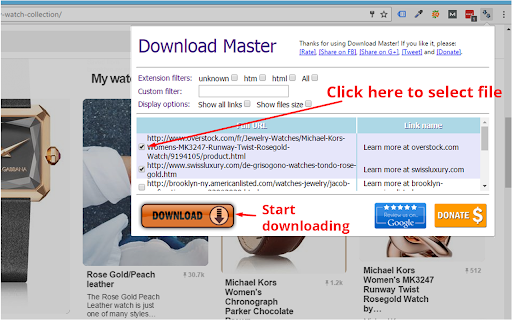
- DOWNLOAD MASTER - KOSTENLOSER DOWNLOAD-MANAGER -
Mit dieser Erweiterung können Sie alle Bilder, Videos, PDF-, DOC- und andere verlinkte Dateien auf der von Ihnen besuchten Webseite herunterladen. Sie können eine bestimmte Dateiauswahl treffen oder Filter verwenden, um alle Dateien desselben Typs mit einem Klick auszuwählen. "Download Master" hilft Ihnen, alles mit einem Klick herunterzuladen und die Dateien im Downloads-Tab des Browsers einfach zu verwalten.
★★★ So verwenden Sie "Download Master" zur Verwaltung von Downloads in Google Chrome:
1. Nach Dateityp filtern:
Unsere Erweiterung zeigt die Dateitypen der besuchten Website an, damit Sie nur einen bestimmten Dateityp dieser Website herunterladen können.
2. Benutzerdefinierter Filter:
Wenn der Dateityp-Filter nicht ausreicht, können Sie Dateien anhand von Zeichenfolgen im Download-Link filtern.
3. Anzeigeoptionen:
Standardmäßig ist "Alle Links anzeigen" deaktiviert. Das bedeutet, dass wir selten heruntergeladene Dateitypen wie html ausblenden und häufig heruntergeladene Typen wie mp3, pdf, png, jpeg anzeigen. Eine weitere Option ist "Dateigröße anzeigen", damit Sie die Größe jeder Datei auf der besuchten Website sehen können. So kennen Sie die Größe im Voraus und können besser auswählen, welche Datei Sie herunterladen möchten.
✔ Starten Sie den Browser neu oder aktualisieren Sie nach der Installation alle Tabs.
✔ Wir kümmern uns um unsere Nutzer: Mit der Erweiterung "Download Master" erhalten Sie einen KOSTENLOSEN Download-Manager für Ihren Browser. Wir unterstützen nach besten Kräften alle Dateitypen und alle Arten von Websites. Daher brauchen wir Ihre Unterstützung, um die Erweiterung weiterzuentwickeln und zu pflegen. Bitte bewerten Sie die Erweiterung, teilen Sie sie und spenden Sie. Vielen Dank!
★★★ Nutzungsbedingungen
Die Verwendung von "Download Master" erfolgt auf eigenes Risiko. Es gibt keine ausdrückliche oder stillschweigende Garantie hinsichtlich Funktionalität oder Nutzbarkeit. Der Autor haftet nicht für Schäden oder Datenverluste, die durch die Nutzung entstehen. Mit dem Herunterladen und Installieren von "Download Master" stimmen Sie diesen Bedingungen zu.
Beachten Sie die Google-Nutzungsbedingungen. Die Erweiterung ermöglicht keinen unbefugten Zugriff oder Download urheberrechtlich geschützter Inhalte oder Medien auf einigen Websites (wie YouTube). Verwenden Sie "Download Master" nicht zum Herunterladen urheberrechtlich geschützter Inhalte; die Erweiterung funktioniert nur, wenn Sie zum Download berechtigt sind und der Webmaster die Dateien als herunterladbare Links auf der besuchten Seite bereitstellt.
Latest reviews
- Dave B
- Can't pick a few individual links out of a list of URLs. Only downloads 1 link randomly from the ticked list. Don't bother downloading, doesn't work
- Barry Grau
- Zero stars. It only downloads the first checked file. I can do that myself without an add-in.
- Steve Mulhern
- I had a website with 51 download links (PDFs, if it makes a difference). I clicked on the extension (which identified each link, which was a nicety) as well as what the saved file would be named, and the size of the file (which is an option). The extension box which comes up CANNOT be resized. (-1 star right there). I had to manually maneuver to the save file location for each file (again, -1 star.) And, when batch saving files, it would only download 10 files per 'run'. (-1 star, again). So you had to go in and select which batch of 10 to download. I look forward to future releases of this extension- but as it sits, it's a pain for what seems to be common sense requirements.
- Kevin O'Brien
- Doesn't recognize the media on the page.
- CG Jung
- Stupid, it doessn't download to a folder, it just opens up all in their own browser window. weird
- Michal Kubis
- Selected all, download always only one. What's wrong with Chrome Extensions? 90% are now disabled and 10% does not work.
- Russell Roberts
- It selects them all by file type, which is great, but the download button almost isn't a button at all. Every time I hit it, it would select whatever file was behind the extension interface. Clicking "enter" on the keyboard didn't do anything either.
- Iwan Sukmana
- Confused
- lucifer morningstar
- nice
- lucifer morningstar
- nice
- Attila Szekeres
- Amateur.
- 邱鈺豐
- good
- 邱鈺豐
- good
- Vasil Georgiev
- Nice and Easy to Work With.I tried 3 other extensions before installing this one, but they didn't work for me.
- Vasil Georgiev
- Nice and Easy to Work With.I tried 3 other extensions before installing this one, but they didn't work for me.
- Muhammad Zia Azizi Azizi
- Tried it. Very Nice
- Muhammad Zia Azizi Azizi
- Tried it. Very Nice
- Alfa Trust trading
- good
- Alfa Trust trading
- good
- John Welsh
- Out of a batch of 20 files, it only recognized 10 and then only two of those 10 kept their file names, the extension gave the rest the names of download (7).download. Not useful and a waste of time. Yes I followed the directions and used the extension as directed.
- John Welsh
- Out of a batch of 20 files, it only recognized 10 and then only two of those 10 kept their file names, the extension gave the rest the names of download (7).download. Not useful and a waste of time. Yes I followed the directions and used the extension as directed.
- adimilson chagas silva
- gostei muito e rapido faz o que promete otimo obrigado
- milani kula
- i lovd it
- milani kula
- i lovd it
- Дуа Тер (Dya Ter)
- Норма. Мне по нраву учиться. (Okey значит интересно только с о . словарь.).
- Abraham David
- This is really a great software, it properly scans the page and reveals all the links.
- Abraham David
- This is really a great software, it properly scans the page and reveals all the links.
- cyh etlab
- good
- cyh etlab
- good
- Makkura Kurakura
- It can download 10 files at once. The download seemed perfect at the beginning (audio) but all the files were corrupted... The download of images seemes to work.
- Makkura Kurakura
- It can download 10 files at once. The download seemed perfect at the beginning (audio) but all the files were corrupted... The download of images seemes to work.
- Marcus Widerberg CG
- Didnt work for downloadking video on sharepoint
- Marcus Widerberg CG
- Didnt work for downloadking video on sharepoint
- Turgunbek Omurkanov
- doesn't work
- Turgunbek Omurkanov
- doesn't work
- Gigih Zhafrans
- its really work on my Laptop. Thanks for the developer, u make me easier to download all my scholl module. Great Extensions!!
- Gigih Zhafrans
- its really work on my Laptop. Thanks for the developer, u make me easier to download all my scholl module. Great Extensions!!
- George Holmogorov
- hi all!
- George Holmogorov
- hi all!
- Fleur DePrintemps
- nadiiiii
- Thomas Schittli
- Unfortunately, it does not allow to download a new job into a specific folder
- Thomas Schittli
- Unfortunately, it does not allow to download a new job into a specific folder
- jan łuckiewicz
- ok
- jan łuckiewicz
- ok
- • Fly Marca
- only lets me download 10 files....
- • Fly Marca
- only lets me download 10 files....
- Plus Lin
- good
- Plus Lin
- good
- Brett Attee
- Total Junk Software - I have never written a bad review in the past ... until now .. usually I give the developer a break. When reading the reviews on how files do not download from the past, I figured it would have been fixed by June 2021. WRONG. I'm on a page with direct links to the download files, it sees all of them (170 files that are all zips). Checkmarks on every file, hit "download" and only the last file downloads. Don't waste your time. I used download mangers for over 15 years and this is horrible programming.
- Brett Attee
- Total Junk Software - I have never written a bad review in the past ... until now .. usually I give the developer a break. When reading the reviews on how files do not download from the past, I figured it would have been fixed by June 2021. WRONG. I'm on a page with direct links to the download files, it sees all of them (170 files that are all zips). Checkmarks on every file, hit "download" and only the last file downloads. Don't waste your time. I used download mangers for over 15 years and this is horrible programming.