
Gestionnaire de téléchargements
Extension Actions
- Extension status: Featured
Téléchargez tous les fichiers en un clic: vidéo, image et autres fichiers.
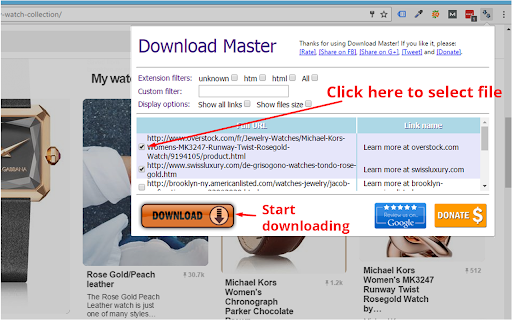
- DOWNLOAD MASTER - GESTIONNAIRE DE TÉLÉCHARGEMENT GRATUIT -
Avec cette extension, vous pouvez télécharger toutes les images, vidéos, PDF, DOC et tout autre fichier lié sur la page web que vous visitez. Vous pouvez choisir un ensemble spécifique de fichiers ou utiliser les filtres pour sélectionner tous les fichiers du même type en un seul clic. "Download Master" vous aide à tout télécharger en un clic et à gérer facilement les fichiers dans l'onglet Téléchargements du navigateur.
★★★ Comment utiliser "Download Master" pour gérer les téléchargements dans Google Chrome :
1. Filtrer selon le type de fichier :
Notre extension affiche les types de fichiers du site visité pour vous permettre de ne télécharger qu'un type de fichier spécifique.
2. Filtre personnalisé :
Si le filtre par type de fichier ne suffit pas, vous pouvez filtrer les fichiers selon les caractères contenus dans le lien à télécharger.
3. Options d'affichage :
Par défaut, l'option "Afficher tous les liens" est désactivée. Cela signifie que nous masquons les types de fichiers rarement téléchargés comme html et affichons les types les plus courants comme mp3, pdf, png, jpeg... Une autre option est "Afficher la taille du fichier", qui vous indique la taille de chaque fichier sur le site visité. Cela vous aide à connaître la taille à l'avance pour choisir quel fichier télécharger.
✔ Redémarrez le navigateur ou actualisez tous les onglets après l'installation.
✔ Nous nous soucions de nos utilisateurs : avec l'extension "Download Master", vous obtenez un gestionnaire de téléchargement GRATUIT pour votre navigateur. Nous faisons de notre mieux pour prendre en charge tous les types de fichiers et toutes sortes de sites web. Votre soutien est essentiel pour poursuivre le développement et la maintenance de l'extension. Merci de noter l'extension, de la partager et de faire un don. Merci !
★★★ Conditions générales
Utilisez "Download Master" à vos propres risques. Aucune garantie, explicite ou implicite, n'est fournie quant au fonctionnement ou à l'utilisabilité. L'auteur ne peut être tenu responsable de tout dommage ou perte de données causé par son utilisation. En téléchargeant et en installant "Download Master", vous acceptez ces conditions.
Respectez les Conditions d'utilisation de Google. L'extension ne permet pas l'accès non autorisé ni le téléchargement de contenus ou médias protégés par des droits d'auteur sur certains sites (comme YouTube). N'utilisez pas "Download Master" pour télécharger du contenu protégé ; l'extension fonctionne uniquement si vous êtes autorisé à télécharger les fichiers et si le webmaster les propose comme liens téléchargeables sur la page visitée.
Latest reviews
- Dave B
- Can't pick a few individual links out of a list of URLs. Only downloads 1 link randomly from the ticked list. Don't bother downloading, doesn't work
- Barry Grau
- Zero stars. It only downloads the first checked file. I can do that myself without an add-in.
- Steve Mulhern
- I had a website with 51 download links (PDFs, if it makes a difference). I clicked on the extension (which identified each link, which was a nicety) as well as what the saved file would be named, and the size of the file (which is an option). The extension box which comes up CANNOT be resized. (-1 star right there). I had to manually maneuver to the save file location for each file (again, -1 star.) And, when batch saving files, it would only download 10 files per 'run'. (-1 star, again). So you had to go in and select which batch of 10 to download. I look forward to future releases of this extension- but as it sits, it's a pain for what seems to be common sense requirements.
- Kevin O'Brien
- Doesn't recognize the media on the page.
- CG Jung
- Stupid, it doessn't download to a folder, it just opens up all in their own browser window. weird
- Michal Kubis
- Selected all, download always only one. What's wrong with Chrome Extensions? 90% are now disabled and 10% does not work.
- Russell Roberts
- It selects them all by file type, which is great, but the download button almost isn't a button at all. Every time I hit it, it would select whatever file was behind the extension interface. Clicking "enter" on the keyboard didn't do anything either.
- Iwan Sukmana
- Confused
- lucifer morningstar
- nice
- lucifer morningstar
- nice
- Attila Szekeres
- Amateur.
- 邱鈺豐
- good
- 邱鈺豐
- good
- Vasil Georgiev
- Nice and Easy to Work With.I tried 3 other extensions before installing this one, but they didn't work for me.
- Vasil Georgiev
- Nice and Easy to Work With.I tried 3 other extensions before installing this one, but they didn't work for me.
- Muhammad Zia Azizi Azizi
- Tried it. Very Nice
- Muhammad Zia Azizi Azizi
- Tried it. Very Nice
- Alfa Trust trading
- good
- Alfa Trust trading
- good
- John Welsh
- Out of a batch of 20 files, it only recognized 10 and then only two of those 10 kept their file names, the extension gave the rest the names of download (7).download. Not useful and a waste of time. Yes I followed the directions and used the extension as directed.
- John Welsh
- Out of a batch of 20 files, it only recognized 10 and then only two of those 10 kept their file names, the extension gave the rest the names of download (7).download. Not useful and a waste of time. Yes I followed the directions and used the extension as directed.
- adimilson chagas silva
- gostei muito e rapido faz o que promete otimo obrigado
- milani kula
- i lovd it
- milani kula
- i lovd it
- Дуа Тер (Dya Ter)
- Норма. Мне по нраву учиться. (Okey значит интересно только с о . словарь.).
- Abraham David
- This is really a great software, it properly scans the page and reveals all the links.
- Abraham David
- This is really a great software, it properly scans the page and reveals all the links.
- cyh etlab
- good
- cyh etlab
- good
- Makkura Kurakura
- It can download 10 files at once. The download seemed perfect at the beginning (audio) but all the files were corrupted... The download of images seemes to work.
- Makkura Kurakura
- It can download 10 files at once. The download seemed perfect at the beginning (audio) but all the files were corrupted... The download of images seemes to work.
- Marcus Widerberg CG
- Didnt work for downloadking video on sharepoint
- Marcus Widerberg CG
- Didnt work for downloadking video on sharepoint
- Turgunbek Omurkanov
- doesn't work
- Turgunbek Omurkanov
- doesn't work
- Gigih Zhafrans
- its really work on my Laptop. Thanks for the developer, u make me easier to download all my scholl module. Great Extensions!!
- Gigih Zhafrans
- its really work on my Laptop. Thanks for the developer, u make me easier to download all my scholl module. Great Extensions!!
- George Holmogorov
- hi all!
- George Holmogorov
- hi all!
- Fleur DePrintemps
- nadiiiii
- Thomas Schittli
- Unfortunately, it does not allow to download a new job into a specific folder
- Thomas Schittli
- Unfortunately, it does not allow to download a new job into a specific folder
- jan łuckiewicz
- ok
- jan łuckiewicz
- ok
- • Fly Marca
- only lets me download 10 files....
- • Fly Marca
- only lets me download 10 files....
- Plus Lin
- good
- Plus Lin
- good
- Brett Attee
- Total Junk Software - I have never written a bad review in the past ... until now .. usually I give the developer a break. When reading the reviews on how files do not download from the past, I figured it would have been fixed by June 2021. WRONG. I'm on a page with direct links to the download files, it sees all of them (170 files that are all zips). Checkmarks on every file, hit "download" and only the last file downloads. Don't waste your time. I used download mangers for over 15 years and this is horrible programming.
- Brett Attee
- Total Junk Software - I have never written a bad review in the past ... until now .. usually I give the developer a break. When reading the reviews on how files do not download from the past, I figured it would have been fixed by June 2021. WRONG. I'm on a page with direct links to the download files, it sees all of them (170 files that are all zips). Checkmarks on every file, hit "download" and only the last file downloads. Don't waste your time. I used download mangers for over 15 years and this is horrible programming.