
Download Master - Менеджер загрузок
Extension Actions
- Extension status: Featured
Скачивайте все файлы одним кликом. Загрузчик видео, изображений и файлов для всех сайтов.
- DOWNLOAD MASTER - БЕСПЛАТНЫЙ МЕНЕДЖЕР ЗАГРУЗОК -
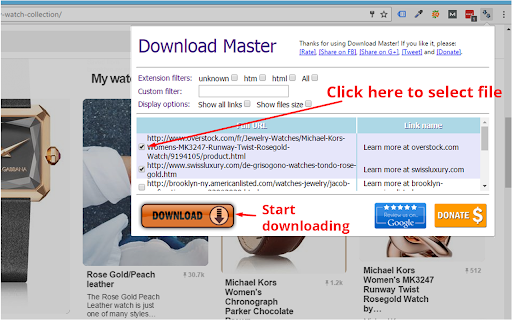
С помощью этого расширения вы можете скачивать все изображения, видео, PDF, документы и любые другие файлы, ссылки на которые есть на посещаемой веб-странице. Вы можете выбрать конкретный набор файлов или использовать фильтры, чтобы одним кликом выбрать все файлы одного типа. «Download Master» поможет вам скачать их все одним нажатием и легко управлять файлами на вкладке «Загрузки» браузера.
★★★ Как использовать «Download Master» для управления загрузками:
1. Фильтрация по типу файлов:
Расширение отобразит типы файлов на посещаемом сайте, чтобы вы могли отфильтровать и скачать только нужный тип файлов.
2. Произвольный фильтр:
Если фильтрации по типу файлов недостаточно, вы можете фильтровать файлы по символам в ссылке для загрузки.
3. Параметры отображения:
По умолчанию режим «Показать все ссылки» отключён — расширение скрывает типы файлов, которые загружают редко (например, HTML), и отображает наиболее востребованные (mp3, pdf, png, jpeg и др.). Также доступна опция «Показать размер файла», которая позволяет узнать размер каждого файла на странице и заранее выбрать нужный для загрузки.
✔ После установки перезапустите браузер или обновите все вкладки.
✔ Мы заботимся о наших пользователях: расширение «Download Master» — это БЕСПЛАТНЫЙ менеджер загрузок для вашего браузера. Мы делаем всё возможное, чтобы поддерживать все типы файлов и всевозможные сайты. Поэтому нам очень важна ваша поддержка для продолжения разработки. Пожалуйста, оцените расширение, поделитесь им и поддержите нас донатом. Спасибо!
★★★ Условия использования
Вы используете «Download Master» на свой страх и риск. Расширение предоставляется без каких-либо гарантий — явных или подразумеваемых — в отношении функциональности или пригодности к использованию. Автор не несёт ответственности за любой ущерб или потерю данных, вызванные его использованием. Устанавливая «Download Master», вы соглашаетесь с настоящими условиями.
В соответствии с Условиями использования Google расширение не обеспечивает несанкционированный доступ к защищённому авторским правом контенту или его скачивание на некоторых сайтах (например, YouTube). Не используйте «Download Master» для скачивания защищённого авторским правом контента. Расширение работает только в том случае, если вы имеете право скачивать файлы, а веб-мастер разместил на странице прямые ссылки для скачивания.
Latest reviews
- Dave B
- Can't pick a few individual links out of a list of URLs. Only downloads 1 link randomly from the ticked list. Don't bother downloading, doesn't work
- Barry Grau
- Zero stars. It only downloads the first checked file. I can do that myself without an add-in.
- Steve Mulhern
- I had a website with 51 download links (PDFs, if it makes a difference). I clicked on the extension (which identified each link, which was a nicety) as well as what the saved file would be named, and the size of the file (which is an option). The extension box which comes up CANNOT be resized. (-1 star right there). I had to manually maneuver to the save file location for each file (again, -1 star.) And, when batch saving files, it would only download 10 files per 'run'. (-1 star, again). So you had to go in and select which batch of 10 to download. I look forward to future releases of this extension- but as it sits, it's a pain for what seems to be common sense requirements.
- Kevin O'Brien
- Doesn't recognize the media on the page.
- CG Jung
- Stupid, it doessn't download to a folder, it just opens up all in their own browser window. weird
- Michal Kubis
- Selected all, download always only one. What's wrong with Chrome Extensions? 90% are now disabled and 10% does not work.
- Russell Roberts
- It selects them all by file type, which is great, but the download button almost isn't a button at all. Every time I hit it, it would select whatever file was behind the extension interface. Clicking "enter" on the keyboard didn't do anything either.
- Iwan Sukmana
- Confused
- lucifer morningstar
- nice
- lucifer morningstar
- nice
- Attila Szekeres
- Amateur.
- 邱鈺豐
- good
- 邱鈺豐
- good
- Vasil Georgiev
- Nice and Easy to Work With.I tried 3 other extensions before installing this one, but they didn't work for me.
- Vasil Georgiev
- Nice and Easy to Work With.I tried 3 other extensions before installing this one, but they didn't work for me.
- Muhammad Zia Azizi Azizi
- Tried it. Very Nice
- Muhammad Zia Azizi Azizi
- Tried it. Very Nice
- Alfa Trust trading
- good
- Alfa Trust trading
- good
- John Welsh
- Out of a batch of 20 files, it only recognized 10 and then only two of those 10 kept their file names, the extension gave the rest the names of download (7).download. Not useful and a waste of time. Yes I followed the directions and used the extension as directed.
- John Welsh
- Out of a batch of 20 files, it only recognized 10 and then only two of those 10 kept their file names, the extension gave the rest the names of download (7).download. Not useful and a waste of time. Yes I followed the directions and used the extension as directed.
- adimilson chagas silva
- gostei muito e rapido faz o que promete otimo obrigado
- milani kula
- i lovd it
- milani kula
- i lovd it
- Дуа Тер (Dya Ter)
- Норма. Мне по нраву учиться. (Okey значит интересно только с о . словарь.).
- Abraham David
- This is really a great software, it properly scans the page and reveals all the links.
- Abraham David
- This is really a great software, it properly scans the page and reveals all the links.
- cyh etlab
- good
- cyh etlab
- good
- Makkura Kurakura
- It can download 10 files at once. The download seemed perfect at the beginning (audio) but all the files were corrupted... The download of images seemes to work.
- Makkura Kurakura
- It can download 10 files at once. The download seemed perfect at the beginning (audio) but all the files were corrupted... The download of images seemes to work.
- Marcus Widerberg CG
- Didnt work for downloadking video on sharepoint
- Marcus Widerberg CG
- Didnt work for downloadking video on sharepoint
- Turgunbek Omurkanov
- doesn't work
- Turgunbek Omurkanov
- doesn't work
- Gigih Zhafrans
- its really work on my Laptop. Thanks for the developer, u make me easier to download all my scholl module. Great Extensions!!
- Gigih Zhafrans
- its really work on my Laptop. Thanks for the developer, u make me easier to download all my scholl module. Great Extensions!!
- George Holmogorov
- hi all!
- George Holmogorov
- hi all!
- Fleur DePrintemps
- nadiiiii
- Thomas Schittli
- Unfortunately, it does not allow to download a new job into a specific folder
- Thomas Schittli
- Unfortunately, it does not allow to download a new job into a specific folder
- jan łuckiewicz
- ok
- jan łuckiewicz
- ok
- • Fly Marca
- only lets me download 10 files....
- • Fly Marca
- only lets me download 10 files....
- Plus Lin
- good
- Plus Lin
- good
- Brett Attee
- Total Junk Software - I have never written a bad review in the past ... until now .. usually I give the developer a break. When reading the reviews on how files do not download from the past, I figured it would have been fixed by June 2021. WRONG. I'm on a page with direct links to the download files, it sees all of them (170 files that are all zips). Checkmarks on every file, hit "download" and only the last file downloads. Don't waste your time. I used download mangers for over 15 years and this is horrible programming.
- Brett Attee
- Total Junk Software - I have never written a bad review in the past ... until now .. usually I give the developer a break. When reading the reviews on how files do not download from the past, I figured it would have been fixed by June 2021. WRONG. I'm on a page with direct links to the download files, it sees all of them (170 files that are all zips). Checkmarks on every file, hit "download" and only the last file downloads. Don't waste your time. I used download mangers for over 15 years and this is horrible programming.