
Controlador de Velocidade de Vídeo
Extension Actions
- Extension status: Featured
- Live on Store
Controle a velocidade de vídeo para todos os reprodutores de vídeo HTML5. Acelere ou diminua a velocidade do vídeo ou do áudio com…
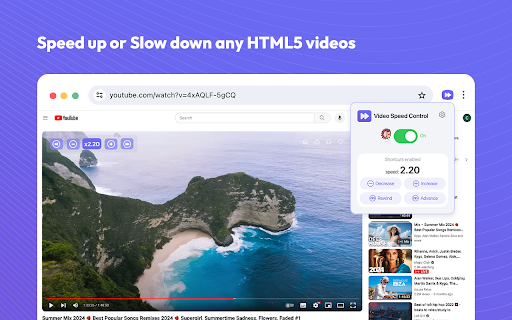
Controlador de velocidade de vídeo para vídeos online. Acelere ou diminua a reprodução em qualquer site. Acelere ou diminua a velocidade de reprodução de vídeos em sites como o YouTube e todos os outros sites com vídeos.
Você tem dificuldade para ajustar a velocidade de reprodução de vídeos em vários sites, incluindo plataformas de streaming populares como Netflix, Amazon Prime Video e YouTube?
Apresentamos o Controlador de Velocidade de Vídeo, uma extensão do Google Chrome que permite ajustar com precisão as configurações de reprodução em seus sites de streaming favoritos. Com opções que variam de 0,25x a 4x, a extensão suporta uma ampla gama de velocidades de reprodução.
Como usar a extensão Controlador de Velocidade de Vídeo:
- Instale a extensão e fixe-a no seu navegador (processo único).
- Abra qualquer vídeo no site de streaming desejado.
- Clique no ícone da extensão.
- Use a janela pop-up da extensão para especificar as configurações de reprodução do vídeo.
- As configurações escolhidas serão aplicadas ao vídeo.
O Controlador de Velocidade de Vídeo HTML5 é um aplicativo que permite aumentar ou diminuir a velocidade de reprodução do conteúdo de vídeo.
Gerencie facilmente a velocidade de reprodução enquanto assiste a vídeos. O Video Speed Controller permite acelerar ou desacelerar qualquer vídeo durante a reprodução, sem padrões ou limitações predefinidas. Você tem a liberdade de aumentar ou diminuir a velocidade de reprodução, bem como avançar e retroceder o vídeo quantas vezes precisar.
Principais recursos:
- O controlador de velocidade de vídeo HTML5 é compatível com quase todos os sites de vídeo que você usa diariamente;
- Precisão única de até 1% na configuração da velocidade de reprodução ideal para você;
- Interface muito intuitiva, tornando o uso do aplicativo extremamente fácil;
- Atalhos de teclado que permitem alterar instantaneamente a velocidade de reprodução.
Felizmente, o Video Speed Controller permite acelerar ou desacelerar vídeos de forma rápida e fácil. Economize tempo hoje mesmo ao assistir vídeos, acelerando ou desacelerando-os.
Esperamos que você ache nossa ferramenta de controle de velocidade de reprodução de vídeo útil! Aguardamos seus comentários e avaliações! Se você estiver enfrentando problemas ou se o controlador de velocidade não estiver funcionando, entre em contato conosco.
Latest reviews
- Layth Mustafa
- so good
- Chirag Jain
- fabulous app, saved a ton of time
- Jonathan Valerie Lara
- yeah
- littletide
- Very easy to use, fantastic.
- Bobur
- goof
- Ibrahim Yassin
- good
- Jadiel Ortiz
- good
- Anthony LaSita
- good
- Saurav Kumar
- Besr, For YouTube :0
- Zeus Maknojia
- okay
- Gowtham Medam
- very good , If you use youtube much it's pretty usefull
- James Gordon
- good
- Fiona Viñas
- helpful
- Deepak Ghorla
- best
- Eesha Sadhu
- Good, but stop POPPING the review sign
- Bilal Noor
- work on almost every site
- ปรีชา รุ่งรัศมีธรรม
- good
- Shaik Rafi
- super
- Kondaveti Tejaswanth
- it is working
- Apexguytheworld!!
- works
- Ravi Kumar
- good
- Navya
- nice
- SK MUKTHAR BASHA
- good
- Nakshatra Pandey
- good
- _MK
- Top
- Mickaël Lecolazet
- indispensable
- Mian Hanan
- VERY BAD ASK EVERYTIME FOR REVIEW
- Adithya
- good
- abi
- ok
- J P
- good
- Muhammad Shaheer
- Its pretty useful
- Rafa Syafiq
- very good
- Diarmuid Sexton
- works well and way better than the other shite one i was using!
- Death or life?
- Great
- Lucas Vilhena
- Does not work on prime video.
- Dartanyen Geick
- Good
- Jasmine Jiang
- Love it, thank you very much.
- Ian Renn
- If it works after this i wont change it to 1
- Obada Al Khayat
- Was working fine, but a month ago it was broken. After increasing the playback speed on youtube, it directly go back to normal speed.
- Aravind Raj
- Good
- Bhavya Kedar
- only reviewing it cause it keeps sending me a pop up
- Raja Asad Khan
- good only writing a review because it keeps asking me too so theres that
- Tao Luo
- very nice
- Dr.ADITYA
- only reviewing it cause it keeps sending me a pop up.
- Aditya
- only reviewing it cause it keeps sending me a pop up.
- Doc Green
- Yeah its aight, only reviewing it cause it keeps sending me a pop up.
- _RM_ Qizhe
- Everything work as expected, but if you don't review it every time when adjust the speed it will pop up a annoying review pop up, and is the reason I give it one star
- labdhi chopda
- Works seamlessly and time savor :)
- Abdulla Al Ameri
- Works Perfectly
- P P
- Works well