
Verbesserer für YouTube™ – Strukturierte Kommentaransicht
Extension Delisted
This extension is no longer available in the official store. Delisted on 2025-12-16.
Extension Actions
Die Erweiterung ist ein Verbesserer für YouTube, der dein Seherlebnis verbessert! Enthält Funktionen und ein neues Layout.
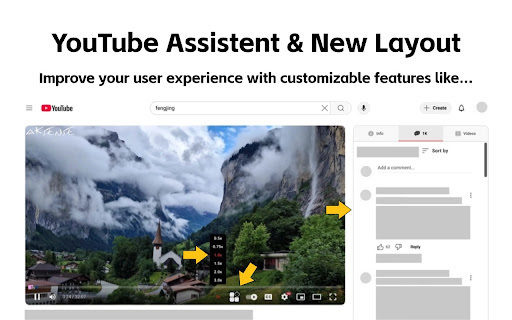
Die Erweiterung ist ein Enhancer für YouTube, um dein Seherlebnis zu verbessern! Sie enthält neue Funktionen und ein überarbeitetes Layout.
Funktionsübersicht:
1. Optimierte Video-Detailseite: Du kannst nun Kommentare lesen, während du das Video ansiehst. Die Videobeschreibung, Kommentare und empfohlenen Videos werden auf die rechte Seite der YouTube-Wiedergabeseite verschoben, ohne dass die Funktionalität beeinträchtigt wird.
2. Verbesserte Video-Fortschrittsleiste: Die Fortschrittsleiste wurde optimiert, um die Seite lebendiger zu gestalten.
3. Markierung von Anzeigen zur Vermeidung versehentlicher Klicks: Werbung ist eine Einnahmequelle von YouTube, und ich beabsichtige nicht, sie zu entfernen.
4. Schnellvorlauf für Videos (mit anpassbarer Wiedergabegeschwindigkeit).
5. Ein-Klick-Screenshot für Videos.
6. Dunkles/Helles Design umschalten: Nutzt die offizielle Methode von YouTube, um das visuelle Erlebnis angenehmer zu gestalten.
7. Videowiedergabeschleifensteuerung
Weitere Tools finden Sie in dieser Erweiterung.
Alle diese Funktionen sind frei anpassbar. Falls du eine der Funktionen nicht benötigst, kannst du sie über das Symbol oben einfach deaktivieren. Falls du Vorschläge oder Feedback zur Erweiterung hast, teile sie gerne mit! Lass uns gemeinsam einen leistungsstarken YouTube-Assistenten schaffen!
Latest reviews
- Vinh Khuong
- Hi, really love the extension. But I'm having a problem where whenever the "Enable video details page interface optimization." option is turned on the Info tab only show Transcript and not the video detail. I dunno why but I would like to have the video description back in the info tab. Thank you!!!
- Malik Murtaza
- Please Make an option for Picture to picture to be on the YouTube seeking bar, separately
- Bruce Eisenhard
- Thanks for this very useful extension! One feature request I have is for an option to select which tab is the default. Right now the extension defaults to the Info tab. I want to be able to have the default be Related videos or comments.
- Dmitsom
- Huge thanks for this extension! I had a serious issue when watching videos on YouTube. Whenever I hovered my mouse over the video player, my CPU temperature would spike up to 70°C, and the fans would start going crazy. But as soon as I moved the cursor away and the player interface disappeared, the temperature would drop back to normal. I suspect it’s because of my 165Hz monitor, which probably forces the YouTube interface to render at 165Hz as well. When I lowered the refresh rate to 60Hz, the temperature was noticeably lower. I spent several days struggling with this until I finally found this extension—it completely fixed the CPU load and the temperature issue. Hopefully, this comment helps someone else with the same problem. Thanks again to the author of the extension and the original script! 🙌
- Emarpie
- This extension is great, but what's with the coupon thing?
- 色気米
- Hello, can you adjust the width of the right bar appropriately according to the width of the browser window? on the 2560*1440 monitor, now the video and the right bar are squeezed into the middle, just a little wider, thank you
- D.E. Lowery
- seen as an ad blocker by youtube and prevents playback
- praveen tech
- Great one. Can you fix this When using large screen there are lot of space on both sides
- Demo Testeur
- Good Can you add an option to remove the nyan cat please ?