
YouTube™ 拡張機能 – コメント構造レイアウト
Extension Delisted
This extension is no longer available in the official store. Delisted on 2025-12-16.
Extension Actions
CRX ID
dninfcoeoeoplchmcleglkelmofmaeho
Description from extension meta
この拡張機能はYouTubeの拡張機能で、視聴体験を向上させます!機能と新しいレイアウトを含みます。
Image from store
Description from store
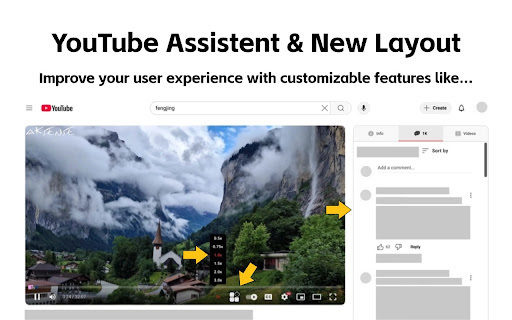
この拡張機能は、YouTube の視聴体験を向上させるための拡張機能です!機能と新しいレイアウトが含まれています
機能の紹介:
1、最適化されたビデオ詳細ページ インターフェース: 動画を視聴しながらコメントを閲覧できるようになりました。この機能により、機能に影響を与えることなく、動画の説明、コメント、おすすめの動画が YouTube 再生ページの右側に移動します。
2、美しくなった動画再生プログレス バー: プログレス バーが強化され、ページがより鮮やかになりました。
3、誤クリックを防ぐためのページ広告マーキング: 広告は YouTube の収益源の 1 つであり、削除するつもりはありません。
4、動画の早送り (再生速度を調整可能)。
5、動画のワンクリック スクリーンショット。
6、ダーク/ライト テーマの切り替え (YouTube の公式メソッドを使用して、ページをより視覚的に魅力的にします)。
7、動画ループコントロール
その他のツールについては、この拡張機能をご確認ください。
これらの機能はすべて自由にカスタマイズできます。これらの機能が不要な場合は、上部のアイコンをクリックしてオフにすることができます。この拡張機能の使用中にご提案やフィードバックがありましたら、お気軽に共有してください。一緒に強力な YouTube アシスタントを作りましょう。
Latest reviews
- Vinh Khuong
- Hi, really love the extension. But I'm having a problem where whenever the "Enable video details page interface optimization." option is turned on the Info tab only show Transcript and not the video detail. I dunno why but I would like to have the video description back in the info tab. Thank you!!!
- Malik Murtaza
- Please Make an option for Picture to picture to be on the YouTube seeking bar, separately
- Bruce Eisenhard
- Thanks for this very useful extension! One feature request I have is for an option to select which tab is the default. Right now the extension defaults to the Info tab. I want to be able to have the default be Related videos or comments.
- Dmitsom
- Huge thanks for this extension! I had a serious issue when watching videos on YouTube. Whenever I hovered my mouse over the video player, my CPU temperature would spike up to 70°C, and the fans would start going crazy. But as soon as I moved the cursor away and the player interface disappeared, the temperature would drop back to normal. I suspect it’s because of my 165Hz monitor, which probably forces the YouTube interface to render at 165Hz as well. When I lowered the refresh rate to 60Hz, the temperature was noticeably lower. I spent several days struggling with this until I finally found this extension—it completely fixed the CPU load and the temperature issue. Hopefully, this comment helps someone else with the same problem. Thanks again to the author of the extension and the original script! 🙌
- Emarpie
- This extension is great, but what's with the coupon thing?
- 色気米
- Hello, can you adjust the width of the right bar appropriately according to the width of the browser window? on the 2560*1440 monitor, now the video and the right bar are squeezed into the middle, just a little wider, thank you
- D.E. Lowery
- seen as an ad blocker by youtube and prevents playback
- praveen tech
- Great one. Can you fix this When using large screen there are lot of space on both sides
- Demo Testeur
- Good Can you add an option to remove the nyan cat please ?