
Potenziante per YouTube™ – Layout commenti strutturati
Extension Delisted
This extension is no longer available in the official store. Delisted on 2025-12-16.
Extension Actions
L'estensione è un potenziatore per YouTube che migliora la tua esperienza di visione! Contiene funzionalità e un nuovo layout.
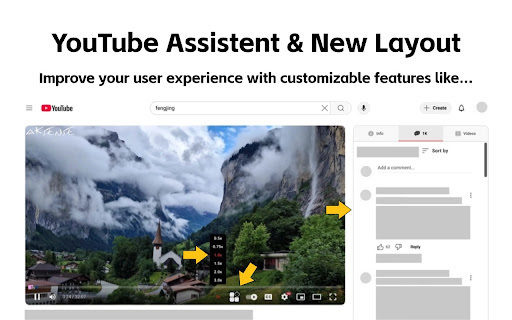
L'estensione è un Enhancer per YouTube per migliorare la tua esperienza di visione! Contiene nuove funzionalità e un layout aggiornato.
Introduzione alle funzionalità:
1. Ottimizzazione dell'interfaccia della pagina dei dettagli video: Ora puoi leggere i commenti mentre guardi il video. La descrizione del video, i commenti e i video consigliati vengono spostati sul lato destro della pagina di riproduzione di YouTube senza comprometterne la funzionalità.
2. Barra di avanzamento della riproduzione migliorata: La barra di avanzamento è stata ottimizzata per rendere la pagina più vivace.
3. Evidenziazione degli annunci per evitare clic accidentali: Gli annunci sono una fonte di entrate per YouTube e non intendo rimuoverli.
4. Avanzamento rapido del video (con velocità di riproduzione regolabile).
5. Screenshot del video con un solo clic.
6. Switch tra tema chiaro e scuro: Utilizza il metodo ufficiale di YouTube per migliorare l'aspetto della pagina.
7. Controllo del ciclo video
Per ulteriori strumenti, controlla questa estensione.
Tutte queste funzionalità sono completamente personalizzabili. Se non ne hai bisogno, puoi disattivarle tramite l'icona in alto. Se hai suggerimenti o feedback durante l'uso dell'estensione, sentiti libero di condividerli. Creiamo insieme un potente assistente per YouTube!
Latest reviews
- Vinh Khuong
- Hi, really love the extension. But I'm having a problem where whenever the "Enable video details page interface optimization." option is turned on the Info tab only show Transcript and not the video detail. I dunno why but I would like to have the video description back in the info tab. Thank you!!!
- Malik Murtaza
- Please Make an option for Picture to picture to be on the YouTube seeking bar, separately
- Bruce Eisenhard
- Thanks for this very useful extension! One feature request I have is for an option to select which tab is the default. Right now the extension defaults to the Info tab. I want to be able to have the default be Related videos or comments.
- Dmitsom
- Huge thanks for this extension! I had a serious issue when watching videos on YouTube. Whenever I hovered my mouse over the video player, my CPU temperature would spike up to 70°C, and the fans would start going crazy. But as soon as I moved the cursor away and the player interface disappeared, the temperature would drop back to normal. I suspect it’s because of my 165Hz monitor, which probably forces the YouTube interface to render at 165Hz as well. When I lowered the refresh rate to 60Hz, the temperature was noticeably lower. I spent several days struggling with this until I finally found this extension—it completely fixed the CPU load and the temperature issue. Hopefully, this comment helps someone else with the same problem. Thanks again to the author of the extension and the original script! 🙌
- Emarpie
- This extension is great, but what's with the coupon thing?
- 色気米
- Hello, can you adjust the width of the right bar appropriately according to the width of the browser window? on the 2560*1440 monitor, now the video and the right bar are squeezed into the middle, just a little wider, thank you
- D.E. Lowery
- seen as an ad blocker by youtube and prevents playback
- praveen tech
- Great one. Can you fix this When using large screen there are lot of space on both sides
- Demo Testeur
- Good Can you add an option to remove the nyan cat please ?