
Улучшатель для YouTube™ – Структурированное оформление комментариев
Extension Delisted
This extension is no longer available in the official store. Delisted on 2025-12-16.
Extension Actions
Расширение — улучшатель для YouTube, который улучшает ваш опыт просмотра! Содержит функции и новый дизайн.
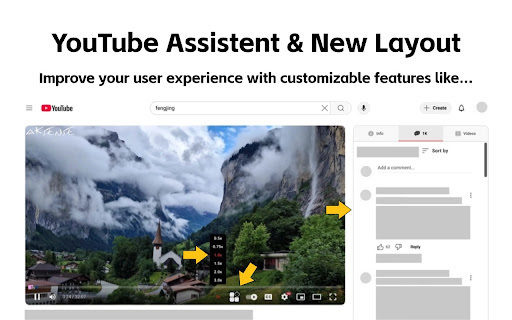
Расширение — это Enhancer для Youtube, который улучшит ваши впечатления от просмотра! Содержит функции и новый макет
Введение в функции:
1. Оптимизированный интерфейс страницы сведений о видео: теперь вы можете просматривать комментарии во время просмотра видео. Эта функция перемещает описание видео, комментарии и рекомендуемые видео в правую часть страницы воспроизведения YouTube, не влияя на функциональность.
2. Улучшенная полоса прогресса воспроизведения видео: полоса прогресса была улучшена, чтобы сделать страницу более яркой.
3. Маркировка рекламы на странице для предотвращения случайных кликов: реклама является одним из источников дохода YouTube, и я не собираюсь ее убирать.
4. Перемотка видео вперед (с регулируемой скоростью воспроизведения).
5. Скриншот видео одним щелчком.
6. Переключение темной/светлой темы (используется официальный метод YouTube, чтобы сделать страницу более визуально привлекательной).
7. Управление циклом воспроизведения видео
Для получения дополнительных инструментов ознакомьтесь с этим расширением.
Все эти функции можно свободно настраивать. Если вам не нужны ни одна из этих функций, вы можете нажать на значок вверху, чтобы отключить их. Если у вас есть предложения или отзывы при использовании этого расширения, не стесняйтесь поделиться ими. Давайте работать вместе, чтобы создать мощного помощника YouTube!
Latest reviews
- Vinh Khuong
- Hi, really love the extension. But I'm having a problem where whenever the "Enable video details page interface optimization." option is turned on the Info tab only show Transcript and not the video detail. I dunno why but I would like to have the video description back in the info tab. Thank you!!!
- Malik Murtaza
- Please Make an option for Picture to picture to be on the YouTube seeking bar, separately
- Bruce Eisenhard
- Thanks for this very useful extension! One feature request I have is for an option to select which tab is the default. Right now the extension defaults to the Info tab. I want to be able to have the default be Related videos or comments.
- Dmitsom
- Huge thanks for this extension! I had a serious issue when watching videos on YouTube. Whenever I hovered my mouse over the video player, my CPU temperature would spike up to 70°C, and the fans would start going crazy. But as soon as I moved the cursor away and the player interface disappeared, the temperature would drop back to normal. I suspect it’s because of my 165Hz monitor, which probably forces the YouTube interface to render at 165Hz as well. When I lowered the refresh rate to 60Hz, the temperature was noticeably lower. I spent several days struggling with this until I finally found this extension—it completely fixed the CPU load and the temperature issue. Hopefully, this comment helps someone else with the same problem. Thanks again to the author of the extension and the original script! 🙌
- Emarpie
- This extension is great, but what's with the coupon thing?
- 色気米
- Hello, can you adjust the width of the right bar appropriately according to the width of the browser window? on the 2560*1440 monitor, now the video and the right bar are squeezed into the middle, just a little wider, thank you
- D.E. Lowery
- seen as an ad blocker by youtube and prevents playback
- praveen tech
- Great one. Can you fix this When using large screen there are lot of space on both sides
- Demo Testeur
- Good Can you add an option to remove the nyan cat please ?