
Adobe Acrobat: nástroje pro úpravu, převod a podpis souborů PDF
Extension Actions
- Extension status: Featured
- Live on Store
Buďte produktivnější při práci se soubory PDF v prohlížeči Google Chrome pomocí nástrojů Adobe Acrobat pro prohlížení, vyplňování,…
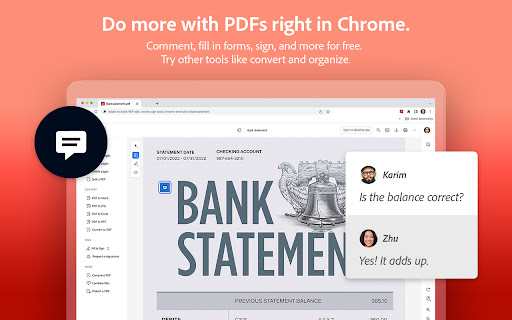
Adobe Acrobat je špičkové řešení pro práci se soubory PDF, které používají miliony lidí. Používejte nástroje Acrobat pro práci se soubory PDF přímo v prohlížeči Google Chrome, vychutnejte si prohlížení souborů PDF a buďte produktivnější při surfování na webu. Do souborů PDF můžete přidávat poznámky, včetně lístků s poznámkou, textu a zvýraznění – a to zcela zdarma.
Pokud vyžadujete pokročilejší funkce aplikace Acrobat, můžete vyzkoušet nástroje například pro export do a ze souboru PDF, tvorbu souborů PDF, sloučení dokumentů PDF, uspořádání souborů PDF a zmenšení velikosti souborů PDF. Práce se soubory PDF online nebyla nikdy tak snadná.
JAK POUŽÍVAT ROZŠÍŘENÍ ACROBAT PRO PROHLÍŽEČ CHROME
1. Nainstalujte rozšíření Acrobat do prohlížeče Chrome.
2. Rozšíření připněte, chcete-li k němu mít rychlý přístup.
3. Otevřete v prohlížeči libovolný soubor PDF.
4. Vyberte nástroj Acrobat.
PROHLÍŽEJTE, STAHUJTE, TISKNĚTE A UKLÁDEJTE SOUBORY PDF
• Se čtečkou souborů PDF Acrobat se vám dostane toho nejlepšího zážitku z prohlížení souborů PDF.
• Stahujte nebo tiskněte pouhým kliknutím.
• Přihlaste se a ukládejte své soubory PDF online, abyste k nim měli přístup odkudkoli.
UPRAVUJTE ZDARMA SOUBORY PDF S MOŽNOSTÍ PŘIDÁVAT POZNÁMKY
• Přidávejte do dokumentů PDF poznámky, včetně lístků s poznámkou, textu a zvýraznění.
• Pomocí funkcí psaní editoru PDF přidávejte do dokumentů PDF text a obrázky.
VYPLŇUJTE A PODEPISUJTE ZDARMA FORMULÁŘE
• Otevírejte soubory PDF v aplikaci Adobe Acrobat Reader a vyplňujte a podepisujte je na svém stolním počítači. • Jednoduše vyplňujte formuláře PDF díky funkci pro vyplňování formulářů nástroje Acrobat.
• Podepisujte dokumenty elektronicky pomocí svého podpisu nebo iniciál.
VYZKOUŠEJTE NÁSTROJE, DÍKY KTERÝM BUDE PRÁCE V PROHLÍŽEČI CHROME PRODUKTIVNĚJŠÍ
Vyzkoušejte prémiové nástroje pro ještě více možnosti při práci se soubory PDF. • Používejte náš nástroj pro převod souborů PDF do a ze souborů Microsoft Word, Excel a PowerPoint, formátu JPG a dalších.
• Vytvářejte soubory PDF z dokumentů nebo obrázků, včetně možnosti převodu souborů JPG do PDF.
• Kombinujte soubory do jednoho souboru PDF nebo naopak rozdělte soubor PDF na více částí.
• Uspořádejte si své soubory PDF. Odstraňujte a otáčejte stránky souboru PDF a měňte jejich pořadí.
• Komprimujte soubory PDF a zmenšete jejich velikost.
• Odesílejte rychle dokumenty ostatním uživatelům k elektronickému podpisu.
• Přidejte heslo a chraňte své dokumenty PDF.
Také si můžete zaregistrovat účet bezplatné zkušební verze na adrese https://www.adobe.com/cz/tryacrobat.
CO JE NOVÉHO:
• Úprava souborů PDF v doplňku Acrobat Chrome Viewer
• Vyplňování a podepisování formulářů zdarma
• Podpora otevírání místních souborů PDF v rozšíření
Smluvní podmínky: Používání této aplikace se řídí obecnými podmínkami použití společnosti Adobe (http://www.adobe.com/go/terms_cz) a zásadami ochrany osobních údajů společnosti Adobe (http://www.adobe.com/go/privacy_policy_cz) a všemi jejich následujícími verzemi.
Latest reviews
- Junior Charles
- I find it a little difficult to use but useful all the same
- Ivan Tchernegovski
- I hate how this new version has taken over the functionality of how I use pdfs.
- Dawn Geddis Allyn
- Scrolling and page changes are very slow. It is not smooth reading scrolling etc.
- Peter Gao
- The webpage to pdf feature doesn't work at all even with full pro subscription
- ANKIT YADAV
- very very very so so
- john kelleher
- really not good. I am trying to fill out a dmv form, with the license plate number for example, it wont allow me to enter more than one character. This is after trying to use the included Adobe AI tools to fill the form, which it claimed it could do, then hallucinated 3 times by just spitting out random formatted text versions of what i gave it (no pdf, just giving me text in the chat)
- Rebecca
- Installed without me asking, prompted me to use AI tools that I did not want, and the plugin slowed my chrome down so much that web pages would not fully load. After I uninstalled the web pages loaded quickly again. Do not use unless you absolutely have to.
- USA Retired and Veteran
- The very best there is personally and professionally! Thank you!
- Kellan Bateman
- Auto downloaded! What a scam! Forget these losers.
- Froylan Fentanes Lavalle
- ok
- Jy Cruize
- This is not a free version and for read only application. Not worth the visit and will ask you to go for paid version in order for you to use the full version. Go for other PDF app that are free like foxit.
- Sean Brockest
- WARNING WARNING: Go into the advanced settings for this Extension and make sure to turn off the extra features you do not want. It's very invasive.
- Tyler XIE
- very disappointed
- Александр Швец (Sanders)
- Ok.
- SAL Serials-Pro
- That company Adobe is a monopol, taking billions from all of us. need to find a solution without beeing slaves!
- IAN BROTHERS STUDIO
- its so usefull to me
- Andrew Thorn
- cost to much
- Liam Echeverria
- cant even delete it
- Radu Cruceru
- Who in their right mind would think it's ok to install this garbage without consent?
- Tom Foolery
- App has started maliciously attacking my pc since i got home from work and my pc had auto updated itself (nearly causing a house fire). this app now opens itself at random when using google and i have quickly made sure to remove it. will be complaining to adobe properly due to the safety risks this has caused me today both physically (fire risk) and online.
- Tim Hart
- Oh look, another productive tool made worse by shoving AI into it. AI does a terrible job of summarizing documents, and stops working after a few shots - but continues to clutter your screen forever after.
- James Hogan
- This app is horrible. It doesn't work with reMarkable as it won't show the layers.
- Jerry Raymond39
- I've been a men after GOD heart for every since i been saved, which was 2004 when it started the testes and tryer, I've been throuth ups and down more down because of skin color here in Holland Michigan. I love too work ,read and easy to get alone with. have three children that i love dearly. there mother R.I.P. MISSING THEM ALL. MY Mother as well I miss she is in Chicago ill. I call out for help because I then try every source I know and still coming up short.Help
- 이근영
- So good
- Emilio Soto
- Great tool to use Adobe Acrobat and download the pages and insert pages or sign documents.
- Sorin Avram
- Unfortunately, Acrobat Pro is sometimes very frustrating to use. The application frequently forces updates while you are actively working, without proper warning, completely interrupting your workflow. This happens far too often and results in lost time and unnecessary frustration. For a professional-grade software, this behavior is unacceptable. Updates should be optional or at least allow postponement, not forced during active use.
- Carol Clark
- Since Google Chrome updated automatically any PDF received via gmail is presented as Adobe Acrobat PDF. Now all PDF's print really faintly so that it is almost unreadable. I cannot find a way to change the print without paying for an updated Adobe product. To be honest, even paying for an updated product may not even fix the printing problem. Not happy with this automatic change at all.
- Maria Victoria Pons Ventura
- I lost count of how many times this extension has been corrupted & needed repair. & the repair never works--I always end up having to re-add through the web store. It's garbage ugh
- Jim Shorto
- Make it simpler to actually open up a PDF, please, e.g. reading a simple PDF should be a basic function of any other similar Adobe program that works with PDFs, Only reason I have to use anything Adobe is because it's an official form and requires 'reader 8 or higher' which hasn't worked on a PC/ Android app, both with freshly downloaded apps, at this point giving up. How about making the reader a usable extension to browsers that common people use?
- Ricardo Peirano
- good
- Anonymous
- Installed itself from the desktop app without my consent. Takes up way to much screen space with things that arent the PDF.
- Anonymous
- good
- Anonymous
- niceone
- Anonymous
- nice application
- Anonymous
- Very Epic Unbelievable Application For Pic Editing Or presentation I will Rate it 5 stars ✨
- Anonymous
- Worst extension I have ever used. I have removed from my browser 100 times but somehow it again appears. It's a ghost extension.
- Anonymous
- I dont want this program and I resent the fact I can't download and print a document I bought and paid for without have to go through this nonsense
- Anonymous
- Adobe Editor is a must-have tool for managing any pdf. Problem: When you simply want to fill out a form, the options are too many, taking the user into an edit mode instead of simply being able to fill out the form--not change it. Most of the other features are top-notch.
- Anonymous
- Makes reading pdf files a nightmare when every other time I click on a pdf it wants to edit the file. When it wants to edit the file pressing on arrow keys just makes the typing pointer move and doesn't change the page. Almost unusable as it is, makes my blood boil and pressing esc doesn't cancel the edit view. I can't even edit the files as I don't have full access but still Adobe wants me to try. Wish there was a working alternative but have to keep pulling teeth with this piece of garbage P.S. Collects data as an opt out, not opt in.
- Anonymous
- So much helpful on documentation. Thanks Adobe!
- Anonymous
- Awesome
- Anonymous
- Super app
- Anonymous
- Excellent app. thank you so much for your support!!
- Anonymous
- super easy, its great.
- Anonymous
- simple and explicit system to use.
- Anonymous
- thx, this app really help me doing many things in the classroom
- Anonymous
- Works for me. Seamless...
- Anonymous
- This is good. Less hassle than most PDF apps
- Anonymous
- Excellent!
- Anonymous
- Its good, love it