
GoFullPage - Full Page Screen Capture
Extension Actions
- Extension status: Featured
余分な権限を要求することなく、現在のページのスクリーンショットを完全に確実にキャプチャできます。
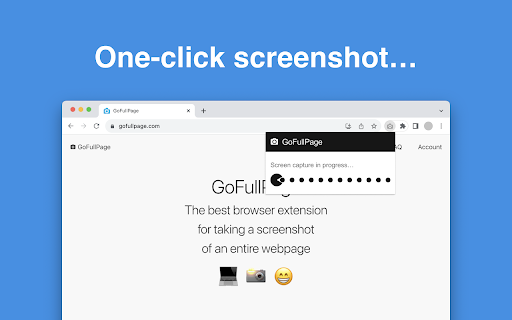
The simplest way to take a full page screenshot of your current browser window. Click on the extension icon (or press Alt+Shift+P), watch the extension capture each part of the page, and be transported to a new tab of your screenshot where you can download it as an image or PDF or even just drag it to your desktop.
*No bloat, no ads, no unnecessary permissions, just a simple way to turn a full web page into an image.*
*NEW:* The advanced screen capture technology handles complex pages—including inner scrollable elements as well as embedded iframes—unlike any other extension. If you encounter an issue, please report it via the customer support flag icon on the capture page, so we can improve the extension for you and everyone else who uses it.
In order to screenshot the entire page it must scroll to each visible part, so please be patient as it quickly assembles all the pieces. For the rare scenario where your page is too large for Chrome to store in one image, it will let you know and split it up into images in separate tabs.
Export your result to PNG, JPEG, or various PDF paper sizes—all configurable from the extension’s options.
This extension is run by an independent developer. View the original open source project on github: https://github.com/mrcoles/full-page-screen-capture-chrome-extension
Change Log:
4.9 — 2018-09-15 — various bugfixes from user-reported issues, including Salesforce lightning dashboards
4.8 — 2018-08-14 — extra handling for Chrome 68 bug with downloads related to allow incognito setting (stay tuned for updates to handle issues with downloading in Chrome Beta & Canary >= v69)
4.7 — 2018-08-08 — bugfixes for some parallax sites and other edge cases
4.6 — 2018-07-23 — fixed regression with a number of pages that stopped scrolling, improvements for fixed background images
4.5 — 2018-07-18 — bugfixes, zoomed in white lines fix
4.4 — 2018-07-16 — new support for fixed header jump, new permissions controls, downloads fix, parallax improvements
4.3 — 2018-06-29 — bugfix for sporadic iframe error
4.2 — 2018-06-14 — bugfixes from user reports
4.1 — 2018-06-12 — bugfixes, zoomed out white lines fix
4.0 — 2018-06-10 — new support for iframes and framesets, Chrome 67 compatability updates
3.17 — 2018-05-30 — improvements to scrolling issue and handling of animations
3.16 — 2018-05-21 — fix for user-reported scrolling issue
3.15 — 2018-05-08 — additional improvements to fixed elements, better capture of feeds
3.14 — 2018-05-02 — improvement to export to PDF filenames
3.13 — 2018-05-01 — fix save as recent download location issue, improvement to fixed elements
3.12 — 2018-04-27 — added export to PDF option, plus bugfixes and performance improvements
3.11 — 2018-04-09 — improvements to captured screen, support for fixed backgrounds
3.10 — 2018-03-30 — bugfixes for various pages, cleaner Options page
3.9 — 2018-03-24 — fix issue saving options, improvements to scrollbar handling
3.8 — 2018-03-22 — add ability to specify download directory, bugfixes
3.7 — 2018-03-20 — download as PNG or JPG via options page, bugfixes for user reported issues
3.6 — 2018-03-16 — bugfixes for various pages including adwords, improved download functionality
3.5 — 2018-03-14 — bugfixes from user reports, stability improvements to capture page
3.4 — 2018-03-09 — improvements with scrollbars and fixed position elements via user reports
3.3 — 2018-03-07 — timestamps in filenames, batch download/delete feature, auto-download option
3.2 — 2018-03-05 — improvements to scrollbars and fixed position elements via user reports
3.1 — 2018-03-03 — updates to customer support feature
3.0 — 2018-02-27 — new advanced scrolling algorithm for difficult pages like Gmail and more!
2.12 — 2018-02-23 — bugfixes for svgs and user-reported pages
2.11 — 2018-02-21 — bugfixes for several user-reported pages
2.10 — 2018-02-20 — advanced support for fixed position elements
2.9 — 2018-02-13 — bugfix for some body scroll issues, natural size for zoom in on high pixel ratio displays
2.8 — 2018-02-08 — improved messaging for restricted URLs
2.7 — 2018-02-06 — bug fix for Chrome version 60 and below
2.6 — 2018-02-05 — style updates, bug fixes
2.4 — 2018-02-02 — fix for quota errors that can prevent capturing an image
2.3 — 2018-01-31 — new customer support feature for better service!
2.2 — 2016-09-01 — support for ctrl+s (or cmd+s on Mac) to save the screenshot
2.1 — 2016-08-22 — fixed capture zoom in/out issues, add an expand button to capture header
2.0 — 2016-08-19 — updated result tab for screenshots with click to download and ability to view/delete your screenshots
1.0.1 — 2016-05-14 — fix incognito mode "File not found" bug and better tab handling
1.0.0 — 2016-05-09 — this is a major release: introduces keyboard shortcut, splitting of images for pages that are too long, better handling of zoomed/emulator pages, more subtle gray icon, SVG support, and stability fixes (thank you @bluememory14, @BSierakowski, @denilsonsa, and all submitters of bug reports)
0.0.15 — 2015-04-05 — add timestamp to images so they are unique paths (via @HetIsNiels) and popup display fix
0.0.14 — 2015-02-14 — more “retina” fixes
0.0.13 — 2015-01-02 — remove scale feature to hopefully fix bugs experienced on “retina” displays
0.0.12 — 2014-08-24 — change permissions to more restrictive “activeTab”
0.0.11 — 2014-04-19 — backwards compatible permissions update
0.0.10 — 2014-04-17 — fixed permissions issue that prevents screen capture in Chrome 34
0.0.9 — 2013-12-08 — fixed bugs when the image is pieced together on retina screens
0.0.8 — 2013-11-17 — improved calculation of page width and height on non-standard pages
0.0.7 — 2013-10-10 — 10x speed improvement in capture time and restore to original scroll positions after capture (via @terrycojones)
0.0.6 — 2013-01-26 — Fixed scenario when captured image can load as a broken icon (caused by loading image before it has been written to the file system)
0.0.5 — 2013–01–21 — Fixed small bug in 0.0.4
0.0.4 — 2013–01–21 — Replaced deprecated BlobBuilder with Blob (via @gleitz)
0.0.3 — 2012-11-25 — Removed need to reload pages that were open before the extension is installed
0.0.2 — 2012-11-21 — Better messaging for pages that can't be screen captured (e.g., content scripts cannot run on the chrome webstore), and the generated image now incorporates the URL into its name
0.0.1 — 2012-11-06 — Initial release
Latest reviews
- Oleg Golubenko
- Very handy tool.
- Jacek Korzemski
- very useful, good quality images, works pretty well in most cases. Background attachment: fixed can cause some problems, but how could you capture moving image? It's the best for what it is ;)
- Michael Williams
- Quick, no fuss saves in png or pdf, I use it a lot, great tool.
- Adam Mohammed
- Lightweight extension that effectively screenshots entire webpages without any permissions.
- SOHAIL MUHAMMAD
- Nice work as i need...well done..
- Marko Avramovic
- Thank you for your service!
- Trevor Eisenman
- It's very useful and time-saving
- Jatin Kumar Hota
- Such an amazing tool, Perfect Screen capture software, Even large webpage can be converted to pdf with good resolution.
- Amanda Meneghini
- I'm not usually one to give reviews, but this is a lifesaver! Wow, so fast and the quality isn't low, it looks great. Huge congratulations to everyone involved!
- Yevhenii S.
- Very fast and useful! Like it
- Aadi Khose
- Really helps when wanting to take a screenshot of a full webpage for further analysis. Easy and intuitive to use.
- Mitanshu Bhasin
- nice extension
- memes world
- Been using this for a long time. It’s probably one of the most reliable tools for full-page capture. The only thing I kept running into was needing to clean up screenshots after exporting them. Recently tried Snapify and it handles that part better, now i have spend less time spent editing after capture.
- Kristīne Kaļva
- Excellent
- MUHAMMAD ZAIN SAEED
- Excellent
- Diptarka Samanta
- nice
- Steven
- I have looked and don't see any "print" option... Maybe I'm not looking in the right place? This app works well enough insofar as downloading but where is a simple option to print?
- GCH Trivs
- Awful. Requires an account to save the image
- Adel Talebi
- Excellent, Useful, Easy To Use.
- Santosh Gondhalekar
- nice.
- Lei David Chen
- Works fantasticly.
- juju
- I love you OMG Where have you been my whole life
- Kirara
- Does not capture the full page when it has to scroll down.
- Avinash Ranga
- Excellent extension . It does what is says
- Sarah Charity
- Fast and works exactly the way it should. Love it! Thank you!
- Olivier Lebel
- Doesn't work for local files. I tried to use it on a local HTML and got a message "Please go to your browser’s extension settings and enable “Allow access to file URLs”, so the extension can access this page." Clic on "Extension settings", but only a white screen appeared, without any way of getting further. Very disappointed.
- José Henrique Câmara
- This app is so good, yet so simple. It gets the job done in a few clicks and has many export options. Thank you for the great work! I use it very often in my work (motion designer).
- YAD
- its working, i download this becoz the built in capturing of opera gx kinda buggy for now
- Joseph Russell
- Easiest solution I found to printing the whole contents of a page, without messing with devtools or intermediate save steps.
- Jordan Taylor
- Absolutely love it. Use it probably every day as I'm always screen capturing and putting it into an AI.
- Aaron Zhang
- Really appreciate your work on it. It’s extremely helpful for taking screenshots of very long web pages.
- Jorge
- Does not capture the scrolling page
- Amshal Ejaz
- Does not capture whole site or whole page just window part which is open.
- Christopher Harper (Christopher Harper)
- no restrictions, even on content blocked for ShareX or NV Share
- Chris Richter
- Does not allow you to capture a scrolling page.
- Borges Filho
- top
- muhammad nazmi
- Weird, mine is no longer SS the full page but instead, only current display, like normal screenshot app
- Surya ABS
- Working flawlessly, saving option as pdf is really helpful. Thanks
- abdu
- pretty nice
- sam
- awesome at taking screenshots, just a heads up if its not taking full page screenshots for you. You may have wrong settings in your app
- Jac Fitzgerald
- Simple and highly-effective. A valuable addition to our modern lifestyle.
- DIMANPRO
- BEST!!!!
- Erin Weigel
- THIS PLUGIN IS A LIFESAVER. I love everything about it.
- eScend Hub
- All the other Full screen capture extensions are garbage. They only hope to be this one......I'm mad it took me this long to find it.
- Will Macdonald
- As a web designer, this is incredibly helpful. Permormace is quick, accurate and the quality is above acceptable. Highly recommend if you have the need to take igaes of a full screen
- Alexandre Alves
- I don't install Chrome extensions that often because of privacy reasons. But this extension is safe as f*dge. Thanks to you guys for maintaining it !
- Seng CHEAM
- Really good stuff, does its job, nuff said ! Thanks for this extension !
- Samantha Taylor
- Has made pinpointing copy changes to webpages super easy
- Andrea Montella
- Works great
- Alicee :3
- One of the most beneficial websites for both students and professionals.