
Custom Cursor for Chrome™ - Изменить курсор
Extension Actions
- Extension status: Featured
Забавные пользовательские курсоры для Chrome ™. Используйте большую коллекцию бесплатных курсоров или загрузите свои собственные.
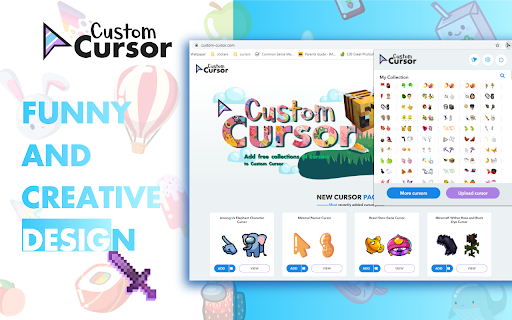
Настройте свой браузер Chrome с помощью нашей бесплатной коллекции курсоров для мыши на сайте Custom Cursor.
В Custom Cursor мы создали гигантскую коллекцию симпатичных курсоров, нарисованных от руки. У нас есть более 8000 различных пакетов, доступных на нашем сайте для вашего удовольствия. С вашей помощью наша коллекция разрослась настолько, что мы разделили ее на категории на любой вкус, например:
- Шахтерское ремесло;
- Симпатичные курсоры;
- Пакеты аниме-мышек;
- Мемы;
- наборы указателей Spy x Family с Аней Форгер;
- Среди нас;
- Два типа Минимальных указателей для работы и учебы;
- Игры;
- Роблокс;
- И много-много других забавных элементов, с которыми вы можете поиграть.
Некоторые из наших наборов указателей мыши связаны с расширением браузера Custom Cursor, но большинство из них ждут вас на нашем веб-сайте. Следите за новыми и трендовыми дополнениями.
Чтобы упростить навигацию, мы организовали нашу коллекцию в коллекции Editor's Picks, каждая из которых имеет уникальную тему. Примеры включают:
- Зеленые стрелки для осени;
- новогодние стрелы;
- Выбор редактора праздников;
- Хэллоуин;
- Совместная работа Custom Cursor с Дайени Шутц;
- Выбор редактора розовых указателей;
- Летние украшения для мышей;
- Цвета радуги;
и многое, многое другое на нашем сайте.
Если вы не можете найти то, что ищете, используйте кнопку «ЗАГРУЗИТЬ КУРСОР», чтобы добавить свой собственный. Управляйте своей личной коллекцией стрел на странице загрузки и настраивайте размер курсора в разделе «Управление».
Новые добавленные коллекции будут загружены в расширение Custom Cursor для Chrome и их можно будет найти в нижней части списка коллекций. Добавленные вами наборы появятся в «Моей коллекции».
Создайте собственную коллекцию курсоров для мыши из любых изображений с помощью инструмента Custom Cursor Creator на нашем сайте. Это позволит вам создавать новые пакеты практически из любого изображения в виде стрелки или указателя в Интернете.
--------------------
! После установки расширения обновите ранее открытые вкладки, чтобы использовать его на этих страницах. Обратите внимание, что расширение может не работать на страницах Интернет-магазина Chrome или на домашней странице. Откройте другой веб-сайт (например, google.com), чтобы протестировать расширение.
Если вам нравится расширение, вы также можете проверить наше приложение Custom Cursor for Windows.
Предварительно просмотрите внешний вид стрелки, нажав на нее в окне расширения и переместив мышь в пустое место внутри окна.
❤️ ❤️ ❤️
Latest reviews
- バオ・チャウ
- it's so cool
- Daxi Tyler
- it wont give me my mouse
- Sidney Thompson
- love it]
- BlueClouds
- I LOVE ALL THE CUSORS AND HOW THERE ARE DIFFERENT ANIMES IN IT
- Abhyuday Pandey
- they forced me to do this
- Mathamane Kodisang
- nice cool cursors!
- Doaa ElHassan
- very bad eww
- Haniak Cabello
- works!
- Slushie Hanna
- i like it
- PHOBOS 92 92 92
- i want to pee now
- Ryker_akaShrig
- good extension!
- AARSHI ANN MITRA stad
- very fun..mom got pissed..i guess that's fine~!
- IVY GRACE VOILET BINTI MICHAEL Moe
- this is sooooo cool and i luv it
- 6G Elijah Cheng Zi
- Not letting me do it
- Lợi Đỗ Khoa
- This app is so great
- Genesis Nene
- its really awesome and cool to have other times of cursors
- Amariah Wright
- it does not give me what I want and the corsurs are so they gave me the ones do not buy this
- Malek osama
- i like this app so much,it has so many cursor collections that actually work but i really have an annoying problem .Some collections don't work,how to add them?
- customer service BO5 41O 5OO3 barg
- Fun way to personalize your cursor with a wide variety of designs.
- mel
- ok lah, its a bit hard to do uknow
- Abigail Morrow
- THIS IS THE BEST THING EVER SINCE MOZARELLA STICKS
- Caliph Destane
- This is so cute!
- Krishiv Patel
- love it
- LAW XIN EN Moe
- its really good .
- Just_someinhuman shit
- nvm it sucks lol
- Alaska Skye
- Absolutely love it, my teacher gave me the link to it.
- Timothy Doke
- it doesnt work.
- tao min
- i like it but it has very little cursors
- Judah Hensley
- I LOVE IT!!!!!!!!!!!!!!!!!!!!!!!!!!!!!!!!!!!!!!!!!!!!!!!!!!!!!!!!!!!!!!!!!!!!!!!!!!!!!!!!!!!!!!!!!!!!!!!!!!!!!!!!!!!!!!!!!!!!!!!!!!!!!!!!!!!!!!!!!!!!!!!!!!!!!!!!!!!!!!!!!!!!!!!!!!!!
- Rody
- they have really pretty nice cursors and all, but none are working in my laptop like they are not downloaded on my windows cursors thingy. its really making me sad about it, but its okay, if u have any idea to fix the problem? (used nezuko as my cursor)
- Jamie Franco
- I love this extension! makes the day more fun!
- Markita Bailey
- Cute and fun to use.
- Jasem Alex
- Its really cute and fun with the cursors 5/5 :) but also could you possibly be able to like kinda animate them personally I think they would be better but also cool but if you already made a few Please tell me because I can't find any( Please take this idea in mind ) :D
- Luis
- like
- Kevin Gonzalez
- I love custom cursors because they're awesome and many colorful mice.
- makerballing
- incredible
- NOE VITOR DE JESUS GODOY MOREIRA
- MOUSES BONS
- Eason Sundaralingam
- W BEAN
- Finn H. Cammayo
- I love the cursors but can you add Project Sekai or Hatsune Miku: Colorful Stage cursors please? i would appreciate it!
- Thanh Thảo
- cool
- Haley Ray
- this is great! I love the Christmas ones!
- Teresa Rose
- cool :)
- Hoàng Khánh
- We need more anime mouse cursor skins, please include all anime series. If you do that, the app will definitely get 5 stars if it adds mouse cursor skins as I requested. So please add "Fire Force" too.
- Keila Rojas
- been using this extension for a while now, i have not experienced any negatives. Everything works smoothly with this extension no lag at all. I love it so much 5 stars.
- NethRBLX
- One of the best extensions for google, I have been using it for almost two years from now. But it needs few more updates like cursor override since most websites don't allow it and at the search bar too, it switches to default cursor. Overall, it's a really good app and I appreciate the developer for making such a good extension.
- Sophie Thein
- i like
- An Đinh
- It's very good and nice
- Niels ove Hansen
- it good broski
- Maryam Al Ayed
- Amazing thanx
- Dawit Abraham
- so fun