
Custom Cursor for Chrome™ - Змінити Курсор
Extension Actions
- Extension status: Featured
- Live on Store
Кастомні курсори для Chrome ™. Використовуйте велику колекцію вільних курсорів або завантажуйте свій власний.
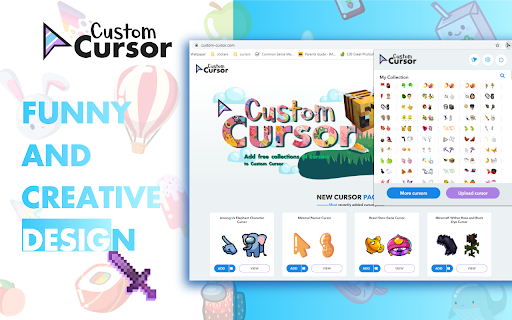
Прикрасьте свій браузер Chrome за допомогою нашої безкоштовної колекції курсорів миші на Custom Cursor.
У Custom Cursor ми створили гігантську колекцію милих курсорів, намальованих від руки. На нашому веб-сайті доступно понад 8000 різноманітних пакетів курсоріи, якими ви можете насолоджуватися. Завдяки вашій допомозі наша колекція настільки зросла, що ми розділили її на категорії на будь-який смак, наприклад:
- Minecraft;
- Милі курсори;
- Набори курсорів аніме;
- Меми;
- Пакети стрілочок для миші Spy x Family з Аньою Форгер;
- Among Us;
- Два види мінімальних курсорів для роботи та навчання;
- Ігри;
- Роблокс;
- І багато, багато інших кумедних елементів, з якими ви можете грати.
Деякі з наших пакетів курсорів для миші постачаються разом із розширенням для браузера Custom Cursor, але більшість із них чекають на вас на нашому веб-сайті. Слідкуйте за новими та трендовими доповненнями.
Щоб спростити навігацію, ми організували нашу колекцію в колекції «Вибір редактора», кожна з яких має унікальну тему. Приклади:
- Зелені стрілки для осені;
- Різдвяні стрілки;
- Вибір редактора свята;
- Хелловін;
- Співпраця Custom Cursor з Daieny Schuttz;
- Вибірки редактора рожевих покажчиків;
- Літні прикраси мишки;
- Кольори веселки;
- Та багато, багато іншого на нашому сайті.
Якщо ви не можете знайти те, що шукаєте, скористайтеся кнопкою «ЗАВАНТАЖИТИ КУРСОР», щоб додати свій власний. Керуйте своєю особистою колекцією стрілок на сторінці завантаження та змінюйте розмір курсору в розділі «Налаштувань».
Нещодавно додані колекції буде завантажено в розширення Custom Cursor for Chrome і їх можна знайти внизу списку колекцій. Додані вами пакети з’являться в розділі «Моя колекція».
Створіть власну колекцію курсорів миші з будь-яких зображень за допомогою інструменту Custom Cursor Creator на нашому веб-сайті. Це дозволить вам створювати нові пакети майже з будь-якої стрілки чи зображення у формі покажчика в Інтернеті.
-------------------
! Після встановлення розширення оновіть раніше відкриті вкладки, щоб використовувати його на цих сторінках. Зауважте, що розширення може не працювати на сторінках веб-магазину Chrome або на домашній сторінці. Відкрийте інший веб-сайт (наприклад, google.com), щоб перевірити розширення.
Якщо вам подобається розширення, ви також можете перевірити нашу програму Custom Cursor for Windows.
Перегляньте вигляд стрілки, клацнувши її у вікні розширення та перемістивши мишу на порожнє місце у вікні.
❤️ ❤️ ❤️
Latest reviews
- Mehak Loura
- not working
- Patricia West
- not working at all, sat for 3 hours trying to figure out why it wouldn't add. and im just removing it at this point
- meowliyn josh
- cool
- Zayna Qazi
- AMAZINGGGGGGGGGGGGG
- Omar Elhelely
- not working
- Isla Trowman
- This is such a good idea! I love this so much and doesn't take much effort to do. There is such a wide range of different cursors to choose from: any one that I searched up you had. I also love you fact you can make your own, it is so cool! It is just a shame that you can't use it everywhere, only on certain websites. That is the only problem!
- Marcus Hieber
- I love this app so fun and so easy to use. Their is so many vibrant and colorful curosors for your mouse and different trails too. You can even add you and your friends face so easily!
- dutch keano
- wonderful
- Saba Umair
- Personally as a really big chiikawa fan I really love it and think it is so cute to have chiikawa and usagi as your cursor but i do request more hachiware because i didn't find a cute one. But personally I don't have any issue so I don't understand the hate
- James Sebastian Conlan Acevedo Conlan Acevedo
- horrible
- Nancy Turner
- it dose not work do not use
- Caden Chappells
- i love this so much but it does not work
- IZABELLY DE OLIVEIRA GONCALVES
- very good
- XxStar maria10
- It's amazing,i found out about it from my bestfriend, oh my goodness I love all the designs, good job! God bless you!
- Anya
- It's really good because of how their quality and what cursors do they have though they don't always work in some sorts of places. The best thing I like about it is that you can turn off your custom cursor or turn on if you want it back on and because of that feature, most custom cursors that I've been searching doesn't have it. This not only works on the official site but other sites (except for homepage for google bc you can't get the custom cursor but good enough). It's already working well and I hope the developer can work better on the app and make the app work better and I hope there's no bugs! Thanks for this app! I love this extension and I will tell my friends to download it!!!
- Phượng Sồ
- good
- Lingxi Song
- So cuuuuuute! Thanks custom cursor production team!!🎊
- Aurora Zielke
- I'm sure its just me but the custom cursor only works on the website and i've tried refreshing my pages on the other tabs but nothing happens....
- Kim Steyn
- Really fun! Especially during teaching classes online.
- Kenia Anaya
- how do i make it work on other websites? it only works on the website
- Izzy V
- cool things
- Franklin J S
- SO COOL COLLECTIONS
- Mohammed Ubaid Ur Rehman
- It has all of my favorites, and even reese's.
- Habib Bakhshi
- Works very well, and you can customize your cursor.
- totil ojo
- such a W
- Nathan Power
- Great Fun and I'll never go searching for mu cursor again...
- Kia
- this is amazing
- chilena TUMBA LA CASA MAMI
- meh it wouldn't let me post in roblox or anywere else only on google and that's it here go 2 stars explain me how too do it if i am doing it right or wrong. :(
- Pastel de flango
- sooooo nice bruh
- JJ
- nice
- III
- This is too good to be true😭
- Dhruvender Tulla
- It's not working
- Kenny Money
- the best cursor
- Matias Ysaguirre
- the best cursor ever
- Siddhartha Mondal
- really cute and amazing
- Ian Silva
- ok
- Quinn Patrick
- impeccable so many cursors!
- Damian Alvarez
- it really goooooooooooooooooooooooooooooooood I love it so much
- Amelia Willey
- so cute!
- Katy
- i love all of the cute cursors
- Kelsey Wiles
- I CANT EVEN DO IT ‼
- jon doe
- how do i keep it on the chrome update it so it can my chrome
- Nicolas Reyna
- So good
- Abdul Mokid
- nice cursor
- Vân Trương
- nice
- Chelsea
- really good but my pc cannot allow some of it but its fine. really good :D
- Hồ Thanh Hà
- Cute
- Arcchit Dutth
- nice
- pepper _
- fav extension of all time!
- ryan laca
- Doesnt save to chrome 🤬