
Hoverify: All-in-one extension for web developers
Extension Actions
- Extension status: In-App Purchases
- Live on Store
All-in-one browser extension that helps you inspect, edit, test, debug, capture, and optimize websites faster.
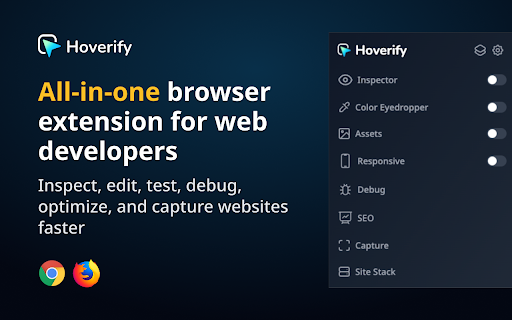
⭐ Inspector: Hover to Inspect, Click to Edit
• Inspect any site by hovering over the element.
• Don't miss any styles. Inspect pseudo-elements and classes.
• Inspect and edit styles for all screen sizes and animations in real time.
• Style elements visually with our powerful visual editor in real time.
• Edit HTML, styles, media queries, and animations in real-time.
• View source CSS from different selectors in the code tab.
• The code is syntax-highlighted for better reading and editing.
• Copy or export the whole component with children to CodePen.
• Edit Copy - Check how different copy looks on your page by editing the element's content in real-time.
• Hide or Remove Elements - Debug page structure by hiding or removing elements.
• Color Palette - Get every color from the page.
• Font Viewer - Know what fonts each tag is using.
• Search - Find the element through tag name, id, or classes. Even with CSS selectors!
• CSS Box - Visually inspect the padding, margin, border, and size of the element.
• Keyboard Shortcuts - Fully customizable shortcuts so you can work without lifting your hands off the keyboard.
⭐ Color Eyedropper: Spot, Point, and Select Colors
• Pick colors from anywhere on the page, even from images and iframes.
• Get RGB, OKLCH, CMYK, HSL, and hex values.
⭐ Responsive Viewer: Preview on Multiple Devices
• Test your websites on multiple devices under multiple conditions in parallel.
• Click or scroll on one device and other devices will follow.
• Simulate modern devices with frames, frame styles, and OS. Includes iPhone 16, iPhone 15, Nothing Phone, Pixel 7 Pro, and more.
• Switch between device frame styles and colors to match real-world hardware.
• Works on any site - can be injected directly into the page for full compatibility.
• Add new custom device profiles to fit your needs.
• Test sites on viewports bigger than your display.
• Toggle horizontal and vertical scrollbars per device.
• Change user-agent.
⭐ Assets: Extract all the assets in one place
• Extract images, videos, SVGs, PDFs, Lottie animations, and favicons from the page.
• Extract assets from iframes and hidden elements. No valuable content is overlooked.
• Preview video thumbnails directly in the images tab.
• Filter and sort assets by type, size, and format. Find what you need quickly.
• Select all or pick individual assets, then zip and save in one click.
⭐ Library: Save assets directly to the cloud
• Save any extracted asset to your connected cloud storage without leaving the browser.
• Access your saved assets anytime from your library.
⭐ Site Stack: Discover the tech stack behind any website
• Uncover what's powering any site from frameworks and hosting to DNS and SSL, all in one place.
• Technologies - Detect frameworks, libraries, CMS platforms, analytics tools, and plugins with confidence scoring and version detection.
• Hosting - Identify the hosting provider, server IP address, location, and infrastructure details.
• DNS - View DNS records, nameservers, and domain registrar information at a glance.
• SSL - Verify the SSL certificate, issuing authority, validity period, TLS version, and key details.
• WordPress - Detect WordPress sites automatically and reveal the active theme, installed plugins, and ratings.
• Export - Download the full tech stack as a JSON file or generate a professionally designed PDF report. Choose exactly which sections to include, perfect for client handoffs and site audits.
⭐ SEO: Optimize your site for search engines
• Run a complete SEO audit on any page, right from your browser.
• Insights - Get Core Web Vitals with real user data from Chrome UX Report and lab performance scores from Google's PageSpeed API, all in one view.
• Meta Tags - Audit your title, description, Open Graph, and Twitter Card tags with character count validation and social preview checks.
• Headers - Visualize your H1 through H6 hierarchy. Spot duplicate headings, missing H1s, and structural issues that hurt readability and rankings.
• Images - Find oversized images, compare original vs rendered dimensions, and catch missing alt text that hurts accessibility and SEO.
• Links - Scan all internal and external links on a page. Filter by type, detect broken URLs with one-click status checks, and audit anchor text.
• Schema - Detect existing structured data (JSON-LD, Microdata, RDFa) with validation, or generate new schema markup from ready-to-use templates.
⭐ Capture: Take stunning screenshots of any website
• Showcase the full webpage or just any part of it with our screenshot tools. Save screenshots in JPEG, PNG, WEBP, or PDF format.
• Visible Part - Capture the visible part of the viewport of the page in high resolution.
• Full Page - Capture the full page and showcase the entire page in one image.
• Select Area - Click and drag to select any area of the page to capture.
• Select Element - Capture any component on the page by clicking on it.
• Screenshot Editor - A full editing suite for your screenshots. Add gradient backgrounds, annotations, branding (your logo and text), and crop with precision. Zoom, pan, paste images from clipboard, snap annotations into place, and export in any format. Turn raw screenshots into polished visuals ready for portfolios, docs, or social media.
⭐ Debug: Optimize and debug your site with ease
• Clear Browsing Data - Instantly remove browsing history, cache, cookies, local storage, and more.
• Custom Code - Inject HTML, CSS, and JavaScript to tailor websites in real-time and make changes persistent.
• Optimize Images - Improve loading times by optimizing images on your landing page.
Please note: This is a paid extension, you can buy it from here- https://tryhoverify.com.
💡 Bug Report and Suggestions
To report a bug or for a feature request, you can send an e-mail to [email protected].
Latest reviews
- Charis Zapitis
- Hoverify is one of those tools that you install and just carry on working because it becomes part of your daily routine. It is awesome to use on layouts to just hover, click and edit, and you get inspection, responsive previews, screenshots and color picking all in one place, which makes everything a bit quicker and easier to access.
- Magnus Petersson
- I love this extension. To do a full page screenshot is so easy!
- Ron Dunn Jr
- This is a no-brainer, must have tool if you build websites. So many great features all in one tool.
- Panther Productions
- Been using this tool for years and it is extremely handy. I have not found a better tool for taking full webpage screenshots and the "Site Stack" feature is pretty cool for breaking down what makes up a specific website, it works very well for WordPress-based websites. Overall I highly recommend this tool for any web developer out there.
- Zoheb Hossain
- The BEst among i tried all of them.... no lagish behaviour after refresh, or delay, not only it HOVER, also just save any pic by tapping S key.... amazing work...
- Derek Padula
- I love Hoverify's screen capture tool. It's the best I've ever used and is so helpful when I need to capture an entire page at once instead of only what is visible on the current screen. The eyedropper tool is also excellent. The rest is an added bonus for when I dig deep into a site while doing web development.
- Stephen Gordon
- Hoverify quickly became part of my workflow and Himanshu regularly updates with new abilities. Highly recommended.
- farhad shaon
- As a web design & developer, this tool has been super helpful in day to day tasks.
- Ed Ellingham
- Incredible tool, that my team uses daily. I've purchased similar tools before, and they just collect dust. This is the one...
- Muhammad
- Hoverify: All-in-one extension for web developers (That can be used only when you pay)
- Natasja Lagerweij
- love it. especially the assets function!
- Scott C
- We rolled Hoverify out to our entire design team, and we absolutely love it. It’s clean, powerful, and saves us a ton of time when inspecting elements, checking spacing, and troubleshooting layouts. The workflow just makes sense, and it’s become one of those tools we now use daily without even thinking about it. Highly recommended for any design or dev team that values efficiency and clean execution.
- MMM Biggest Frank
- I use Hoverify almost every day, and it’s easily one of the most useful tools I’ve added to my workflow. Instead of switching between different extensions, I can inspect, debug, and test everything in one place. The 4.0 update made it even smoother to use, and you can tell a lot of effort went into improving the details. It saves me time on projects and just makes web work easier. Highly recommend it to any developer or designer.
- Khalid Hasan Zibon
- It would be great if it were mentioned somewhere that you cannot test this extension without purchasing a license.
- Andrew D. Forbes
- I've been using Hoverify the past couple of years and it's become an essential part of my workflow. This plugin has genuinely streamlined how I approach web development and design work. What I love most is how it consolidates so many useful tools into one reliable extension - instead of juggling multiple browser tools, I can quickly grab screenshots, inspect CSS, download assets, analyze website structures, and use the color eyedropper all from one interface.
- Kamron Nelson
- Great app for quick insights on website info. I use it a lot for site asset downloads, discovering fonts, and taking screenshots. The developer seems pretty active as well and continues to make improvements.
- osirisgothra (osirisgothra)
- Why does this come up as free, its not free. You can't even try to use it. I'll just write my own or find someone else 'cause its not like it does some super unique thing anyway. Whaleware.
- Joe (Joe)
- This is a PAID tool. Why is this even here. There's no free version of this, its straight right let you buy a license
- Liz Weaver
- I use this tool every day. I have paid for this plugin for the past few years. It has helped my workflow for developing websites and maintaining them tremendously. If your looking for a quick and simple way to review sites you need to provide a quote to redo, fix, or just check your own work I would recommend this tool.
- Fresh Eggs
- Love this tool. I use it daily.
- Helen Bee
- Fantastic tool packed with useful stuff I use nearly every day. I've used a few similar tools in the past, but this has everything I need in 1 app, and it works! Inspector, colour eyedropper, screen capture, responsive previews, assets & site stacks (+ more) all work well. It's ace!
- KG
- Hoverify makes inspecting websites super easy. I love how quickly I can take full-page screenshots, grab images or assets, and check styles without digging through the dev tools. It saves me a lot of time when working on designs.
- Jonathan Camp
- I have used several tools over the years to help with every day web development. This browser add-in gives you all the essential information at your fingertips to help you examine the structure of a web page. Not only that you can screenshot information, see the exact CSS, modify pages, export information, view all the colours used, see detailed information about hosting and plugins used, plus a lot more. It helps me as a developer and is a tool that replaced several other tools, and just works. It even has a built in image editor. It is a tool I could not do without and use it daily.
- Jennie Powell
- Excellent tool for web development - I use it in all my design projects. The Inspector, Color Eyedropper and Capture elements are so useful I use them everyday.
- Neil McDermott
- As a web designer this is an absolutely essential part of my toolbox. Highly recommended.
- Deeton Rushton
- It's a must have for web development. It's effectively a better, more user friendly, less bloated version of the browser tools. It's $30 per year, which really isn't much, and helps support the developer. Good work! One improvement I'd suggest is adding support for higher resolution monitors. I have a 1440p monitor, and when I use the colour eye dropper the entire page becomes really blurry. (Not sure if that's intended or not, but I don't like it personally. A setting to disable this would suffice if that's the case) When I'm being quick I use this for alignment, and the blur makes that difficult. The inspector is proper, you can see all information really clearly, catch alignment issues fast. No painful DOM parsing for my poor brain. Some more defaults in the responsive feature would be nice too. Newest iPhones & Samsung phones. The capture feature is especially useful. Being able to capture the entire page, single elements, or selected areas has saved me from lots of micro-management. The dialog for copying or saving is super simple and intuitive, too. The site stacks cool too, for when I'm feeling nosey.
- carsten d
- It's a great tool, and it gets better with every update. Many thanks to the developer. One of my favorite web development tools.
- GenViajero .es
- We absolutely love this tool, we use it everyday. One of our fave chrome extensions! highly reccomended
- Tanner Kovach
- Not smooth enough of an experience to warrant 30 bucks. Don't bother. Just use the inspector tools.
- bryan godoy aran
- you have to pay a subscription, you should inform that in the extension page
- Calico Jack
- It's excellent.
- Blue
- It used to be excellent before the updates, but now the eyedropper tool is completely unusable. I stopped using it for months after the latest update, and upon my return, the problem remains. I really don’t get it. I’m certain I’m not alone in bringing up this issue. I can't comprehend why they would abandon something that worked well and replace it with one that is so flawed. *update Turns out I need to Reset Extension from the setting to make everything works well.
- Radek Raczkowski
- paid only.
- John Marra
- UPDATE: A lot of the issues that I was having due to the big update back in April of 2024 seem to be resolved. It cuts down on all the individual extensions I had. The page capture feature was recently updated as well.
- Mike Sutherland
- Had this on my browser for years. As a developer I would not be without it. Great tool!
- Eleiyas B
- For those like me who didn't read the entire wall of text "Overview", this is a paid-only extension and although you can download it for free here on the Chrome store, it will do absolutely nothing while still asking for the permissions to read all site data and what-not. Despite their website being "try Hoverify", there is no trial version and it is $30 for what seems like a year.
- SouL RebeL
- Ive been using Hoverify for about a year, I wish I had found is sooner. I cant imagine working without this tool on a day to day basis. This is a must have for every web dev and its extremely useful for web design as well. Edit: I will also mention that the dev has been consistently sending emails regarding, fixes and updates.
- Fect Agency
- A fectacular site analysis tool!
- Servemark Hosting
- A valuable and great tool for any designer, developer or web maven.
- Jessica Rhoades
- I use this plugin everyday. It's an essential web designers tool!
- Manu Arora
- Super cool product
- Simon Hibberd
- I've been using Hoverify for a while now for many things - downloading all images from a page, inspecting the DOM. It's a well put together plugin, recommend
- Bharat Devana
- Have been using this for the last couple of years for website development purpose. Its been great with regular updates. Honestly, I cannot function without Hoverify daily.
- Sergey B - Офисный Экаунт
- what did you do with responsive it doesn’t work well return it to how it was
- Kenneth Konecki
- I've been using this since the beginning and have seen it transform from a neat plugin to an advanced tool I use daily in my workflow, especially the recent additions of an SEO link checker and Asset downloads. It is amazing. Developers are active and respond to bugs promptly.
- tj y
- If this extension can simulator the safari browser in iphone like extension `mobile-simulator-responsive`, I will buy it.
- Mariano Goren
- A shadow of what it used to be, screencap and inspector are disabled--unfortunate turn of events.
- Marion Paolo
- Hoverify 'was' one of the best tool Ive invested. But who ever thought about the new release is absolutely no clue about UX. The inspection tool and color picker is now unusable. You broke a perfectly working tool! Idk what were you thinking guys. I promise, if you don't amend this mess of an update, people would definitely spread words. One of the web designer groups are already talking about this. What a bad turn. I will change this once the issue is resolved. Ps. This original review is from May 2022 and now its May 2024
- Marion Paolo
- Hoverify 'was' one of the best tool Ive invested. But who ever thought about the new release is absolutely no clue about UX. The inspection tool and color picker is now unusable. You broke a perfectly working tool! Idk what were you thinking guys. I promise, if you don't amend this mess of an update, people would definitely spread words. One of the web designer groups are already talking about this. What a bad turn. I will change this once the issue is resolved. Ps. This original review is from May 2022 and now its May 2024
- Alex L.P.
- i confirm that the last update broke the extension, when i click on the logo, it only shows a small gray square, see screenshot https://i.imgur.com/HSMqpE6.png I uninstalled and re install the extension and it did not fix it --Update, April 28th-- I guess they fixed the issue, I had to log into my account again and now it works fine!