
Save image as Type
Malware Detected
This extension has been flagged as potentially malicious.
Extension Delisted
This extension is no longer available in the official store. Delisted on 2026-03-15.
Extension Actions
CRX ID
gabfmnliflodkdafenbcpjdlppllnemd
Status
- Extension status: Featured
- Malware
- Removed Long Ago
Description from extension meta
Save image as PNG, JPG or WebP by context menu on image.
Image from store
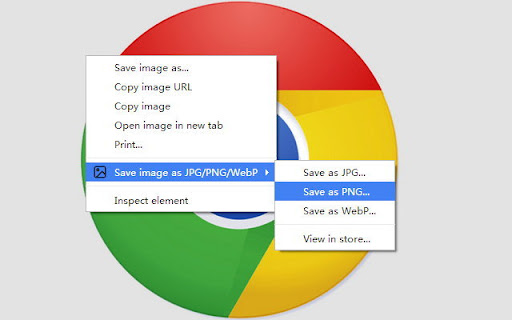
Description from store
Fügen Sie ein Kontextmenü für Bilder hinzu, um das Bild im PNG-, JPG- oder WebP-Format zu speichern.
Diese Erweiterung ist Open Source.
Es werden keine Informationen gesammelt.
Keine Werbung.
Kein Login oder Registrierung.
Latest reviews
- Mono Phaux
- Great extension I just really wish it wouldn't strictly default to saving into downloads. Makes a very handy extenstion kind of frustrating to use when I have to save many multiple files, which is a part of my job
- Kuhu Tanvir
- It's a relief to have an easy alternative to webp extensions (whose daft idea is that anyway). I only wish selecting save image as type didn't default to the downloads folder for each save even after having selected a different folder the first time around.
- Departamento Diseño
- THE GOATTTTTTT
- Paul Salcido
- This app is a life saver. I use it more than once per day. I think it is the most useful extension out there.
- Abhimanyu Ghoshal
- Does what it says on the tin without adding a lot of clutter to your browser. Saves me plenty of time at work each week.
- Naqeeb Ullah
- Perfect, do the work it's supposed to do.
- William Gustafson
- WEBP isn't supported by my old paint program. I don't know how much better the compression is compared to JPG or PNG either.
- Canamochi
- Love how it allows me to save things not in WEBP, Tho wish it would remember where I last saved an image. Perfect otherwise!!
- Jose Hoyos
- bye bye WEBP.
- DRXWA
- Useful
- Curry Kingwurst
- Does exactly what it's supposed to do when you need it. Perfect, no notes. 5 stars.
- Grazielle Azotea (Graey)
- Nice extension, very useful
- Saiful Islam
- King of all extensions.
- Matthew Hardaker
- love this
- Lee Vance
- goated
- Cassandra Ellison
- I use this extension weekly. Works great!
- Ilze Brand
- Love this! Use it for interior and web design moodboards and makes things so much easier! Highly recommend if you're looking for a super quick and easy way to save images from the web!
- Daniel Maguire
- Game changer, couldn't do any of my visual literacy hacks and personalization for either my teaching or Dungeon Mastering without it. A1!
- Jamie Chiarello
- A proud crusader against the proliferation of webp
- abigael cailan milan
- goated
- Vrushali Khaire
- very convinient
- Louis Lapointe
- Amazing extension, my favorite one <3
- Nitin Verma
- good
- silverwasp
- Super quick and easy; just right click, and 'Save as PNG.' Works great!
- Louis Lapointe
- My favorite extension ever, it's perfect
- Youtube Shorts
- it made the downloading images task much easier
- Alec Fraser
- Lets me download the pics I want. Love it!
- Fesaitu Wong
- No more Web files, 10/10
- Joy Healey
- Love it, a real time saver. Thanks
- Adarsh Kumar
- Best tool, it saves me a lot of time.
- Nirzo Islam
- great tool for saving images from online even any format.
- anonymous Who
- designer saver!!
- Luka Nelis
- Perfectly to get around a website forcing to download .webp :D
- Stuart Bramley
- Saves images as the requested type just fine.. only grumble is that it doesn't remember the folder that you last saved to which is a bit of a ballache when saving a number of files..
- iDoc Solution
- amazing and fast way to image download
- Jamie Kinthaert
- BEWARE - this extension gives a redirect if you visit BestBuy.com (v1.7.2). I tested this by disabling every single extension one-by-one, and this was the culprit. If you allow 'Full Site Access' on all websites, it will do a redirect to a website called 'beyondcheap'. To repeat this process, go to Best Buy and click on any item and watch the redirect, or simply do a search. I changed the Site Access to 'On Click' and it stopped it.
- Hady Slayer
- Amazing tool
- Industrialtech
- it is very helpful
- Jigar Patel
- Absolutely Great Extensions No complains this Extensions very helpful
- useless account
- Absolutely nothing to complain about. No more webp!
- Denim Roberts
- I hate when chrome makes me download images as webp, when I try saving it as a png normally it screws up when I try importing it somewhere, this is very helpful! ^o^
- DreamQuest Studios
- I found it to be very convenient to click and save my images now. If you handle a lot of images, this is the Extention of your dreams. 5 Stars all the way!!
- Jenna Kober
- Super easy, always works, and I use it all the time for work!
- Jérémy Boufenech (Spectre2409)
- Works as intended, perfect!
- Muhammad Awais
- excellent
- Susie Harris
- life saver
- Delta Mega Mandiri Office
- simple, powerfull, easy use
- Waleed Mashrequi
- i used lots of extension, but this is the most used one so far. simple and useful. thanks.
- Joshua Donald
- nothing could be better.
- Tyler Ike
- Game Changer