
HoverTranslate - Traducteur Sous-titres YouTube
Extension Actions
- Extension status: Featured
- Live on Store
Enrichissez votre vocabulaire sur YouTube ! Traduisez les mots des sous-titres en survolant avec la souris. Parfait pour apprendre…
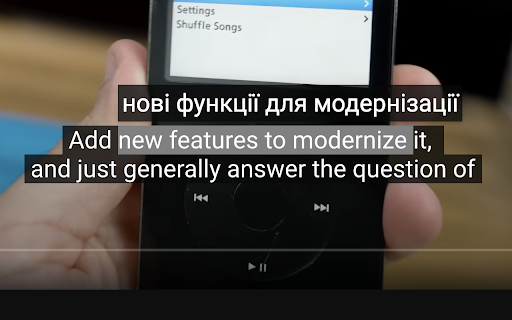
HoverTranslate – Enrichissez votre Vocabulaire avec la Traduction de Sous-titres YouTube !
Transformez YouTube en votre professeur de langues personnel ! HoverTranslate est l'outil ultime pour apprendre les langues avec des vidéos. Regardez du contenu en langue originale avec sous-titres et comprenez chaque mot instantanément sans interrompre la lecture.
Pourquoi les apprenants choisissent HoverTranslate :
Fini les pauses et les allers-retours au dictionnaire ! Survolez simplement n'importe quel mot dans les sous-titres YouTube pour voir sa traduction instantanée. Parfait pour enrichir votre vocabulaire naturellement tout en profitant de vos contenus préférés.
Fonctionnalités clés pour un apprentissage efficace :
• Traduction instantanée au survol : Apprenez du vocabulaire sans effort - survolez simplement un mot des sous-titres pour voir sa traduction immédiatement.
• Traduction intelligente de phrases : Apprenez les expressions idiomatiques ! Maintenez Shift pour sélectionner et traduire des phrases entières, ou activez la sélection multiple permanente.
• Support de 190+ langues : Apprenez l'anglais, l'espagnol, le japonais, le coréen, l'allemand ou toute autre langue ! Traduisez les sous-titres YouTube de n'importe quelle langue vers le français.
• Détection automatique de langue : L'extension détecte automatiquement la langue des sous-titres - commencez à apprendre immédiatement !
• Choix du traducteur : Choisissez entre Google Traduction et Bing Translator pour les traductions de vocabulaire les plus précises.
• Pause automatique intelligente : Les vidéos se mettent automatiquement en pause au survol des sous-titres, vous donnant le temps d'apprendre le nouveau vocabulaire sans manquer de contenu.
• Support universel des sous-titres : Fonctionne parfaitement avec les sous-titres manuels et générés automatiquement sur YouTube.
• Constructeur de vocabulaire personnel : Sauvegardez les nouveaux mots et expressions dans votre dictionnaire d'un seul clic ! Créez votre liste de vocabulaire personnelle en regardant. Exportez votre dictionnaire en JSON ou CSV.
• Interface personnalisable : Les info-bulles de traduction s'adaptent à votre thème YouTube ou peuvent être personnalisées selon vos préférences.
Parfait pour :
- Apprendre l'anglais avec des vidéos YouTube
- Étudiants enrichissant leur vocabulaire avec du contenu vidéo
- Professionnels améliorant leur anglais des affaires
- Fans d'anime apprenant le japonais naturellement
- Amateurs de K-pop et K-dramas étudiant le coréen
- Tous ceux qui apprennent les langues par immersion
Open Source et Communauté :
HoverTranslate est un projet open source :
- GitHub : https://github.com/kozii-d/hover-translate
- Email : [email protected]
- Changelog : https://github.com/kozii-d/hover-translate/blob/master/CHANGELOG.md
Commencez à apprendre plus efficacement dès aujourd'hui !
Commencez dès maintenant à apprendre les langues plus efficacement ! HoverTranslate transforme YouTube en un outil puissant pour apprendre de nouveaux mots et expressions de manière naturelle.
Installez maintenant et transformez chaque vidéo YouTube en opportunité d'enrichir votre vocabulaire !
Latest reviews
- Ilyas Gaifullin
- Great extention, thanks! It didn't work at first, but it helped to refresh the page 3-4 times/select other settings (Translation from: Auto). But is it possible to show a little more info about the word? Other meanings/articles/gender (must for German) or the AI summary of the translation in the context of the whole sentence. I was thinking to vibecode it myself, but your solution is already great!
- Charles
- The pause function is great!!! The dictionary, not so much. Only one word translations, and often they're completely wrong. I'd love to see it become at least as good as the very common Google Translate app. The pause function, though, in itself, is still an invaluable function, giving plenty of time to study subtitles.
- Sergey Nekrasov
- things I like here: -light weight -a design that continues to follow the original -quick translation -autopause -moderate customizing
- Elena
- im confused on how to use it, i downloaded but it doesnt translate anything??
- Đức Thắng Lưu
- I found the right extension I needed, really want to send you a deep thank you, it will help me learn foreign language videos a lot.
- Peterson Alves
- Works very well!
- Hiếu Hà
- Exactly what I'm looking for. I've tried many other ext and none of them can satisfy me. I'm just looking for a simple and easy to use caption word-translation. This extension had that. Many thanks
- Muzaffar Murodovich
- I've tried so many extensions that translate subtitle. But this one is the best. Many thanks to developers!
- Charles
- I'm giving this thing a 5, which is unusual for me. I've run the gamut on subtitle extensions. Most of them are very clunky, complicated, just full of things you don't want or need. But you take them anyway, because they have certain features you want or need. I use a double subtitle extension, and Google Translate, separately. But, for now, I'm switching to this tool for my translations also. It seems to be giving me the same translations that Google Translate does through their own extension, so why not! The only thing that annoys me about this extension so far is that you have to hit shift on the keyboard, if you want to translate more than a single word. I use these mouse extensions because I find them more convenient than the keyboard. I don't want to use both. Also, it would sure be nice if I could disable the dictionary feature, as I don't use it, and the message, then, becomes a bit annoying, since I tend to click and copy words to get a better definition sometimes. Nevertheless, I really like this tool so far. It's the cleanest and most elegant I've seen to this point, and I use it every day. Great job on the part of the developer. It's beautifully done, clean, efficient, accurate, and I love the feature to pause the video, so that I can highlight a word, and just study the captions longer. In fact, that was what I was looking for originally when I stumbled onto this extension. Excellent work, developer! Update: I'm very happy to see the new option to turn off the dictionary if we're not using it, very handy. For me, however, the update has caused everything my cursor passes over to be included in the translation now. That may seem helpful, at first glance. But it's not, because my cursor often has to slide over phrases that I don't need translated, in order to get to the ones I do want to translate. It would be better if we could left click and slide the cursor across the exact phrase we need. I realize that many users still prefer to include the keyboard, even when dealing with captions, although I can't imagine why. Still, it's not the end of the world, and it is an improvement over the older version, which was already excellent! Thanks for the terrific extension. I've been using it for some time now, and It's definitely one of my favorites for language learning, especially the pause function.
- ANDRII VAKHOTSKYI
- Good job
- Vitalii Zarytskyi
- Great extension with useful features
- Desterly Master
- A good addition, although it saves a small amount of time, it makes watching the video convenient without interruptions for translation
- Maksym Kyryliuk
- Simple and useful
- Bell Cranel
- Helpfull extension, love to use.