
HoverTranslate - YouTube Altyazı Çevirmeni
Extension Actions
- Extension status: Featured
- Live on Store
YouTube izlerken kelime dağarcığınızı geliştirin! Altyazıdaki kelimelerin üzerine gelerek anında çevirin. Dil öğrenenler için…
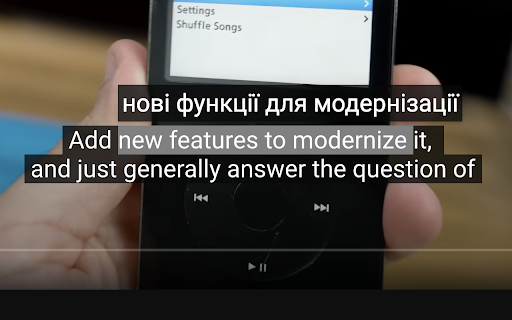
HoverTranslate – YouTube Altyazı Çevirisi ile Dil Öğrenirken Kelime Dağarcığınızı Geliştirin!
YouTube videolarını izlerken dil öğrenin! HoverTranslate, dil öğrenenler için en iyi kelime geliştirme ve altyazı çeviri aracıdır. Orijinal altyazılı içerikleri izleyin ve izleme deneyiminizi bölmeden her kelimeyi anında anlayın.
Neden Dil Öğrenenler HoverTranslate'i Seçiyor?
Artık videoları durdurmaya veya sözlüklere bakmaya son! YouTube altyazılarındaki herhangi bir kelimenin üzerine gelerek anında çevirisini görün. En sevdiğiniz içeriklerin tadını çıkarırken doğal bir şekilde kelime dağarcığınızı geliştirmek için mükemmeldir.
Etkili Dil Öğrenimi İçin Temel Özellikler:
• Anında Üzerine Gelerek Çeviri: Zahmetsizce kelime öğrenin - çevirisini anında görmek için farenizi herhangi bir altyazı kelimesinin üzerine getirin.
• Akıllı İfade Çevirisi: Deyimleri ve kalıpları öğrenin! Tüm ifadeleri seçmek ve çevirmek için Shift tuşuna basın veya daha kolay seçim için "Her zaman çoklu seçimi etkinleştir" ayarını açın.
• 190+ Dil Desteği: İngilizce, İspanyolca, Fransızca, Japonca, Korece, Almanca veya herhangi bir dili öğrenin! YouTube altyazılarını herhangi bir dilden kendi dilinize çevirin.
• Otomatik Dil Algılama: Eklenti altyazı dilini otomatik olarak algılar - hemen öğrenmeye başlayın!
• Çoklu Çevirmenler: En doğru kelime çevirileri için Google Çeviri ve Bing Çevirmen arasında seçim yapın.
• Akıllı Otomatik Duraklatma: Altyazıların üzerine geldiğinizde videolar otomatik olarak duraklar, böylece içeriği kaçırmadan yeni kelimeler öğrenmeniz için size zaman tanır.
• Evrensel Altyazı Desteği: Hem manuel hem de otomatik oluşturulan YouTube altyazılarıyla mükemmel çalışır.
• Kişisel Kelime Defteri: Yeni kelimeleri ve ifadeleri tek tıkla sözlüğünüze kaydedin! İzlerken kişisel kelime listenizi oluşturun. Sözlüğünüzü JSON veya CSV olarak dışa aktarın.
• Özelleştirilebilir Arayüz: Çeviri kutucuklarını YouTube temanıza göre ayarlayın veya konforlu bir öğrenme için dilediğiniz gibi özelleştirin.
Şunlar İçin Mükemmeldir:
- YouTube üzerinden kelime dağarcığını geliştirmek isteyen öğrenciler
- İş dilini geliştirmek isteyen profesyoneller
- Anime izleyerek Japonca öğrenenler
- K-drama hayranları için Korece çalışma aracı
- İçeriklere dalarak dil öğrenmek isteyen herkes
Açık Kaynak ve Topluluk Odaklı:
HoverTranslate şeffaflığa ve sürekli gelişime inanır:
- GitHub: https://github.com/kozii-d/hover-translate
- E-posta: [email protected]
- Changelog: https://github.com/kozii-d/hover-translate/blob/master/CHANGELOG.md
Kelime Dağarcığınızı Bugün Geliştirmeye Başlayın!
HoverTranslate, YouTube'u güçlü bir kelime öğrenme aracına dönüştürerek temel kelimelerden karmaşık ifadelere doğal bir şekilde ilerlemenize yardımcı olur.
Hemen yükleyin ve her YouTube videosunu bir öğrenme fırsatına dönüştürün!
Latest reviews
- Ilyas Gaifullin
- Great extention, thanks! It didn't work at first, but it helped to refresh the page 3-4 times/select other settings (Translation from: Auto). But is it possible to show a little more info about the word? Other meanings/articles/gender (must for German) or the AI summary of the translation in the context of the whole sentence. I was thinking to vibecode it myself, but your solution is already great!
- Charles
- The pause function is great!!! The dictionary, not so much. Only one word translations, and often they're completely wrong. I'd love to see it become at least as good as the very common Google Translate app. The pause function, though, in itself, is still an invaluable function, giving plenty of time to study subtitles.
- Sergey Nekrasov
- things I like here: -light weight -a design that continues to follow the original -quick translation -autopause -moderate customizing
- Elena
- im confused on how to use it, i downloaded but it doesnt translate anything??
- Đức Thắng Lưu
- I found the right extension I needed, really want to send you a deep thank you, it will help me learn foreign language videos a lot.
- Peterson Alves
- Works very well!
- Hiếu Hà
- Exactly what I'm looking for. I've tried many other ext and none of them can satisfy me. I'm just looking for a simple and easy to use caption word-translation. This extension had that. Many thanks
- Muzaffar Murodovich
- I've tried so many extensions that translate subtitle. But this one is the best. Many thanks to developers!
- Charles
- I'm giving this thing a 5, which is unusual for me. I've run the gamut on subtitle extensions. Most of them are very clunky, complicated, just full of things you don't want or need. But you take them anyway, because they have certain features you want or need. I use a double subtitle extension, and Google Translate, separately. But, for now, I'm switching to this tool for my translations also. It seems to be giving me the same translations that Google Translate does through their own extension, so why not! The only thing that annoys me about this extension so far is that you have to hit shift on the keyboard, if you want to translate more than a single word. I use these mouse extensions because I find them more convenient than the keyboard. I don't want to use both. Also, it would sure be nice if I could disable the dictionary feature, as I don't use it, and the message, then, becomes a bit annoying, since I tend to click and copy words to get a better definition sometimes. Nevertheless, I really like this tool so far. It's the cleanest and most elegant I've seen to this point, and I use it every day. Great job on the part of the developer. It's beautifully done, clean, efficient, accurate, and I love the feature to pause the video, so that I can highlight a word, and just study the captions longer. In fact, that was what I was looking for originally when I stumbled onto this extension. Excellent work, developer! Update: I'm very happy to see the new option to turn off the dictionary if we're not using it, very handy. For me, however, the update has caused everything my cursor passes over to be included in the translation now. That may seem helpful, at first glance. But it's not, because my cursor often has to slide over phrases that I don't need translated, in order to get to the ones I do want to translate. It would be better if we could left click and slide the cursor across the exact phrase we need. I realize that many users still prefer to include the keyboard, even when dealing with captions, although I can't imagine why. Still, it's not the end of the world, and it is an improvement over the older version, which was already excellent! Thanks for the terrific extension. I've been using it for some time now, and It's definitely one of my favorites for language learning, especially the pause function.
- ANDRII VAKHOTSKYI
- Good job
- Vitalii Zarytskyi
- Great extension with useful features
- Desterly Master
- A good addition, although it saves a small amount of time, it makes watching the video convenient without interruptions for translation
- Maksym Kyryliuk
- Simple and useful
- Bell Cranel
- Helpfull extension, love to use.