
HoverTranslate - YouTube 字幕翻譯器
Extension Actions
- Extension status: Featured
- Live on Store
邊看 YouTube 邊記單字!懸停字幕即可即時翻譯單字。語言學習者的完美伴侶。
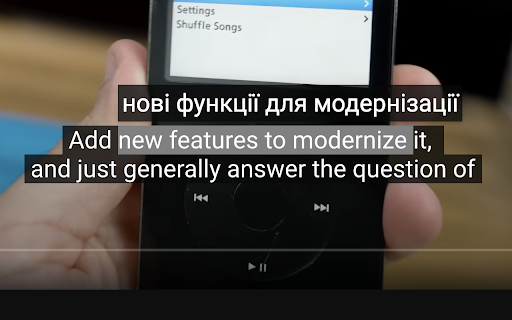
HoverTranslate – 邊看 YouTube 邊累積單字,字幕翻譯神器!
想透過 YouTube 提升英文聽力?看日劇韓劇想順便學語言?HoverTranslate 是您的最佳選擇!這是一款專為語言學習者設計的 YouTube 字幕翻譯與詞彙累積工具。讓您在觀看原聲影片的同時,無需中斷即可即時理解每一個生字。
為什麼語言學習者都愛 HoverTranslate:
再也不用頻繁暫停影片或切換查單字軟體了!只需將滑鼠懸停在 YouTube 字幕的任何單字上,即可看到即時翻譯。在享受您喜愛的影片內容時,自然而然地累積詞彙量。
核心功能:
• 即時懸停翻譯:高效記單字 - 滑鼠懸停即可查看字幕單字翻譯。
• 智慧短語翻譯:學習道地表達!按住 Shift 鍵即可選擇並翻譯整個短語,或開啟「始終開啟多選」模式。
• 支援 190 多種語言:無論是學英文、日文、韓文還是德文,都能輕鬆應對。支援全球主流語言互譯。
• 自動語言偵測:擴充功能會自動識別字幕語言,讓您立即進入學習狀態。
• 多翻譯引擎:內建 Google 翻譯和 Bing 翻譯,確保詞彙翻譯的準確性。
• 智慧自動暫停:懸停查單字時影片自動暫停,給您充足的時間學習新詞彙,不遺漏任何精彩內容。
• 完美相容:支援 YouTube 原生字幕及自動生成的字幕。
• 個人生字本:一鍵儲存生字和短語!在觀看影片的同時構建您的專屬詞庫。支援匯出為 JSON 或 CSV 格式。
• 自定義介面:翻譯提示框風格可隨 YouTube 主題自動切換,也可根據您的喜好自定義,讓學習更舒適。
適用對象:
- 希望透過 YouTube 影片擴大詞彙量的學生
- 想要提升商務英文水平的職場人士
- 喜歡看動漫學日文的愛好者
- 追韓劇學韓文的粉絲
- 任何透過沉浸式內容學習語言的愛好者
開源與社群驅動:
HoverTranslate 堅持透明與持續改進:
- GitHub: https://github.com/kozii-d/hover-translate
- Email: [email protected]
- Changelog: https://github.com/kozii-d/hover-translate/blob/master/CHANGELOG.md
今天就開始您的詞彙累積之旅!
讓 YouTube 變成您最強大的語言學習工具。從基礎單字到複雜表達,HoverTranslate 助您自然進階。
立即安裝,讓每一個 YouTube 影片都成為您提升語言能力的絕佳機會!
Latest reviews
- Ilyas Gaifullin
- Great extention, thanks! It didn't work at first, but it helped to refresh the page 3-4 times/select other settings (Translation from: Auto). But is it possible to show a little more info about the word? Other meanings/articles/gender (must for German) or the AI summary of the translation in the context of the whole sentence. I was thinking to vibecode it myself, but your solution is already great!
- Charles
- The pause function is great!!! The dictionary, not so much. Only one word translations, and often they're completely wrong. I'd love to see it become at least as good as the very common Google Translate app. The pause function, though, in itself, is still an invaluable function, giving plenty of time to study subtitles.
- Sergey Nekrasov
- things I like here: -light weight -a design that continues to follow the original -quick translation -autopause -moderate customizing
- Elena
- im confused on how to use it, i downloaded but it doesnt translate anything??
- Đức Thắng Lưu
- I found the right extension I needed, really want to send you a deep thank you, it will help me learn foreign language videos a lot.
- Peterson Alves
- Works very well!
- Hiếu Hà
- Exactly what I'm looking for. I've tried many other ext and none of them can satisfy me. I'm just looking for a simple and easy to use caption word-translation. This extension had that. Many thanks
- Muzaffar Murodovich
- I've tried so many extensions that translate subtitle. But this one is the best. Many thanks to developers!
- Charles
- I'm giving this thing a 5, which is unusual for me. I've run the gamut on subtitle extensions. Most of them are very clunky, complicated, just full of things you don't want or need. But you take them anyway, because they have certain features you want or need. I use a double subtitle extension, and Google Translate, separately. But, for now, I'm switching to this tool for my translations also. It seems to be giving me the same translations that Google Translate does through their own extension, so why not! The only thing that annoys me about this extension so far is that you have to hit shift on the keyboard, if you want to translate more than a single word. I use these mouse extensions because I find them more convenient than the keyboard. I don't want to use both. Also, it would sure be nice if I could disable the dictionary feature, as I don't use it, and the message, then, becomes a bit annoying, since I tend to click and copy words to get a better definition sometimes. Nevertheless, I really like this tool so far. It's the cleanest and most elegant I've seen to this point, and I use it every day. Great job on the part of the developer. It's beautifully done, clean, efficient, accurate, and I love the feature to pause the video, so that I can highlight a word, and just study the captions longer. In fact, that was what I was looking for originally when I stumbled onto this extension. Excellent work, developer! Update: I'm very happy to see the new option to turn off the dictionary if we're not using it, very handy. For me, however, the update has caused everything my cursor passes over to be included in the translation now. That may seem helpful, at first glance. But it's not, because my cursor often has to slide over phrases that I don't need translated, in order to get to the ones I do want to translate. It would be better if we could left click and slide the cursor across the exact phrase we need. I realize that many users still prefer to include the keyboard, even when dealing with captions, although I can't imagine why. Still, it's not the end of the world, and it is an improvement over the older version, which was already excellent! Thanks for the terrific extension. I've been using it for some time now, and It's definitely one of my favorites for language learning, especially the pause function.
- ANDRII VAKHOTSKYI
- Good job
- Vitalii Zarytskyi
- Great extension with useful features
- Desterly Master
- A good addition, although it saves a small amount of time, it makes watching the video convenient without interruptions for translation
- Maksym Kyryliuk
- Simple and useful
- Bell Cranel
- Helpfull extension, love to use.