
HoverTranslate - YouTube सबटाइटल अनुवादक
Extension Actions
- Extension status: Featured
- Live on Store
YouTube देखते हुए शब्दावली बढ़ाएं! सबटाइटल के शब्दों पर माउस ले जाएं - तुरंत अनुवाद देखें। भाषा सीखने के लिए परफेक्ट!
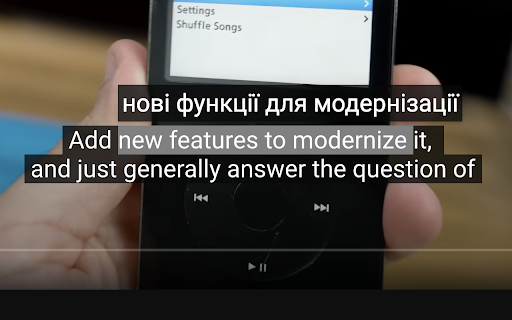
HoverTranslate – YouTube सबटाइटल अनुवाद से शब्दावली में तेज़ी से सुधार!
YouTube को अपना निजी भाषा शिक्षक बनाएं! HoverTranslate वीडियो के माध्यम से भाषा सीखने का सबसे बेहतरीन टूल है। मूल भाषा में सबटाइटल के साथ वीडियो देखें और बिना रुके हर शब्द को तुरंत समझें।
भाषा सीखने वाले HoverTranslate क्यों चुनते हैं:
अब वीडियो रोकने या dictionary खोलने की जरूरत नहीं! बस YouTube सबटाइटल में किसी भी शब्द पर माउस ले जाएं और तुरंत अनुवाद देखें। अपने पसंदीदा content का आनंद लेते हुए स्वाभाविक रूप से शब्दावली बढ़ाने के लिए परफेक्ट।
प्रभावी भाषा सीखने के लिए मुख्य विशेषताएं:
• तुरंत होवर अनुवाद: आसानी से शब्दावली सीखें - सबटाइटल के किसी भी शब्द पर माउस ले जाएं और तुरंत अनुवाद देखें।
• स्मार्ट वाक्यांश अनुवाद: मुहावरे और expressions सीखें! पूरे वाक्यांश का अनुवाद करने के लिए Shift दबाकर कई शब्द चुनें।
• 190+ भाषाओं का समर्थन: अंग्रेजी, स्पेनिश, फ्रेंच, जापानी, कोरियाई या कोई भी भाषा सीखें! YouTube सबटाइटल को किसी भी भाषा से हिंदी में अनुवाद करें।
• स्वचालित भाषा पहचान: Extension स्वतः सबटाइटल की भाषा पहचान लेता है - तुरंत सीखना शुरू करें!
• अनुवादक चयन: सबसे सटीक अनुवाद के लिए Google Translate या Bing Translator में से चुनें।
• स्मार्ट ऑटो-पॉज़: सबटाइटल पर होवर करने पर वीडियो अपने आप रुक जाता है, जिससे आप नई शब्दावली सीख सकें।
• सभी सबटाइटल समर्थन: Manual और auto-generated दोनों YouTube सबटाइटल के साथ परफेक्ट काम करता है।
• व्यक्तिगत शब्दकोश: नए शब्द और वाक्यांश एक क्लिक में save करें! देखते समय अपनी शब्दावली सूची बनाएं। अपना शब्दकोश JSON या CSV में export करें।
• Customizable Interface: अनुवाद tooltips आपकी YouTube theme से मेल खाते हैं या अपनी पसंद से customize करें।
इनके लिए परफेक्ट:
- YouTube से अंग्रेजी सीखने वाले छात्र
- Business English सुधारने वाले professionals
- IELTS/TOEFL की तैयारी करने वाले
- प्राकृतिक तरीके से भाषा सीखने वाले सभी लोग
Open Source और Community:
HoverTranslate एक open source project है:
- GitHub: https://github.com/kozii-d/hover-translate
- Email: [email protected]
- Changelog: https://github.com/kozii-d/hover-translate/blob/master/CHANGELOG.md
आज ही प्रभावी भाषा सीखना शुरू करें!
आज से ही अधिक प्रभावी तरीके से भाषाएं सीखना शुरू करें! HoverTranslate YouTube को नए शब्दों और expressions को प्राकृतिक रूप से सीखने के लिए एक शक्तिशाली टूल में बदल देता है।
अभी install करें और हर YouTube वीडियो को अपनी शब्दावली बढ़ाने का अवसर बनाएं!
Latest reviews
- Ilyas Gaifullin
- Great extention, thanks! It didn't work at first, but it helped to refresh the page 3-4 times/select other settings (Translation from: Auto). But is it possible to show a little more info about the word? Other meanings/articles/gender (must for German) or the AI summary of the translation in the context of the whole sentence. I was thinking to vibecode it myself, but your solution is already great!
- Charles
- The pause function is great!!! The dictionary, not so much. Only one word translations, and often they're completely wrong. I'd love to see it become at least as good as the very common Google Translate app. The pause function, though, in itself, is still an invaluable function, giving plenty of time to study subtitles.
- Sergey Nekrasov
- things I like here: -light weight -a design that continues to follow the original -quick translation -autopause -moderate customizing
- Elena
- im confused on how to use it, i downloaded but it doesnt translate anything??
- Đức Thắng Lưu
- I found the right extension I needed, really want to send you a deep thank you, it will help me learn foreign language videos a lot.
- Peterson Alves
- Works very well!
- Hiếu Hà
- Exactly what I'm looking for. I've tried many other ext and none of them can satisfy me. I'm just looking for a simple and easy to use caption word-translation. This extension had that. Many thanks
- Muzaffar Murodovich
- I've tried so many extensions that translate subtitle. But this one is the best. Many thanks to developers!
- Charles
- I'm giving this thing a 5, which is unusual for me. I've run the gamut on subtitle extensions. Most of them are very clunky, complicated, just full of things you don't want or need. But you take them anyway, because they have certain features you want or need. I use a double subtitle extension, and Google Translate, separately. But, for now, I'm switching to this tool for my translations also. It seems to be giving me the same translations that Google Translate does through their own extension, so why not! The only thing that annoys me about this extension so far is that you have to hit shift on the keyboard, if you want to translate more than a single word. I use these mouse extensions because I find them more convenient than the keyboard. I don't want to use both. Also, it would sure be nice if I could disable the dictionary feature, as I don't use it, and the message, then, becomes a bit annoying, since I tend to click and copy words to get a better definition sometimes. Nevertheless, I really like this tool so far. It's the cleanest and most elegant I've seen to this point, and I use it every day. Great job on the part of the developer. It's beautifully done, clean, efficient, accurate, and I love the feature to pause the video, so that I can highlight a word, and just study the captions longer. In fact, that was what I was looking for originally when I stumbled onto this extension. Excellent work, developer! Update: I'm very happy to see the new option to turn off the dictionary if we're not using it, very handy. For me, however, the update has caused everything my cursor passes over to be included in the translation now. That may seem helpful, at first glance. But it's not, because my cursor often has to slide over phrases that I don't need translated, in order to get to the ones I do want to translate. It would be better if we could left click and slide the cursor across the exact phrase we need. I realize that many users still prefer to include the keyboard, even when dealing with captions, although I can't imagine why. Still, it's not the end of the world, and it is an improvement over the older version, which was already excellent! Thanks for the terrific extension. I've been using it for some time now, and It's definitely one of my favorites for language learning, especially the pause function.
- ANDRII VAKHOTSKYI
- Good job
- Vitalii Zarytskyi
- Great extension with useful features
- Desterly Master
- A good addition, although it saves a small amount of time, it makes watching the video convenient without interruptions for translation
- Maksym Kyryliuk
- Simple and useful
- Bell Cranel
- Helpfull extension, love to use.