
HoverTranslate - Tłumacz Napisów YouTube
Extension Actions
- Extension status: Featured
- Live on Store
Poszerzaj słownictwo oglądając YouTube! Najedź kursorem na słowo w napisach - zobaczysz tłumaczenie. Idealny do nauki języków!
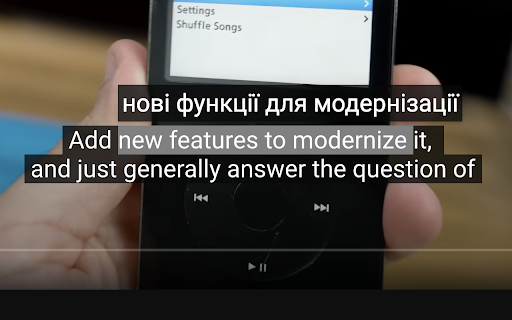
HoverTranslate – Rozwijaj Słownictwo z Tłumaczeniem Napisów YouTube!
Zamień YouTube w swojego prywatnego lektora języków! HoverTranslate to najlepsze narzędzie do nauki języków przez filmy. Oglądaj treści w oryginalnym języku z napisami i natychmiast rozumiej każde słowo bez przerywania odtwarzania.
Dlaczego uczący się języków wybierają HoverTranslate:
Koniec z pauzowaniem filmów i szukaniem w słownikach! Po prostu najedź kursorem na dowolne słowo w napisach YouTube, aby zobaczyć natychmiastowe tłumaczenie. Idealny do naturalnego poszerzania słownictwa podczas oglądania ulubionych treści.
Kluczowe funkcje dla efektywnej nauki języków:
• Natychmiastowe tłumaczenie najechaniem: Ucz się słownictwa bez wysiłku - najedź myszką na słowo w napisach, aby od razu zobaczyć tłumaczenie.
• Inteligentne tłumaczenie fraz: Ucz się idiomów i wyrażeń! Przytrzymaj Shift, aby zaznaczyć i przetłumaczyć całe frazy, lub włącz stałe zaznaczanie wielu słów.
• Obsługa 190+ języków: Ucz się angielskiego, niemieckiego, hiszpańskiego, francuskiego, włoskiego czy dowolnego języka! Tłumacz napisy YouTube z każdego języka na polski.
• Automatyczne wykrywanie języka: Rozszerzenie automatycznie wykrywa język napisów - zacznij naukę od razu!
• Wybór tłumacza: Wybierz między Tłumaczem Google a Bing Translator dla najdokładniejszych tłumaczeń słownictwa.
• Inteligentna autopauza: Filmy automatycznie zatrzymują się przy najechaniu na napisy, dając czas na naukę nowego słownictwa bez pomijania treści.
• Uniwersalna obsługa napisów: Działa perfekcyjnie zarówno z ręcznymi, jak i automatycznie generowanymi napisami YouTube.
• Osobisty słownik: Zapisuj nowe słowa i frazy do swojego słownika jednym kliknięciem! Buduj osobistą listę słownictwa podczas oglądania. Eksportuj swój słownik jako JSON lub CSV.
• Konfigurowalny interfejs: Dymki z tłumaczeniem dopasowują się do twojego motywu YouTube lub możesz je dostosować według preferencji.
Idealny dla:
- Uczniów i studentów uczących się angielskiego przez YouTube
- Osób poszerzających słownictwo przez treści wideo
- Profesjonalistów doskonalących biznesowy angielski
- Pracowników IT uczących się technicznego angielskiego
- Fanów seriali uczących się z napisów
- Każdego, kto uczy się języków przez immersję
Open Source i społeczność:
HoverTranslate to projekt open source:
- GitHub: https://github.com/kozii-d/hover-translate
- Email: [email protected]
- Changelog: https://github.com/kozii-d/hover-translate/blob/master/CHANGELOG.md
Zacznij skuteczniej uczyć się języków już dziś!
Rozpocznij dziś efektywniejszą naukę języków! HoverTranslate zamienia YouTube w potężne narzędzie do budowania słownictwa, pomagając ci przejść od podstawowych słów do złożonych wyrażeń w naturalny sposób.
Zainstaluj teraz i zamień każdy film na YouTube w okazję do poszerzenia słownictwa!
Latest reviews
- Ilyas Gaifullin
- Great extention, thanks! It didn't work at first, but it helped to refresh the page 3-4 times/select other settings (Translation from: Auto). But is it possible to show a little more info about the word? Other meanings/articles/gender (must for German) or the AI summary of the translation in the context of the whole sentence. I was thinking to vibecode it myself, but your solution is already great!
- Charles
- The pause function is great!!! The dictionary, not so much. Only one word translations, and often they're completely wrong. I'd love to see it become at least as good as the very common Google Translate app. The pause function, though, in itself, is still an invaluable function, giving plenty of time to study subtitles.
- Sergey Nekrasov
- things I like here: -light weight -a design that continues to follow the original -quick translation -autopause -moderate customizing
- Elena
- im confused on how to use it, i downloaded but it doesnt translate anything??
- Đức Thắng Lưu
- I found the right extension I needed, really want to send you a deep thank you, it will help me learn foreign language videos a lot.
- Peterson Alves
- Works very well!
- Hiếu Hà
- Exactly what I'm looking for. I've tried many other ext and none of them can satisfy me. I'm just looking for a simple and easy to use caption word-translation. This extension had that. Many thanks
- Muzaffar Murodovich
- I've tried so many extensions that translate subtitle. But this one is the best. Many thanks to developers!
- Charles
- I'm giving this thing a 5, which is unusual for me. I've run the gamut on subtitle extensions. Most of them are very clunky, complicated, just full of things you don't want or need. But you take them anyway, because they have certain features you want or need. I use a double subtitle extension, and Google Translate, separately. But, for now, I'm switching to this tool for my translations also. It seems to be giving me the same translations that Google Translate does through their own extension, so why not! The only thing that annoys me about this extension so far is that you have to hit shift on the keyboard, if you want to translate more than a single word. I use these mouse extensions because I find them more convenient than the keyboard. I don't want to use both. Also, it would sure be nice if I could disable the dictionary feature, as I don't use it, and the message, then, becomes a bit annoying, since I tend to click and copy words to get a better definition sometimes. Nevertheless, I really like this tool so far. It's the cleanest and most elegant I've seen to this point, and I use it every day. Great job on the part of the developer. It's beautifully done, clean, efficient, accurate, and I love the feature to pause the video, so that I can highlight a word, and just study the captions longer. In fact, that was what I was looking for originally when I stumbled onto this extension. Excellent work, developer! Update: I'm very happy to see the new option to turn off the dictionary if we're not using it, very handy. For me, however, the update has caused everything my cursor passes over to be included in the translation now. That may seem helpful, at first glance. But it's not, because my cursor often has to slide over phrases that I don't need translated, in order to get to the ones I do want to translate. It would be better if we could left click and slide the cursor across the exact phrase we need. I realize that many users still prefer to include the keyboard, even when dealing with captions, although I can't imagine why. Still, it's not the end of the world, and it is an improvement over the older version, which was already excellent! Thanks for the terrific extension. I've been using it for some time now, and It's definitely one of my favorites for language learning, especially the pause function.
- ANDRII VAKHOTSKYI
- Good job
- Vitalii Zarytskyi
- Great extension with useful features
- Desterly Master
- A good addition, although it saves a small amount of time, it makes watching the video convenient without interruptions for translation
- Maksym Kyryliuk
- Simple and useful
- Bell Cranel
- Helpfull extension, love to use.