
Sötét mód – Night Eye
Extension Actions
- Extension status: Featured
- Extension status: In-App Purchases
- Live on Store
Igény szerint minden webhelyet állítson sötét/világos módba. Vigyázzon a szemére a Night Eye segítségével.
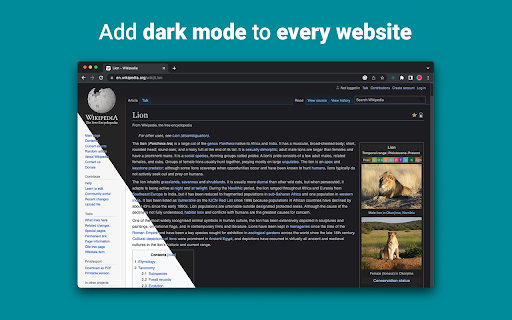
A „Night Eye” lehetővé teszi a sötét mód engedélyezését szinte minden webhelyen, javítva az olvashatóságot és csökkentve a szem megerőltetését gyenge fényviszonyok mellett. Emellett testreszabási lehetőségeket is kínál, például fényerő-, kontraszt- és telítettség-beállításokat, valamint kék fényszűrőt a szem védelmére. Ráadásul a támogatott webhelyek beépített sötét témáinak vezérlésével teljes mértékben kézben tarthatja online élményét.
Az összes főbb böngészőben több mint 1 000 000 felhasználó által megbízott "Night Eye" a megfelelő választás az Ön szemének. Intelligens konverzió, nincsenek hirdetések, nincs adatbányászat, segítőkész támogatás!
A bővítményeket az elmúlt 5 évben rendszeresen, havonta frissítjük, és ezt még nagyon hosszú időre tervezzük.
Ha a webhely beépített sötét témával rendelkezik, közvetlenül a „Night Eye” alkalmazásból vezérelheti, ha pedig nem (például a Gmail, a Google Docs, az Office Online, a Github és még sok millió más), a „Night Eye” konvertálja a színeket. hogy egyenletes és egyenletes sötét módot biztosítson.
AZ ADATVÉDELMI SZEMPONTOK SZÁMÁRA
A Chrome figyelmezteti Önt, hogy a bővítmény elolvashatja és módosíthatja az Ön által felkeresett webhelyeken található összes adatot.
Íme a teljes történet:
Ez a bővítmény elemzi az egyes weboldalak színeit, és átalakítja azokat annak érdekében, hogy egyenletes és egyenletes sötét módot biztosítson. Nincs más mód a kiterjesztés átalakítására a színek hozzáférési jogosultsága nélkül.
Azonban soha nem gyűjtjük az Ön adatait. Üzleti modellünk az előfizetéseken, nem pedig az adatok tárolásán és értékesítésén alapul. Végül, de nem utolsósorban, mi is internetezők vagyunk, és nem akarunk gonoszak lenni.
A Chrome 86-os verziójától kezdve az összes új bővítmény el van rejtve az URL-sáv melletti „bővítmények” menüben. A „Night Eye” ikon megjelenítéséhez rögzítenie kell. További részletekért tekintse meg a fenti képernyőképeket.
Bővítményünk teljes mértékben kompatibilis a legújabb manifest V3-mal. Csak néhány korlátozás van.
Kövess minket a Twitteren, hogy értesülhess a "Night Eye"-vel kapcsolatos legfrissebb hírekről és arról, hogy mit tervezünk előre - https://twitter.com/nighteye_ext
—————————
ÁRAZÁSI TERVEK
Megérkezett a "Night Eye" Lite - a "Night Eye" örökre ingyenes verziója.
Dióhéjban – a „Night Eye” Lite legfeljebb 5 webhelyen használható. Például - Google.com, Gmail.com stb. Az 5 webhely listáját bármikor kezelheti. Nincsenek hirdetések, nincsenek rejtett dolgok – örökre ingyen.
További részletek itt találhatók - https://nighteye.app/lite-free-dark-mode-extension/
Mielőtt a Lite-ra megy, szeretnénk meghívni Önt, hogy 3 hónapig ingyenesen próbálja ki a „Night Eye” Pro-t – hitelkártya nélkül, fizetés nélkül – egyszerűen telepítse és próbálja ki.
A „Night Eye” Pro próbaidőszakának lejárta után fizetni kell a további használatért, vagy a teljesen ingyenes verziót – a „Night Eye” Lite-ot – kell használnia.
További részletek árainkról - https://nighteye.app/how-to-start/
—————————
NÉHÁNY JELLEMZŐ
➤ OS/böngésző színséma integráció - szinkronizálja a "Night Eye"-t a macOS/Windows sötét témáival
➤ Mély integráció a saját beépített sötét témájú webhelyekkel.
➤ Ütemezze be a sötét módot a be- és kikapcsoláshoz
➤ Egyéni sötét mód PDF-ekhez
➤ Adatok exportálása/importálása a böngészők között
—————————
VÁLTOZÁSI NAPLÓ
Arra törekszünk, hogy a lehető legjobb sötét mód élményt nyújtsuk. Ebben a frissítésben több fejlesztést is végrehajtottunk, és hozzáadtunk egy fő funkciót – az operációs rendszer/böngésző színséma integrációját.
Az összes frissítésünket és tevékenységünket a https://nighteye.app/changelog oldalon követheti
—————————
ELÉRHETŐ MÓDOK
A bővítmény lehetővé teszi a három elérhető mód gyors váltását
➤ Sötét – Teljes sötét módba lépés. Minden szín, kis kép és ikon konvertálva lesz, hogy a lehető legsimább sötét élményt nyújtsa.
➤ Szűrt – A webhelyek színei nem változnak, de továbbra is módosíthatja a fényerőt, a kontrasztot, a melegséget és egyebeket.
➤ Normál – Térjen vissza a normál böngészési élményhez.
—————————
TESTRESZABÁSI LEHETŐSÉGEK
Bármilyen módosítást, például kontrasztszint-beállítást, kékfény-szűrőt stb. végrehajthat egyetlen webhelyen vagy globálisan.
➤ Képek – A „Night Eye” csak a webhely kis képeit és ikonjait elemzi és konvertálja, hogy még simább élményt nyújtson. A Facebook-bejegyzések és más jelentős médiatartalom nem konvertálódik.
➤ Fényerő / Telítettség / Kontraszt - Állítsa be a fényerőt, a kontrasztot és a telítettséget az ajánlott egészséges szinteknek megfelelően, és védje szemét. Az alapértelmezett beállítás mindegyiknél 50%, de mindegyiket testreszabhatja a kívánt szintre
➤ Kék fény – Vigyázzon a szemére azáltal, hogy megszünteti a képernyőről érkező kék fényt. Erősen ajánlott, különösen késő esti böngészéskor. Egyszerűen csúsztassa a kívánt melegítési szintre.
➤ Dim – Rendkívül hasznos, ha sötét helyen/szobában dolgozik, és a képernyő az egyetlen fényforrás a szobában. Az alapértelmezett beállítás 50%, de tetszés szerint testreszabhatja.
—————————
MINDIG ELÉRHETŐ TÁMOGATÁS
Beépített támogatási rendszer – büszkék vagyunk arra, hogy rendelkezésre állunk, hogy megbízható támogatást nyújthassunk, és segítsünk bármilyen felmerülő problémában vagy problémábana kiterjesztéssel.
—————————
ELÉRHETŐ
A "Night Eye" jelenleg a Google Chrome, a Mozilla Firefox, a Safari, a Microsoft Edge, az Opera, a Vivaldi, a Brave, a Yandex és az összes többi Chromium alapú böngészőn dolgozik.
—————————
GONDJUNK A ADATVÉDELEM
Ahelyett, hogy egyszerűen az adatvédelmi szabályzatunkra mutatnánk. Ezzel a témával szeretnénk itt a legérthetőbb nyelven foglalkozni.
A bővítmény használata során NEM gyűjtünk anonim használati adatokat iparági szabványos, harmadik féltől származó elemzések (Google Analytics) segítségével.
Csak az egyes "Night Eye" felhasználók meglátogatott webhelyeinek mentett beállításait tároljuk a helyi tárhelyükön (az Ön számítógépén). Ez vonatkozik minden olyan módosításra, amelyet a felhasználó a „Night Eye” használatával javít a böngészési élményen. Hétféle beállítás létezik: Színek, Képek, Fényerő, Kontraszt, Telítettség, Hideg/Meleg és Dim.
Más szóval – csak az internetes böngészés során végzett vizuális beállításokat tároljuk. Nem a szervereinken tároljuk őket, hanem a helyi tárhelyén (a számítógépén).
—————————
Ne felejts el lájkolni és kövess minket:
Facebook - https://facebook.com/night.eye.extension/
Twitter - https://twitter.com/nighteye_ext
Pinterest - https://pinterest.com/nighteyeextension/
Latest reviews
- Pixelbass
- Genuinely the best solution to custom dark mode settings on a per-site basis that I've found online so far—especially for Google Sheets with it's horrendously bright white glare. I've been using it for several months now, and they're also pretty generous with the trial & extensions to your trial, after which I'll certainly be subscribing to continue availing of its features.
- Mohamed Khaled
- Really don't have any complaints. One of the better dark mode extension on Chrome.
- Deshan Sameera
- good extenstion
- Dean Otsyeno
- I have tried several extensions for enabling dark mode, but Night Eye is the best. The way it is easy to enable and disable but the click of a button, and how it makes every page still viewable is just the best.
- Prismo PC
- My eyes are much less tired than before.
- Chatree Ithipathachai
- It's cool, I guess.
- captnsaveahoee
- Really don't have any complaints. One of the better dark mode extension on Chrome.
- César
- A great tool, really like it!!!!
- Mazen Ayman
- It's the best. Just get it and don't waste your time looking for alternatives. It doesn't lag and does the job
- Onibut sussy
- The best app I've ever seen for automatic transformation of any website to dark mode, the instant dark mode conversion and their unique dark mode setup for each website, is way beyond description. I would highly recommend this program for anyone. Thank you!
- Ashley
- The app is amazing, I can finally have dark mode google docs without any issues!
- Sandeep Yadav
- this extension is wonderful, it helps me while using laptop at night and at dark places. it reduces the contrast automatically and protects eyes .I really liked this and I would recommend people who wants an extension for night reading
- Gary Finn
- ""Offers in-app purchases". What this means is after a month, you pay! Not just once, a subscription. Just find a free dark mode.
- J Widdicombe
- Great app for anyone who prefers browsing in dark mode! Dark Mode - Night Eye does a solid job of applying a smooth, consistent dark theme across websites, even ones that don’t support it natively. It’s easy to use, works reliably, and really helps reduce eye strain during late-night sessions. Definitely worth installing if you spend a lot of time on your phone or tablet
- GM Zeyad Gouda
- Really smooth experience overall — no lag, no glitches, nothing uncomfortable. The dark mode colors are well-balanced and easy on the eyes. Does exactly what it promises without getting in the way. Recommended!
- Devansh Lath
- Excellent
- Cuenta Lan
- great app, love it
- Ryan Pakieser
- This is one of the better night mode extensions out there. It is relatively smooth transitioning between various websites and has an intuitive extension plug in.
- Evan Christopher Tschaja
- Pay for dark mode? Are you kidding me?
- Aleksa Markovic
- Amazing App
- Ibrahim walid
- Great extension, very useful in most apps.
- Jaydin Wilson
- I have been using this extension for my work computer and it works amazingly. Especially being up early in the morning and looking at a screen all day. Would definitely recommend. Great work Night Eye!
- Julian Marthinsen
- Been using this extension on my home pc and work laptop since 2019. Couldn't be more happier, some small bugs on a few sites but easily solved with tweaking settings
- Vijay
- the screen gets slower and sometimes the font is also turned black with the background, but overall its good
- Samir Alakbarov
- it is not free. Just gives one month trial. I didnt know about this in advance
- Sara Milosavljević
- Great extension, flexible for modifications
- Scott Smith
- This extension has saved me a lot of trouble. After 7 eye surgeries, I really needed the functionality that this extension has to offer. Thanks, Night Eye!!! Scott
- Lee Lee
- Good Extension very usefull, highly recommended :)
- Alan WW
- good
- Wrex
- Great extension.
- Ong Jin Yong Jace
- Night eye the best chrome dark mode extension after trying out multiple others, highly recommended
- Lukas Hohl
- Good Extension very usfull ^^
- Илья Шмелёв
- Easy solution for all my tabs in the Chrome browser to be in dark mode. I like this extension cause it works for different types of web sites I browse. I cannot remember an examlpe of a site which is not in dark mode with this extension.
- Light theKnight
- It's not free for long.
- Chris
- This is a much more clean approach to Dark/Light mode than any tool I have used so far!
- Zango
- it's free to use and works like wonder. highly recommended :)
- En Force
- Honestly this extension is amazing because it just works better then others who hog up the system resources. Would recommend it surely.
- WildBear
- The extensions works on websites that other extensions did not. It been helping me with eye strain while reading at night.
- RoyalRain
- I have been using this for over a year, and it has made browsing the web so easy on my eyes. It only inverts certain parts of a page rather than the entire thing so you get dark mode without things looking weird all over the place. Highly recommend.
- BreakFreeFromDesk
- Love the app. so helpful!
- Michael GC
- This extension rocks! big help!
- don cassi
- This extension works on more sites than the other extension I used. Recommended if you have sites where other dark readers fail.
- Ogeid Aevir
- Awesome extension! Helps my eyes at night and it is very clear and smooth. I love it! Recommended!
- Alex P
- Great extension. It does exactly what you expect/ Clean, comfortable dark mode across every site. I especially like that it doesn’t mess with websites that already have their own dark theme. Everything just works automatically and feels well thought out. I’m usually pretty picky with tools like this, but honestly I don’t even have suggestions for improvement. Thanks to the team for a really solid product!
- Raeesa Khan
- As someone with astigmatism this has really helped my eyes feel at ease when looking at dark screens for extended hours
- Jakson Pedreira
- Night Eye is one of the best dark mode extensions I’ve used. It works smoothly across almost all websites and the color conversion looks natural instead of just inverting colors. It significantly reduces eye strain, especially when browsing at night. The customization options like brightness, contrast, and blue light filtering make the experience even better. Highly recommended for anyone who spends many hours in front of the screen.
- Carol Cumberland
- PERFECTION! Thank you for this! I get chronic migraines and the bright screens are torture. This is a huge help!
- Jacob Mira
- Great Dark Mode Extension – Works Smoothly Night Eye is one of the best dark mode extensions I’ve tried. It automatically converts bright websites into a comfortable dark theme, which makes browsing much easier on the eyes, especially at night. The extension is simple to install and works instantly on most websites without breaking the layout. I also like that it allows customization like brightness, contrast, and blue light filtering. It runs smoothly in the background and doesn’t slow down the browser. Overall, it's a great tool for anyone who spends long hours browsing and wants to reduce eye strain. Highly recommended for daily use.
- Wayne Anderson
- I am in front of the computer for hours every day. I thought my eyes were going bad. I stumbled across Night Eye and it was the next best thing to sliced bread!! I love this product!!!!!
- Oof Iff
- no better than this!