
Karanlık Mod - Gece Gözü
Extension Actions
- Extension status: Featured
- Extension status: In-App Purchases
- Live on Store
Her web sitesini istediğiniz gibi karanlık moda / ışık moduna geçirin. Gece Gözü ile gözlerinize iyi bakın.
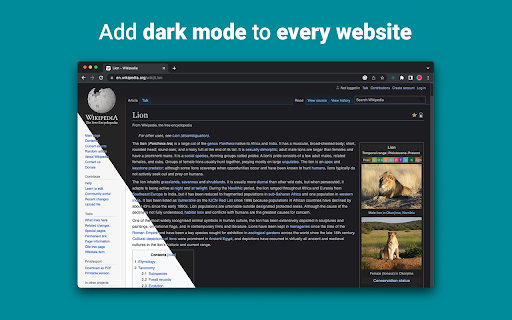
"Night Eye", neredeyse tüm web sitelerinde karanlık modu etkinleştirmenizi sağlayarak, düşük ışıklı ortamlarda okunabilirliği artırır ve göz yorgunluğunu azaltır. Ayrıca, gözleri korumak için mavi ışık filtresinin yanı sıra parlaklık, kontrast ve doygunluk ayarları gibi özelleştirme seçenekleri sunar. Ayrıca, desteklenen web sitelerinde yerleşik karanlık temaları kontrol etme yeteneği sayesinde çevrimiçi deneyiminiz üzerinde tam kontrole sahip olacaksınız.
Tüm büyük tarayıcılarda 1 000 000'den fazla kullanıcı tarafından güvenilen "Night Eye", gözleriniz için doğru seçimdir. Akıllı dönüştürme, reklam yok, veri madenciliği yok, yardımcı destek!
Uzantıları son 5 yıl boyunca aylık olarak düzenli olarak güncelliyoruz ve bunu çok uzun bir süre daha yapmayı planlıyoruz.
Web sitesinde yerleşik karanlık tema varsa, onu doğrudan "Night Eye"dan kontrol edebilirsiniz ve yoksa (Gmail, Google Docs, Office Online, Github ve diğer milyonlarca kişi gibi), "Night Eye" renkleri dönüştürür size pürüzsüz ve tutarlı karanlık mod sağlamak için.
GİZLİLİK ENDİŞESİ OLANLAR İÇİN
Chrome, uzantının ziyaret ettiğiniz web sitelerindeki tüm verilerinizi okuyup değiştirebileceği konusunda sizi uyaracaktır.
İşte tüm hikaye:
Bu uzantı, her web sayfasının renklerini analiz eder ve size pürüzsüz ve tutarlı bir karanlık mod sağlamak için dönüştürür. Uzantının, onlara erişme ayrıcalığı olmadan renkleri dönüştürmesinin başka yolu yoktur.
Ancak, asla verilerinizi toplamıyoruz. İş modelimiz, verilerinizi depolamaya ve satmaya değil, aboneliklere dayanır. Son olarak, biz de internet kullanıcısıyız ve kötü biri olmak istemiyoruz.
Chrome sürüm 86'dan itibaren, tüm yeni uzantılar artık url çubuğunun yanındaki "uzantılar" menüsüne gizlenmiştir. "Gece Gözü" simgesini ortaya çıkarmak için onu sabitlemeniz gerekir. Daha fazla ayrıntı için yukarıdaki ekran görüntülerini kontrol edin.
Uzantımız en son manifest V3 ile tamamen uyumludur. Sadece bazı kısıtlamalar var.
"Night Eye" ile ilgili en son haberleri ve ileriye yönelik planlarımızı takip etmek için bizi Twitter'da takip edin - https://twitter.com/nighteye_ext
————————
FİYATLANDIRMA PLANLARI
"Night Eye" Lite burada - "Night Eye" ın sonsuza kadar tamamen ücretsiz versiyonu.
Özetle - "Night Eye" Lite en fazla 5 web sitesinde kullanılabilir. Örneğin - Google.com, Gmail.com vb. Bu 5 web sitesinin listesini istediğiniz zaman yönetebilirsiniz. Reklam yok, gizli öğe yok - sonsuza kadar ücretsiz.
Daha fazla ayrıntı burada bulunabilir - https://nighteye.app/lite-free-dark-mode-extension/
Lite'a geçmeden önce sizi "Night Eye" Pro'yu 3 ay boyunca ücretsiz denemeye davet ediyoruz - kredi kartı yok, ödeme sorulmuyor - sadece kurun ve deneyin.
"Night Eye" Pro'nun deneme süresi sona erdikten sonra, onu kullanmaya devam etmek veya tamamen ücretsiz sürüm olan "Night Eye" Lite ile devam etmek için ödeme yapmanız istenecektir.
Fiyatlandırmamız hakkında daha fazla ayrıntı - https://nighteye.app/how-to-start/
————————
BAZI ÖZELLİKLER
➤ İşletim Sistemi/Tarayıcı Renk düzeni entegrasyonu - "Night Eye"ı macOS/Windows karanlık temalarınızla senkronize edin
➤ Kendi yerleşik karanlık temalarına sahip web siteleriyle derin entegrasyon.
➤ Açmak ve kapatmak için karanlık modu programlayın
➤ PDF'ler için özel karanlık mod
➤ Tarayıcılarınız arasında verileri dışa/içe aktarın
————————
DEĞİŞİKLİK GÜNLÜĞÜ
Size mümkün olan en iyi karanlık mod deneyimini sunmak için çalışıyoruz. Bu güncellemede çeşitli iyileştirmeler yaptık ve önemli bir özellik ekledik - İşletim Sistemi/Tarayıcı renk şeması entegrasyonu.
Tüm güncellemelerimizi ve neler yaptığımızı https://nighteye.app/changelog adresinden takip edebilirsiniz.
————————
MEVCUT MODLAR
Uzantı, mevcut üç modu hızlı bir şekilde değiştirmenize olanak tanır
➤ Karanlık - Tamamen karanlık moda geçin. Tüm renkler, küçük resimler ve simgeler, size mümkün olan en yumuşak karanlık deneyimini sunmak için dönüştürülecektir.
➤ Filtrelendi - Web sitelerinin renkleri değişmeyecek, ancak yine de parlaklığı, kontrastı, sıcaklığı ve daha fazlasını ayarlayabilirsiniz.
➤ Normal - Normal tarama deneyimine geri dönün.
————————
ÖZELLEŞTİRME SEÇENEKLERİ
Kontrast seviyesi ayarı, mavi ışık filtresi vb. yaptığınız değişiklikler tek bir web sitesine veya global olarak uygulanabilir.
➤ Görüntüler - "Night Eye", size daha akıcı bir deneyim sunmak için bir web sitesindeki yalnızca küçük görüntüleri ve simgeleri analiz eder ve dönüştürür. Facebook gönderileri ve diğer önemli medyalar dönüştürülmez.
➤ Parlaklık / Doygunluk / Kontrast - Parlaklığı, kontrastı ve doygunluğu önerilen sağlıklı seviyelere uyacak şekilde ayarlayın ve gözlerinizi koruyun. Her biri için varsayılan ayar %50'dir ancak her birini tercih edilen düzeylere göre özelleştirebilirsiniz.
➤ Mavi Işık - Ekranınızdan gelen mavi ışığı ortadan kaldırarak gözlerinize iyi bakın. Özellikle gece geç saatlerde gezinirken şiddetle tavsiye edilir. Tercih ettiğiniz sıcaklık seviyesine kaydırmanız yeterlidir.
➤ Dim - Karanlık alanda/odada çalışıyorsanız ve odadaki tek ışık kaynağı ekransa son derece kullanışlıdır. Varsayılan ayar %50 olarak ayarlanmıştır, ancak bunu istediğiniz gibi özelleştirebilirsiniz.
————————
HER ZAMAN MEVCUT DESTEK
Yerleşik destek sistemi - güvenilir destek sağlamak ve karşılaşabileceğiniz herhangi bir sorun veya sorunda size yardımcı olmaktan gurur duyuyoruzuzantı ile.
————————
MEVCUT TARİHİ
"Night Eye" şu anda Google Chrome, Mozilla Firefox, Safari, Microsoft Edge, Opera, Vivaldi, Brave, Yandex ve diğer tüm Chromium tabanlı tarayıcılarda çalışmaktadır.
————————
GİZLİLİĞİ ÖNEMSİYORUZ
Sizi basitçe gizlilik politikamıza yönlendirmek yerine. Bu konuyu burada en anlaşılır dille ele almak istiyoruz.
Uzantıyı kullanırken endüstri standardı bir üçüncü taraf analitiği (Google Analytics) kullanarak anonim kullanım verilerini TOPLAMAZ.
Her "Night Eye" kullanıcısının ziyaret ettiği her web sitesi için kaydedilen ayarları yalnızca kendi localStorage'larında (bilgisayarınız) saklarız. Bu, kullanıcının "Night Eye" kullanımı aracılığıyla göz atma deneyimini iyileştirmek için yaptığı tüm ayarlamalarla ilgilidir. 7 tür ayar vardır: Renkler, Görüntüler, Parlaklık, Kontrast, Doygunluk, Soğuk/Sıcak ve Loş.
Başka bir deyişle, yalnızca internette gezinirken yaptığınız görsel ayarlamaları saklarız. Bunları sunucularımızda değil, localStorage'ınızda (bilgisayarınız) saklıyoruz.
————————
Beğenmeyi ve Bizi Takip Etmeyi Unutmayın:
Facebook - https://facebook.com/night.eye.extension/
Twitter - https://twitter.com/nighteye_ext
Pinterest -https://pinterest.com/nighteyeextension/
Latest reviews
- Pixelbass
- Genuinely the best solution to custom dark mode settings on a per-site basis that I've found online so far—especially for Google Sheets with it's horrendously bright white glare. I've been using it for several months now, and they're also pretty generous with the trial & extensions to your trial, after which I'll certainly be subscribing to continue availing of its features.
- Mohamed Khaled
- Really don't have any complaints. One of the better dark mode extension on Chrome.
- Deshan Sameera
- good extenstion
- Dean Otsyeno
- I have tried several extensions for enabling dark mode, but Night Eye is the best. The way it is easy to enable and disable but the click of a button, and how it makes every page still viewable is just the best.
- Prismo PC
- My eyes are much less tired than before.
- Chatree Ithipathachai
- It's cool, I guess.
- captnsaveahoee
- Really don't have any complaints. One of the better dark mode extension on Chrome.
- César
- A great tool, really like it!!!!
- Mazen Ayman
- It's the best. Just get it and don't waste your time looking for alternatives. It doesn't lag and does the job
- Onibut sussy
- The best app I've ever seen for automatic transformation of any website to dark mode, the instant dark mode conversion and their unique dark mode setup for each website, is way beyond description. I would highly recommend this program for anyone. Thank you!
- Ashley
- The app is amazing, I can finally have dark mode google docs without any issues!
- Sandeep Yadav
- this extension is wonderful, it helps me while using laptop at night and at dark places. it reduces the contrast automatically and protects eyes .I really liked this and I would recommend people who wants an extension for night reading
- Gary Finn
- ""Offers in-app purchases". What this means is after a month, you pay! Not just once, a subscription. Just find a free dark mode.
- J Widdicombe
- Great app for anyone who prefers browsing in dark mode! Dark Mode - Night Eye does a solid job of applying a smooth, consistent dark theme across websites, even ones that don’t support it natively. It’s easy to use, works reliably, and really helps reduce eye strain during late-night sessions. Definitely worth installing if you spend a lot of time on your phone or tablet
- GM Zeyad Gouda
- Really smooth experience overall — no lag, no glitches, nothing uncomfortable. The dark mode colors are well-balanced and easy on the eyes. Does exactly what it promises without getting in the way. Recommended!
- Devansh Lath
- Excellent
- Cuenta Lan
- great app, love it
- Ryan Pakieser
- This is one of the better night mode extensions out there. It is relatively smooth transitioning between various websites and has an intuitive extension plug in.
- Evan Christopher Tschaja
- Pay for dark mode? Are you kidding me?
- Aleksa Markovic
- Amazing App
- Ibrahim walid
- Great extension, very useful in most apps.
- Jaydin Wilson
- I have been using this extension for my work computer and it works amazingly. Especially being up early in the morning and looking at a screen all day. Would definitely recommend. Great work Night Eye!
- Julian Marthinsen
- Been using this extension on my home pc and work laptop since 2019. Couldn't be more happier, some small bugs on a few sites but easily solved with tweaking settings
- Vijay
- the screen gets slower and sometimes the font is also turned black with the background, but overall its good
- Samir Alakbarov
- it is not free. Just gives one month trial. I didnt know about this in advance
- Sara Milosavljević
- Great extension, flexible for modifications
- Scott Smith
- This extension has saved me a lot of trouble. After 7 eye surgeries, I really needed the functionality that this extension has to offer. Thanks, Night Eye!!! Scott
- Lee Lee
- Good Extension very usefull, highly recommended :)
- Alan WW
- good
- Wrex
- Great extension.
- Ong Jin Yong Jace
- Night eye the best chrome dark mode extension after trying out multiple others, highly recommended
- Lukas Hohl
- Good Extension very usfull ^^
- Илья Шмелёв
- Easy solution for all my tabs in the Chrome browser to be in dark mode. I like this extension cause it works for different types of web sites I browse. I cannot remember an examlpe of a site which is not in dark mode with this extension.
- Light theKnight
- It's not free for long.
- Chris
- This is a much more clean approach to Dark/Light mode than any tool I have used so far!
- Zango
- it's free to use and works like wonder. highly recommended :)
- En Force
- Honestly this extension is amazing because it just works better then others who hog up the system resources. Would recommend it surely.
- WildBear
- The extensions works on websites that other extensions did not. It been helping me with eye strain while reading at night.
- RoyalRain
- I have been using this for over a year, and it has made browsing the web so easy on my eyes. It only inverts certain parts of a page rather than the entire thing so you get dark mode without things looking weird all over the place. Highly recommend.
- BreakFreeFromDesk
- Love the app. so helpful!
- Michael GC
- This extension rocks! big help!
- don cassi
- This extension works on more sites than the other extension I used. Recommended if you have sites where other dark readers fail.
- Ogeid Aevir
- Awesome extension! Helps my eyes at night and it is very clear and smooth. I love it! Recommended!
- Alex P
- Great extension. It does exactly what you expect/ Clean, comfortable dark mode across every site. I especially like that it doesn’t mess with websites that already have their own dark theme. Everything just works automatically and feels well thought out. I’m usually pretty picky with tools like this, but honestly I don’t even have suggestions for improvement. Thanks to the team for a really solid product!
- Raeesa Khan
- As someone with astigmatism this has really helped my eyes feel at ease when looking at dark screens for extended hours
- Jakson Pedreira
- Night Eye is one of the best dark mode extensions I’ve used. It works smoothly across almost all websites and the color conversion looks natural instead of just inverting colors. It significantly reduces eye strain, especially when browsing at night. The customization options like brightness, contrast, and blue light filtering make the experience even better. Highly recommended for anyone who spends many hours in front of the screen.
- Carol Cumberland
- PERFECTION! Thank you for this! I get chronic migraines and the bright screens are torture. This is a huge help!
- Jacob Mira
- Great Dark Mode Extension – Works Smoothly Night Eye is one of the best dark mode extensions I’ve tried. It automatically converts bright websites into a comfortable dark theme, which makes browsing much easier on the eyes, especially at night. The extension is simple to install and works instantly on most websites without breaking the layout. I also like that it allows customization like brightness, contrast, and blue light filtering. It runs smoothly in the background and doesn’t slow down the browser. Overall, it's a great tool for anyone who spends long hours browsing and wants to reduce eye strain. Highly recommended for daily use.
- Wayne Anderson
- I am in front of the computer for hours every day. I thought my eyes were going bad. I stumbled across Night Eye and it was the next best thing to sliced bread!! I love this product!!!!!
- Oof Iff
- no better than this!