
Tmavý režim - Nočné oko
Extension Actions
- Extension status: Featured
- Extension status: In-App Purchases
- Live on Store
Prepnite každú webovú stránku do tmavého / svetlého režimu podľa potreby. Starajte sa o svoje oči s Night Eye.
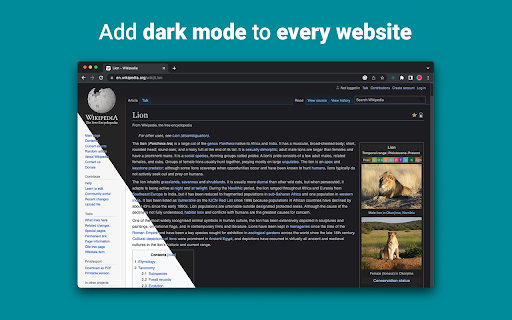
„Night Eye“ vám umožňuje povoliť tmavý režim na takmer všetkých webových stránkach, čím sa zlepšuje čitateľnosť a znižuje sa namáhanie očí v prostredí so slabým osvetlením. Ponúka tiež možnosti prispôsobenia, ako je nastavenie jasu, kontrastu a sýtosti, ako aj filter modrého svetla na ochranu očí. Navyše, vďaka možnosti ovládať vstavané tmavé témy na podporovaných webových stránkach budete mať úplnú kontrolu nad online zážitkom.
„Night Eye“, ktorému dôveruje viac ako 1 000 000 používateľov vo všetkých hlavných prehliadačoch, je tou správnou voľbou pre vaše oči. Inteligentná konverzia, žiadne reklamy, žiadne získavanie údajov, užitočná podpora!
Rozšírenia aktualizujeme pravidelne na mesačnej báze za posledných 5 rokov a plánujeme to robiť na veľmi dlhú dobu.
Ak má webová stránka zabudovanú tmavú tému, môžete ju ovládať priamo z „Night Eye“ a ak nie (ako Gmail, Dokumenty Google, Office Online, Github a milióny ďalších), „Night Eye“ skonvertuje farby. aby vám poskytol plynulý a konzistentný tmavý režim.
PRE TÝCH, KTORÍ MAJÚ OCHRANU SÚKROMIA
Chrome vás upozorní, že rozšírenie môže čítať a meniť všetky vaše údaje na webových stránkach, ktoré navštevujete.
Tu je celý príbeh:
Toto rozšírenie analyzuje farby každej webovej stránky a konvertuje ich, aby vám poskytlo hladký a konzistentný tmavý režim. Neexistuje žiadny iný spôsob, ako môže rozšírenie previesť farby bez privilégia na prístup k nim.
Nikdy však nezhromažďujeme žiadne vaše údaje. Náš obchodný model sa spolieha na predplatné a nie na ukladanie a predaj vašich údajov. V neposlednom rade sme tiež používateľmi internetu a nechceme byť zlí.
Od verzie Chrome 86 sú teraz všetky nové rozšírenia skryté v ponuke „rozšírení“ vedľa panela s adresou URL. Ak chcete zobraziť ikonu „Night Eye“, musíte ju pripnúť. Ďalšie podrobnosti nájdete na snímkach obrazovky vyššie.
Naše rozšírenie je plne kompatibilné s najnovším manifestom V3. Existujú len určité obmedzenia.
Sledujte nás na Twitteri, aby ste držali krok s najnovšími správami o "Night Eye" a o tom, čo plánujeme dopredu - https://twitter.com/nighteye_ext
—————————
CENOVÉ PLÁNY
"Night Eye" Lite je tu - úplne bezplatná navždy verzia "Night Eye".
Stručne povedané - "Night Eye" Lite je možné použiť až na 5 webových stránkach. Napríklad – Google.com, Gmail.com atď. Zoznam týchto 5 webových stránok môžete spravovať kedykoľvek. Žiadne reklamy, žiadne skryté veci – navždy zadarmo.
Viac podrobností nájdete tu - https://nighteye.app/lite-free-dark-mode-extension/
Pred odchodom do Lite by sme vás chceli pozvať na vyskúšanie „Night Eye“ Pro na 3 mesiace zadarmo – žiadna kreditná karta, žiadna platba – jednoducho si to nainštalujte a vyskúšajte.
Po uplynutí skúšobnej doby "Night Eye" Pro budete vyzvaní, aby ste zaplatili, aby ste ju mohli ďalej používať, alebo prejsť na úplne bezplatnú verziu - "Night Eye" Lite.
Viac podrobností o našich cenách - https://nighteye.app/how-to-start/
—————————
NIEKTORÉ VLASTNOSTI
➤ Integrácia farebnej schémy OS/prehliadača – synchronizujte „Night Eye“ s tmavými motívmi pre macOS/Windows
➤ Hlboká integrácia s webovými stránkami, ktoré majú svoje vlastné vstavané tmavé témy.
➤ Naplánujte zapnutie a vypnutie tmavého režimu
➤ Vlastný tmavý režim pre súbory PDF
➤ Exportujte/importujte údaje medzi vašimi prehliadačmi
—————————
CHANGELOG
Snažíme sa vám priniesť ten najlepší možný zážitok z tmavého režimu. V tejto aktualizácii sme urobili niekoľko vylepšení a pridali jednu hlavnú funkciu – integráciu farebnej schémy OS/prehliadača.
Všetky naše aktualizácie a to, čo robíme, môžete sledovať na https://nighteye.app/changelog
—————————
DOSTUPNÉ REŽIMY
Rozšírenie umožňuje rýchlo prepínať tri dostupné režimy
➤ Dark – prejdite do úplne tmavého režimu. Všetky farby, malé obrázky a ikony sa skonvertujú, aby vám poskytli čo najplynulejší zážitok z tmy.
➤ Filtrované - Farby webových stránok sa nezmenia, ale stále môžete upraviť jas, kontrast, teplo a ďalšie.
➤ Normálne – Vráťte sa k bežnému zážitku z prehliadania.
—————————
MOŽNOSTI PRISPÔSOBENIA
Akékoľvek úpravy, ktoré vykonáte, ako je nastavenie úrovne kontrastu, filter modrého svetla atď., možno použiť na jednu webovú stránku alebo globálne.
➤ Obrázky – „Night Eye“ analyzuje a konvertuje iba malé obrázky a ikony na webovej stránke, aby vám poskytla ešte plynulejší zážitok. Príspevky na Facebooku a iné významné médiá sa nekonvertujú.
➤ Jas/Sýtosť/Kontrast – Upravte jas, kontrast a sýtosť tak, aby zodpovedali odporúčaným zdravým úrovniam a chránili vaše oči. Predvolené nastavenie pre každú z nich je 50 %, ale každú si môžete prispôsobiť na preferované úrovne
➤ Modré svetlo – Starajte sa o svoje oči odstránením modrého svetla vychádzajúceho z obrazovky. Dôrazne sa odporúča najmä počas neskorého nočného prehliadania. Jednoducho posuňte na preferovanú úroveň tepla.
➤ Stlmenie – Mimoriadne užitočné, ak pracujete v tmavom priestore/miestnosti a obrazovka je jediným zdrojom svetla v miestnosti. Predvolené nastavenie je 50 %, ale môžete si ho prispôsobiť.
—————————
VŽDY DOSTUPNÁ PODPORA
Zabudovaný systém podpory – sme hrdí na to, že sme vám k dispozícii, aby sme vám poskytli spoľahlivú podporu a pomohli vám s akýmikoľvek problémami alebo problémami, s ktorými sa môžete stretnúťs rozšírením.
—————————
DOSTUPNÉ ZAP
„Night Eye“ momentálne funguje v prehliadačoch Google Chrome, Mozilla Firefox, Safari, Microsoft Edge, Opera, Vivaldi, Brave, Yandex a všetkých ostatných prehliadačoch založených na prehliadači Chromium.
—————————
ZÁLEŽÍ NÁM NA SÚKROMÍ
Namiesto toho, aby sme vás jednoducho upozornili na naše zásady ochrany osobných údajov. Radi by sme sa tu venovali tejto téme čo najzrozumiteľnejším jazykom.
Počas používania rozšírenia NEZhromažďujeme anonymné údaje o používaní pomocou odvetvovej štandardnej analýzy tretej strany (Google Analytics).
Uložené nastavenia pre každú navštívenú webovú stránku každého používateľa „Night Eye“ ukladáme iba do jeho localStorage (váš počítač). Týka sa to všetkých úprav vykonaných používateľom na zlepšenie zážitku z prehliadania pomocou funkcie „Night Eye“. K dispozícii je 7 typov úprav: Farby, Obrázky, Jas, Kontrast, Sýtosť, Studená/Teplá a Tlmená.
Inými slovami – ukladáme len akékoľvek vizuálne úpravy, ktoré ste vykonali počas prehliadania internetu. Neukladáme ich na našich serveroch, ale vo vašom miestnom úložisku (vo vašom počítači).
—————————
Nezabudnite dať like a sledovať nás:
Facebook - https://facebook.com/night.eye.extension/
Twitter – https://twitter.com/nighteye_ext
Pinterest – https://pinterest.com/nighteyeextension/
Latest reviews
- Pixelbass
- Genuinely the best solution to custom dark mode settings on a per-site basis that I've found online so far—especially for Google Sheets with it's horrendously bright white glare. I've been using it for several months now, and they're also pretty generous with the trial & extensions to your trial, after which I'll certainly be subscribing to continue availing of its features.
- Mohamed Khaled
- Really don't have any complaints. One of the better dark mode extension on Chrome.
- Deshan Sameera
- good extenstion
- Dean Otsyeno
- I have tried several extensions for enabling dark mode, but Night Eye is the best. The way it is easy to enable and disable but the click of a button, and how it makes every page still viewable is just the best.
- Prismo PC
- My eyes are much less tired than before.
- Chatree Ithipathachai
- It's cool, I guess.
- captnsaveahoee
- Really don't have any complaints. One of the better dark mode extension on Chrome.
- César
- A great tool, really like it!!!!
- Mazen Ayman
- It's the best. Just get it and don't waste your time looking for alternatives. It doesn't lag and does the job
- Onibut sussy
- The best app I've ever seen for automatic transformation of any website to dark mode, the instant dark mode conversion and their unique dark mode setup for each website, is way beyond description. I would highly recommend this program for anyone. Thank you!
- Ashley
- The app is amazing, I can finally have dark mode google docs without any issues!
- Sandeep Yadav
- this extension is wonderful, it helps me while using laptop at night and at dark places. it reduces the contrast automatically and protects eyes .I really liked this and I would recommend people who wants an extension for night reading
- Gary Finn
- ""Offers in-app purchases". What this means is after a month, you pay! Not just once, a subscription. Just find a free dark mode.
- J Widdicombe
- Great app for anyone who prefers browsing in dark mode! Dark Mode - Night Eye does a solid job of applying a smooth, consistent dark theme across websites, even ones that don’t support it natively. It’s easy to use, works reliably, and really helps reduce eye strain during late-night sessions. Definitely worth installing if you spend a lot of time on your phone or tablet
- GM Zeyad Gouda
- Really smooth experience overall — no lag, no glitches, nothing uncomfortable. The dark mode colors are well-balanced and easy on the eyes. Does exactly what it promises without getting in the way. Recommended!
- Devansh Lath
- Excellent
- Cuenta Lan
- great app, love it
- Ryan Pakieser
- This is one of the better night mode extensions out there. It is relatively smooth transitioning between various websites and has an intuitive extension plug in.
- Evan Christopher Tschaja
- Pay for dark mode? Are you kidding me?
- Aleksa Markovic
- Amazing App
- Ibrahim walid
- Great extension, very useful in most apps.
- Jaydin Wilson
- I have been using this extension for my work computer and it works amazingly. Especially being up early in the morning and looking at a screen all day. Would definitely recommend. Great work Night Eye!
- Julian Marthinsen
- Been using this extension on my home pc and work laptop since 2019. Couldn't be more happier, some small bugs on a few sites but easily solved with tweaking settings
- Vijay
- the screen gets slower and sometimes the font is also turned black with the background, but overall its good
- Samir Alakbarov
- it is not free. Just gives one month trial. I didnt know about this in advance
- Sara Milosavljević
- Great extension, flexible for modifications
- Scott Smith
- This extension has saved me a lot of trouble. After 7 eye surgeries, I really needed the functionality that this extension has to offer. Thanks, Night Eye!!! Scott
- Lee Lee
- Good Extension very usefull, highly recommended :)
- Alan WW
- good
- Wrex
- Great extension.
- Ong Jin Yong Jace
- Night eye the best chrome dark mode extension after trying out multiple others, highly recommended
- Lukas Hohl
- Good Extension very usfull ^^
- Илья Шмелёв
- Easy solution for all my tabs in the Chrome browser to be in dark mode. I like this extension cause it works for different types of web sites I browse. I cannot remember an examlpe of a site which is not in dark mode with this extension.
- Light theKnight
- It's not free for long.
- Chris
- This is a much more clean approach to Dark/Light mode than any tool I have used so far!
- Zango
- it's free to use and works like wonder. highly recommended :)
- En Force
- Honestly this extension is amazing because it just works better then others who hog up the system resources. Would recommend it surely.
- WildBear
- The extensions works on websites that other extensions did not. It been helping me with eye strain while reading at night.
- RoyalRain
- I have been using this for over a year, and it has made browsing the web so easy on my eyes. It only inverts certain parts of a page rather than the entire thing so you get dark mode without things looking weird all over the place. Highly recommend.
- BreakFreeFromDesk
- Love the app. so helpful!
- Michael GC
- This extension rocks! big help!
- don cassi
- This extension works on more sites than the other extension I used. Recommended if you have sites where other dark readers fail.
- Ogeid Aevir
- Awesome extension! Helps my eyes at night and it is very clear and smooth. I love it! Recommended!
- Alex P
- Great extension. It does exactly what you expect/ Clean, comfortable dark mode across every site. I especially like that it doesn’t mess with websites that already have their own dark theme. Everything just works automatically and feels well thought out. I’m usually pretty picky with tools like this, but honestly I don’t even have suggestions for improvement. Thanks to the team for a really solid product!
- Raeesa Khan
- As someone with astigmatism this has really helped my eyes feel at ease when looking at dark screens for extended hours
- Jakson Pedreira
- Night Eye is one of the best dark mode extensions I’ve used. It works smoothly across almost all websites and the color conversion looks natural instead of just inverting colors. It significantly reduces eye strain, especially when browsing at night. The customization options like brightness, contrast, and blue light filtering make the experience even better. Highly recommended for anyone who spends many hours in front of the screen.
- Carol Cumberland
- PERFECTION! Thank you for this! I get chronic migraines and the bright screens are torture. This is a huge help!
- Jacob Mira
- Great Dark Mode Extension – Works Smoothly Night Eye is one of the best dark mode extensions I’ve tried. It automatically converts bright websites into a comfortable dark theme, which makes browsing much easier on the eyes, especially at night. The extension is simple to install and works instantly on most websites without breaking the layout. I also like that it allows customization like brightness, contrast, and blue light filtering. It runs smoothly in the background and doesn’t slow down the browser. Overall, it's a great tool for anyone who spends long hours browsing and wants to reduce eye strain. Highly recommended for daily use.
- Wayne Anderson
- I am in front of the computer for hours every day. I thought my eyes were going bad. I stumbled across Night Eye and it was the next best thing to sliced bread!! I love this product!!!!!
- Oof Iff
- no better than this!