
ഡാർക്ക് മോഡ് - നൈറ്റ് ഐ
Extension Actions
- Extension status: Featured
- Extension status: In-App Purchases
- Live on Store
ഓരോ വെബ്സൈറ്റും ആവശ്യാനുസരണം ഡാർക്ക് മോഡിലേക്ക് / ലൈറ്റ് മോഡിലേക്ക് മാറ്റുക. നൈറ്റ് ഐ ഉപയോഗിച്ച് നിങ്ങളുടെ കണ്ണുകളെ പരിപാലിക്കുക.
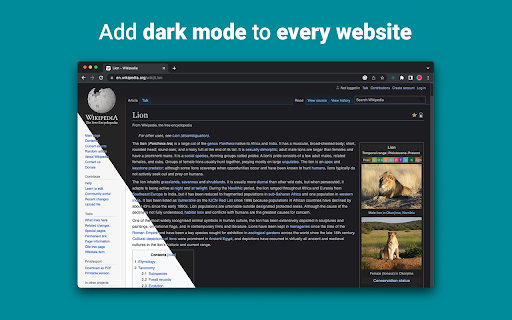
മിക്കവാറും എല്ലാ വെബ്സൈറ്റുകളിലും ഡാർക്ക് മോഡ് പ്രവർത്തനക്ഷമമാക്കാനും വായനാക്ഷമത മെച്ചപ്പെടുത്താനും വെളിച്ചം കുറഞ്ഞ അന്തരീക്ഷത്തിൽ കണ്ണിന്റെ ബുദ്ധിമുട്ട് കുറയ്ക്കാനും നൈറ്റ് ഐ നിങ്ങളെ അനുവദിക്കുന്നു. ഇത് തെളിച്ചം, ദൃശ്യതീവ്രത, സാച്ചുറേഷൻ അഡ്ജസ്റ്റ്മെന്റുകൾ എന്നിവ പോലെയുള്ള ഇഷ്ടാനുസൃതമാക്കൽ ഓപ്ഷനുകളും കണ്ണുകളെ സംരക്ഷിക്കുന്നതിനുള്ള ബ്ലൂ ലൈറ്റ് ഫിൽട്ടറും വാഗ്ദാനം ചെയ്യുന്നു. കൂടാതെ, പിന്തുണയ്ക്കുന്ന വെബ്സൈറ്റുകളിൽ ബിൽറ്റ്-ഇൻ ഡാർക്ക് തീമുകൾ നിയന്ത്രിക്കാനുള്ള കഴിവ് ഉപയോഗിച്ച്, നിങ്ങളുടെ ഓൺലൈൻ അനുഭവത്തിൽ നിങ്ങൾക്ക് പൂർണ്ണ നിയന്ത്രണം ലഭിക്കും.
എല്ലാ പ്രധാന ബ്രൗസറിലുടനീളമുള്ള 1000 000-ത്തിലധികം ഉപയോക്താക്കൾ വിശ്വസിക്കുന്നു, നൈറ്റ് ഐയാണ് നിങ്ങളുടെ കണ്ണുകൾക്ക് ശരിയായ ചോയ്സ്. മികച്ച പരിവർത്തനം, പരസ്യങ്ങളില്ല, ഡാറ്റ മൈനിംഗ് ഇല്ല, സഹായകരമായ പിന്തുണ!
കഴിഞ്ഞ 5 വർഷമായി ഞങ്ങൾ വിപുലീകരണങ്ങൾ മാസാടിസ്ഥാനത്തിൽ പതിവായി അപ്ഡേറ്റ് ചെയ്യുകയും വളരെക്കാലം അത് ചെയ്യാൻ പദ്ധതിയിടുകയും ചെയ്യുന്നു.
വെബ്സൈറ്റിന് ബിൽറ്റ്-ഇൻ ഡാർക്ക് തീം ഉണ്ടെങ്കിൽ, നിങ്ങൾക്ക് അത് നൈറ്റ് ഐയിൽ നിന്ന് നേരിട്ട് നിയന്ത്രിക്കാം, ഇല്ലെങ്കിൽ (ജിമെയിൽ, ഗൂഗിൾ ഡോക്സ്, ഓഫീസ് ഓൺലൈൻ, ഗിത്തബ് തുടങ്ങി ദശലക്ഷക്കണക്കിന് മറ്റുള്ളവ), നൈറ്റ് ഐ നിങ്ങൾക്ക് നൽകുന്നതിന് നിറങ്ങൾ പരിവർത്തനം ചെയ്യും. സുഗമവും സ്ഥിരവുമായ ഇരുണ്ട മോഡ്.
സ്വകാര്യത ആശങ്കയുള്ളവർക്ക്
നിങ്ങൾ സന്ദർശിക്കുന്ന വെബ്സൈറ്റുകളിലെ നിങ്ങളുടെ എല്ലാ ഡാറ്റയും വിപുലീകരണം വായിക്കുകയും മാറ്റുകയും ചെയ്തേക്കുമെന്ന് Chrome നിങ്ങളെ അറിയിക്കും.
മുഴുവൻ കഥയും ഇതാ:
ഈ വിപുലീകരണം ഓരോ വെബ്പേജിന്റെയും നിറങ്ങൾ വിശകലനം ചെയ്യുകയും നിങ്ങൾക്ക് സുഗമവും സ്ഥിരതയുള്ളതുമായ ഡാർക്ക് മോഡ് നൽകുന്നതിന് അവയെ പരിവർത്തനം ചെയ്യുകയും ചെയ്യുന്നു. വിപുലീകരണത്തിന് നിറങ്ങൾ ആക്സസ് ചെയ്യാനുള്ള പ്രത്യേകാവകാശമില്ലാതെ പരിവർത്തനം ചെയ്യാൻ മറ്റൊരു മാർഗവുമില്ല.
എന്നിരുന്നാലും, ഞങ്ങൾ ഒരിക്കലും നിങ്ങളുടെ ഡാറ്റയൊന്നും ശേഖരിക്കില്ല. ഞങ്ങളുടെ ബിസിനസ്സ് മോഡൽ സബ്സ്ക്രിപ്ഷനുകളെ ആശ്രയിച്ചിരിക്കുന്നു, നിങ്ങളുടെ ഡാറ്റ സംഭരിക്കുന്നതിലും വിൽക്കുന്നതിലല്ല. അവസാനത്തേത് പക്ഷേ, ഞങ്ങൾ ഇന്റർനെറ്റ് ഉപയോക്താക്കളാണ്, തിന്മ ചെയ്യാൻ ആഗ്രഹിക്കുന്നില്ല.
Chrome പതിപ്പ് 86-ൽ നിന്ന്, എല്ലാ പുതിയ വിപുലീകരണങ്ങളും ഇപ്പോൾ url ബാറിന് അടുത്തുള്ള "വിപുലീകരണങ്ങൾ" മെനുവിലേക്ക് മറച്ചിരിക്കുന്നു. നൈറ്റ് ഐയുടെ ഐക്കൺ പുറത്തെടുക്കാൻ, നിങ്ങൾ അത് പിൻ ചെയ്യേണ്ടതുണ്ട്. കൂടുതൽ വിവരങ്ങൾക്ക് മുകളിലുള്ള സ്ക്രീൻഷോട്ടുകൾ പരിശോധിക്കുക.
ഞങ്ങളുടെ വിപുലീകരണം ഏറ്റവും പുതിയ മാനിഫെസ്റ്റ് V3-യുമായി പൂർണ്ണമായും പൊരുത്തപ്പെടുന്നു. ചില നിയന്ത്രണങ്ങൾ മാത്രമേയുള്ളൂ.
നൈറ്റ് ഐയെക്കുറിച്ചുള്ള ഏറ്റവും പുതിയ വാർത്തകളും ഞങ്ങൾ എന്താണ് ആസൂത്രണം ചെയ്യുന്നതെന്നും അറിയാൻ Twitter-ൽ ഞങ്ങളെ പിന്തുടരുക - https://twitter.com/nighteye_ext
————————
വിലനിർണ്ണയ പദ്ധതികൾ
നൈറ്റ് ഐ ലൈറ്റ് ഇവിടെയുണ്ട് - നൈറ്റ് ഐയുടെ എക്കാലവും സൗജന്യ പതിപ്പ്.
ചുരുക്കത്തിൽ - 5 വെബ്സൈറ്റുകളിൽ വരെ നൈറ്റ് ഐ ലൈറ്റ് ഉപയോഗിക്കാം. ഉദാഹരണത്തിന് - Google.com, Gmail.com മുതലായവ. നിങ്ങൾക്ക് എപ്പോൾ വേണമെങ്കിലും ആ 5 വെബ്സൈറ്റുകളുടെ ലിസ്റ്റ് മാനേജ് ചെയ്യാം. പരസ്യങ്ങളില്ല, മറഞ്ഞിരിക്കുന്ന കാര്യങ്ങളില്ല - എക്കാലവും സൗജന്യം.
കൂടുതൽ വിശദാംശങ്ങൾ ഇവിടെ കാണാം - https://nighteye.app/lite-free-dark-mode-extension/
Lite-ലേക്ക് പോകുന്നതിന് മുമ്പ്, 3 മാസത്തേക്ക് സൗജന്യമായി നൈറ്റ് ഐ പ്രോ പരീക്ഷിക്കാൻ നിങ്ങളെ ക്ഷണിക്കാൻ ഞങ്ങൾ ആഗ്രഹിക്കുന്നു - ക്രെഡിറ്റ് കാർഡില്ല, പേയ്മെന്റ് ചോദിച്ചില്ല - ഇൻസ്റ്റാൾ ചെയ്ത് പരീക്ഷിച്ചുനോക്കൂ.
നൈറ്റ് ഐ പ്രോയുടെ ട്രയൽ കാലയളവ് കാലഹരണപ്പെട്ടതിന് ശേഷം, അത് ഉപയോഗിക്കുന്നത് തുടരാൻ നിങ്ങളോട് പണമടയ്ക്കാൻ ആവശ്യപ്പെടും അല്ലെങ്കിൽ പൂർണ്ണമായും സൗജന്യ പതിപ്പ് - നൈറ്റ് ഐ ലൈറ്റ് ഉപയോഗിക്കുക.
ഞങ്ങളുടെ വിലയെക്കുറിച്ചുള്ള കൂടുതൽ വിശദാംശങ്ങൾ - https://nighteye.app/how-to-start/
————————
ചില സവിശേഷതകൾ
➤ OS/ബ്രൗസർ കളർ സ്കീം ഏകീകരണം - നിങ്ങളുടെ macOS/Windows ഡാർക്ക് തീമുകളുമായി നൈറ്റ് ഐ സമന്വയിപ്പിക്കുക
➤ സ്വന്തമായി ബിൽറ്റ്-ഇൻ ഡാർക്ക് തീമുകളുള്ള വെബ്സൈറ്റുകളുമായുള്ള ആഴത്തിലുള്ള സംയോജനം.
➤ ഓണാക്കാനും ഓഫാക്കാനും ഡാർക്ക് മോഡ് ഷെഡ്യൂൾ ചെയ്യുക
➤ PDF-കൾക്കുള്ള ഇഷ്ടാനുസൃത ഡാർക്ക് മോഡ്
➤ നിങ്ങളുടെ ബ്രൗസറുകൾക്കിടയിൽ ഡാറ്റ കയറ്റുമതി/ഇറക്കുമതി ചെയ്യുക
————————
ചേഞ്ച്ലോഗ്
നിങ്ങൾക്ക് സാധ്യമായ ഏറ്റവും മികച്ച ഡാർക്ക് മോഡ് അനുഭവം നൽകാൻ ഞങ്ങൾ ശ്രമിക്കുന്നു. ഈ അപ്ഡേറ്റിൽ ഞങ്ങൾ നിരവധി മെച്ചപ്പെടുത്തലുകൾ വരുത്തുകയും ഒരു പ്രധാന ഫീച്ചർ ചേർക്കുകയും ചെയ്തിട്ടുണ്ട് - OS/ബ്രൗസർ കളർ സ്കീം ഏകീകരണം.
ഞങ്ങളുടെ എല്ലാ അപ്ഡേറ്റുകളും ഞങ്ങൾ ചെയ്യുന്ന കാര്യങ്ങളും https://nighteye.app/changelog എന്നതിൽ നിങ്ങൾക്ക് നിരീക്ഷിക്കാനാകും
————————
ലഭ്യമായ മോഡുകൾ
ലഭ്യമായ മൂന്ന് മോഡുകൾ വേഗത്തിൽ മാറാൻ വിപുലീകരണം നിങ്ങളെ അനുവദിക്കുന്നു
➤ ഡാർക്ക് - പൂർണ്ണ ഡാർക്ക് മോഡിലേക്ക് പോകുക. നിങ്ങൾക്ക് സാധ്യമായ ഏറ്റവും സുഗമമായ ഇരുണ്ട അനുഭവം നൽകുന്നതിന് എല്ലാ നിറങ്ങളും ചെറിയ ചിത്രങ്ങളും ഐക്കണുകളും പരിവർത്തനം ചെയ്യപ്പെടും.
➤ ഫിൽട്ടർ ചെയ്തു - വെബ്സൈറ്റുകളുടെ നിറങ്ങൾ മാറ്റില്ല, പക്ഷേ നിങ്ങൾക്ക് ഇപ്പോഴും തെളിച്ചം, ദൃശ്യതീവ്രത, ചൂട് എന്നിവയും മറ്റും ക്രമീകരിക്കാൻ കഴിയും.
➤ സാധാരണ - സാധാരണ ബ്രൗസിംഗ് അനുഭവത്തിലേക്ക് മടങ്ങുക.
————————
ഇഷ്ടാനുസൃതമാക്കൽ ഓപ്ഷനുകൾ
കോൺട്രാസ്റ്റ് ലെവൽ അഡ്ജസ്റ്റ്മെന്റ്, ബ്ലൂ ലൈറ്റ് ഫിൽട്ടർ മുതലായവ പോലെ നിങ്ങൾ വരുത്തുന്ന ഏത് പരിഷ്ക്കരണങ്ങളും ഒരൊറ്റ വെബ്സൈറ്റിലോ ആഗോളതലത്തിലോ പ്രയോഗിക്കാവുന്നതാണ്.
➤ ഇമേജുകൾ - നിങ്ങൾക്ക് കൂടുതൽ സുഗമമായ അനുഭവം നൽകുന്നതിന് ഒരു വെബ്സൈറ്റിലെ ചെറിയ ചിത്രങ്ങളും ഐക്കണുകളും മാത്രം രാത്രി കണ്ണ് വിശകലനം ചെയ്യുകയും പരിവർത്തനം ചെയ്യുകയും ചെയ്യുന്നു. ഫേസ്ബുക്ക് പോസ്റ്റുകളും മറ്റ് പ്രധാനപ്പെട്ട മീഡിയകളും പരിവർത്തനം ചെയ്യപ്പെടുന്നില്ല.
➤ തെളിച്ചം / സാച്ചുറേഷൻ / കോൺട്രാസ്റ്റ് - ശുപാർശ ചെയ്യുന്ന ആരോഗ്യകരമായ തലങ്ങളുമായി പൊരുത്തപ്പെടുന്നതിനും നിങ്ങളുടെ കണ്ണുകളെ സംരക്ഷിക്കുന്നതിനും തെളിച്ചം, ദൃശ്യതീവ്രത, സാച്ചുറേഷൻ എന്നിവ ക്രമീകരിക്കുക. ഓരോന്നിന്റെയും സ്ഥിരസ്ഥിതി ക്രമീകരണം 50% ആണ്, എന്നാൽ നിങ്ങൾക്ക് ഓരോന്നും ഇഷ്ടപ്പെട്ട ലെവലിലേക്ക് ഇഷ്ടാനുസൃതമാക്കാനാകും
➤ ബ്ലൂ ലൈറ്റ് - നിങ്ങളുടെ സ്ക്രീനിൽ നിന്ന് വരുന്ന നീല വെളിച്ചം ഒഴിവാക്കിക്കൊണ്ട് നിങ്ങളുടെ കണ്ണുകളെ പരിപാലിക്കുക. പ്രത്യേകിച്ച് രാത്രി വൈകിയുള്ള ബ്രൗസിംഗ് സമയത്ത് വളരെ ശുപാർശ ചെയ്യുന്നു. ഇഷ്ടപ്പെട്ട ഊഷ്മള തലത്തിലേക്ക് സ്ലൈഡ് ചെയ്യുക.
➤ മങ്ങിയ - നിങ്ങൾ ഇരുണ്ട സ്ഥലത്ത് / മുറിയിൽ ജോലി ചെയ്യുന്നുണ്ടെങ്കിൽ അത് വളരെ ഉപയോഗപ്രദമാണ്, കൂടാതെ മുറിയിലെ പ്രകാശത്തിന്റെ ഏക ഉറവിടം സ്ക്രീൻ മാത്രമാണെങ്കിൽ. ഡിഫോൾട്ട് ക്രമീകരണം 50% ആയി സജ്ജീകരിച്ചിരിക്കുന്നു, എന്നാൽ നിങ്ങൾക്കത് ഇഷ്ടാനുസൃതമാക്കാം.
————————
എല്ലായ്പ്പോഴും ലഭ്യമായ പിന്തുണ
ബിൽറ്റ്-ഇൻ സപ്പോർട്ട് സിസ്റ്റം - വിശ്വസനീയമായ പിന്തുണ നൽകുന്നതിനും വിപുലീകരണത്തിൽ നിങ്ങൾ അനുഭവിച്ചേക്കാവുന്ന എന്തെങ്കിലും പ്രശ്നങ്ങളിലും പ്രശ്നങ്ങളിലും നിങ്ങളെ സഹായിക്കുന്നതിനും ലഭ്യമായതിൽ ഞങ്ങൾ അഭിമാനിക്കുന്നു.
————————
എന്നതിൽ ലഭ്യമാണ്
Google Chrome, Mozilla Firefox, Safari, Microsoft Edge, Opera, Vivaldi, Brave, Yandex എന്നിവയിലും മറ്റെല്ലാ Chromium അടിസ്ഥാനമാക്കിയുള്ള ബ്രൗസറുകളിലും Night Eye നിലവിൽ പ്രവർത്തിക്കുന്നു.
————————
ഞങ്ങൾ സ്വകാര്യതയെക്കുറിച്ച് ശ്രദ്ധിക്കുന്നു
ഞങ്ങളുടെ സ്വകാര്യതാ നയത്തിലേക്ക് നിങ്ങളെ ചൂണ്ടിക്കാണിക്കുന്നതിന് പകരം. ഇവിടെ ഏറ്റവും മനസ്സിലാക്കാവുന്ന ഭാഷയിൽ ഈ വിഷയം അഭിസംബോധന ചെയ്യാൻ ഞങ്ങൾ ആഗ്രഹിക്കുന്നു.
എക്സ്റ്റൻഷൻ ഉപയോഗിക്കുമ്പോൾ ഒരു ഇൻഡസ്ട്രി സ്റ്റാൻഡേർഡ് തേർഡ് പാർട്ടി അനലിറ്റിക്സ് (Google Analytics) ഉപയോഗിച്ച് ഞങ്ങൾ അജ്ഞാത ഉപയോഗ ഡാറ്റ ശേഖരിക്കില്ല.
ഓരോ നൈറ്റ് ഐ ഉപയോക്താവിന്റെയും സന്ദർശിച്ച ഓരോ വെബ്സൈറ്റിനും ഞങ്ങൾ സംരക്ഷിച്ച ക്രമീകരണങ്ങൾ അവരുടെ ലോക്കൽ സ്റ്റോറേജിൽ (നിങ്ങളുടെ കമ്പ്യൂട്ടർ) മാത്രം സംഭരിക്കുന്നു. നൈറ്റ് ഐയുടെ ഉപയോഗത്തിലൂടെ അവരുടെ ബ്രൗസിംഗ് അനുഭവം മെച്ചപ്പെടുത്തുന്നതിനായി ഉപയോക്താവ് നടത്തിയ എല്ലാ ക്രമീകരണങ്ങളുമായി ഇത് ബന്ധപ്പെട്ടിരിക്കുന്നു. 7 തരം അഡ്ജസ്റ്റ്മെന്റുകളുണ്ട്: നിറങ്ങൾ, ചിത്രങ്ങൾ, തെളിച്ചം, ദൃശ്യതീവ്രത, സാച്ചുറേഷൻ, കോൾഡ്/വാം, ഡിം.
മറ്റൊരു വിധത്തിൽ പറഞ്ഞാൽ - ഇന്റർനെറ്റ് ബ്രൗസുചെയ്യുമ്പോൾ നിങ്ങൾ വരുത്തിയ ദൃശ്യ ക്രമീകരണങ്ങൾ മാത്രമേ ഞങ്ങൾ സംഭരിക്കുന്നുള്ളൂ. ഞങ്ങൾ അവ ഞങ്ങളുടെ സെർവറുകളിൽ സംഭരിക്കുന്നില്ല, പകരം നിങ്ങളുടെ ലോക്കൽ സ്റ്റോറേജിൽ (നിങ്ങളുടെ കമ്പ്യൂട്ടർ) സംഭരിക്കുന്നു.
————————
ഞങ്ങളെ ലൈക്ക് ചെയ്യാനും ഫോളോ ചെയ്യാനും മറക്കരുത്:
Facebook - https://facebook.com/night.eye.extension/
ട്വിറ്റർ - https://twitter.com/nighteye_ext
Pinterest -https://pinterest.com/nighteyeextension/
Latest reviews
- Pixelbass
- Genuinely the best solution to custom dark mode settings on a per-site basis that I've found online so far—especially for Google Sheets with it's horrendously bright white glare. I've been using it for several months now, and they're also pretty generous with the trial & extensions to your trial, after which I'll certainly be subscribing to continue availing of its features.
- Mohamed Khaled
- Really don't have any complaints. One of the better dark mode extension on Chrome.
- Deshan Sameera
- good extenstion
- Dean Otsyeno
- I have tried several extensions for enabling dark mode, but Night Eye is the best. The way it is easy to enable and disable but the click of a button, and how it makes every page still viewable is just the best.
- Prismo PC
- My eyes are much less tired than before.
- Chatree Ithipathachai
- It's cool, I guess.
- captnsaveahoee
- Really don't have any complaints. One of the better dark mode extension on Chrome.
- César
- A great tool, really like it!!!!
- Mazen Ayman
- It's the best. Just get it and don't waste your time looking for alternatives. It doesn't lag and does the job
- Onibut sussy
- The best app I've ever seen for automatic transformation of any website to dark mode, the instant dark mode conversion and their unique dark mode setup for each website, is way beyond description. I would highly recommend this program for anyone. Thank you!
- Ashley
- The app is amazing, I can finally have dark mode google docs without any issues!
- Sandeep Yadav
- this extension is wonderful, it helps me while using laptop at night and at dark places. it reduces the contrast automatically and protects eyes .I really liked this and I would recommend people who wants an extension for night reading
- Gary Finn
- ""Offers in-app purchases". What this means is after a month, you pay! Not just once, a subscription. Just find a free dark mode.
- J Widdicombe
- Great app for anyone who prefers browsing in dark mode! Dark Mode - Night Eye does a solid job of applying a smooth, consistent dark theme across websites, even ones that don’t support it natively. It’s easy to use, works reliably, and really helps reduce eye strain during late-night sessions. Definitely worth installing if you spend a lot of time on your phone or tablet
- GM Zeyad Gouda
- Really smooth experience overall — no lag, no glitches, nothing uncomfortable. The dark mode colors are well-balanced and easy on the eyes. Does exactly what it promises without getting in the way. Recommended!
- Devansh Lath
- Excellent
- Cuenta Lan
- great app, love it
- Ryan Pakieser
- This is one of the better night mode extensions out there. It is relatively smooth transitioning between various websites and has an intuitive extension plug in.
- Evan Christopher Tschaja
- Pay for dark mode? Are you kidding me?
- Aleksa Markovic
- Amazing App
- Ibrahim walid
- Great extension, very useful in most apps.
- Jaydin Wilson
- I have been using this extension for my work computer and it works amazingly. Especially being up early in the morning and looking at a screen all day. Would definitely recommend. Great work Night Eye!
- Julian Marthinsen
- Been using this extension on my home pc and work laptop since 2019. Couldn't be more happier, some small bugs on a few sites but easily solved with tweaking settings
- Vijay
- the screen gets slower and sometimes the font is also turned black with the background, but overall its good
- Samir Alakbarov
- it is not free. Just gives one month trial. I didnt know about this in advance
- Sara Milosavljević
- Great extension, flexible for modifications
- Scott Smith
- This extension has saved me a lot of trouble. After 7 eye surgeries, I really needed the functionality that this extension has to offer. Thanks, Night Eye!!! Scott
- Lee Lee
- Good Extension very usefull, highly recommended :)
- Alan WW
- good
- Wrex
- Great extension.
- Ong Jin Yong Jace
- Night eye the best chrome dark mode extension after trying out multiple others, highly recommended
- Lukas Hohl
- Good Extension very usfull ^^
- Илья Шмелёв
- Easy solution for all my tabs in the Chrome browser to be in dark mode. I like this extension cause it works for different types of web sites I browse. I cannot remember an examlpe of a site which is not in dark mode with this extension.
- Light theKnight
- It's not free for long.
- Chris
- This is a much more clean approach to Dark/Light mode than any tool I have used so far!
- Zango
- it's free to use and works like wonder. highly recommended :)
- En Force
- Honestly this extension is amazing because it just works better then others who hog up the system resources. Would recommend it surely.
- WildBear
- The extensions works on websites that other extensions did not. It been helping me with eye strain while reading at night.
- RoyalRain
- I have been using this for over a year, and it has made browsing the web so easy on my eyes. It only inverts certain parts of a page rather than the entire thing so you get dark mode without things looking weird all over the place. Highly recommend.
- BreakFreeFromDesk
- Love the app. so helpful!
- Michael GC
- This extension rocks! big help!
- don cassi
- This extension works on more sites than the other extension I used. Recommended if you have sites where other dark readers fail.
- Ogeid Aevir
- Awesome extension! Helps my eyes at night and it is very clear and smooth. I love it! Recommended!
- Alex P
- Great extension. It does exactly what you expect/ Clean, comfortable dark mode across every site. I especially like that it doesn’t mess with websites that already have their own dark theme. Everything just works automatically and feels well thought out. I’m usually pretty picky with tools like this, but honestly I don’t even have suggestions for improvement. Thanks to the team for a really solid product!
- Raeesa Khan
- As someone with astigmatism this has really helped my eyes feel at ease when looking at dark screens for extended hours
- Jakson Pedreira
- Night Eye is one of the best dark mode extensions I’ve used. It works smoothly across almost all websites and the color conversion looks natural instead of just inverting colors. It significantly reduces eye strain, especially when browsing at night. The customization options like brightness, contrast, and blue light filtering make the experience even better. Highly recommended for anyone who spends many hours in front of the screen.
- Carol Cumberland
- PERFECTION! Thank you for this! I get chronic migraines and the bright screens are torture. This is a huge help!
- Jacob Mira
- Great Dark Mode Extension – Works Smoothly Night Eye is one of the best dark mode extensions I’ve tried. It automatically converts bright websites into a comfortable dark theme, which makes browsing much easier on the eyes, especially at night. The extension is simple to install and works instantly on most websites without breaking the layout. I also like that it allows customization like brightness, contrast, and blue light filtering. It runs smoothly in the background and doesn’t slow down the browser. Overall, it's a great tool for anyone who spends long hours browsing and wants to reduce eye strain. Highly recommended for daily use.
- Wayne Anderson
- I am in front of the computer for hours every day. I thought my eyes were going bad. I stumbled across Night Eye and it was the next best thing to sliced bread!! I love this product!!!!!
- Oof Iff
- no better than this!