
Tamsusis režimas – nakties akis
Extension Actions
- Extension status: Featured
- Extension status: In-App Purchases
- Live on Store
Perjunkite kiekvieną svetainę į tamsųjį / šviesųjį režimą, kaip norite. Pasirūpinkite savo akimis su Night Eye.
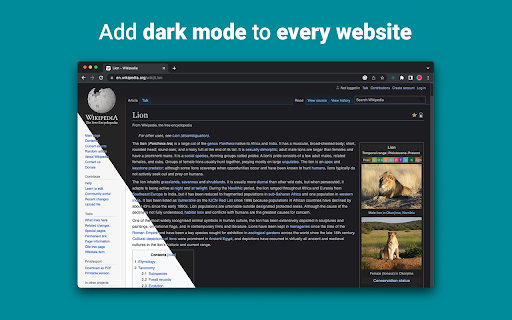
„Night Eye“ leidžia beveik visose svetainėse įjungti tamsųjį režimą, pagerinant skaitomumą ir sumažinant akių nuovargį esant prastam apšvietimui. Jame taip pat yra tinkinimo parinkčių, tokių kaip ryškumo, kontrasto ir sodrumo reguliavimas, taip pat mėlynos šviesos filtras, apsaugantis akis. Be to, turėdami galimybę valdyti įtaisytas tamsias temas palaikomose svetainėse, galėsite visiškai valdyti savo internetines funkcijas.
„Night Eye“, kuriuo pasitiki daugiau nei 1 000 000 vartotojų visose pagrindinėse naršyklėse, yra tinkamas pasirinkimas jūsų akims. Išmani konversija, jokių skelbimų, jokios duomenų gavybos, naudingas palaikymas!
Plėtinius atnaujiname reguliariai kas mėnesį pastaruosius 5 metus ir planuojame tai daryti labai ilgai.
Jei svetainėje yra įmontuota tamsioji tema, galite ją valdyti tiesiogiai iš „Night Eye“, o jei jos nėra (pvz., „Gmail“, „Google“ dokumentai, „Office Online“, „Github“ ir daugybė kitų), „Night Eye“ konvertuos spalvas, kad suteiktų jums sklandus ir nuoseklus tamsus režimas.
TIEMS, KURIŲ NURĖTI PRIVATUMO
„Chrome“ įspės, kad plėtinys gali nuskaityti ir pakeisti visus jūsų lankomų svetainių duomenis.
Štai visa istorija:
Šis plėtinys analizuoja kiekvieno tinklalapio spalvas ir konvertuoja jas, kad tamsus režimas būtų sklandus ir nuoseklus. Nėra kito būdo, kaip plėtinys gali konvertuoti spalvas be teisės jas pasiekti.
Tačiau mes niekada nerenkame jokių jūsų duomenų. Mūsų verslo modelis priklauso nuo prenumeratos, o ne nuo jūsų duomenų saugojimo ir pardavimo. Paskutinis, bet ne mažiau svarbus dalykas – mes taip pat esame interneto vartotojai ir nenorime būti blogi.
Nuo 86 versijos „Chrome“ visi nauji plėtiniai dabar yra paslėpti meniu „Plėtiniai“, esančiame šalia URL juostos. Norėdami pamatyti „Night Eye“ piktogramą, turite ją prisegti. Norėdami gauti daugiau informacijos, žiūrėkite aukščiau esančias ekrano kopijas.
Mūsų plėtinys visiškai suderinamas su naujausiu manifesto V3. Yra tik keletas apribojimų.
Sekite mus „Twitter“, kad gautumėte naujausias „Night Eye“ naujienas ir ką mes planuojame ateityje – https://twitter.com/nighteye_ext
————————
KAINŲ PLANAI
„Night Eye Lite“ yra čia – visiškai nemokama amžinai „Night Eye“ versija.
Trumpai tariant, „Night Eye Lite“ galima naudoti iki 5 svetainių. Pavyzdžiui – Google.com, Gmail.com ir kt. Tų 5 svetainių sąrašą galite tvarkyti bet kuriuo metu. Jokių skelbimų, jokių paslėptų dalykų – nemokamai amžinai.
Daugiau informacijos rasite čia - https://nighteye.app/lite-free-dark-mode-extension/
Prieš einant į Lite, norime pakviesti 3 mėnesius nemokamai išbandyti „Night Eye Pro“ – be kredito kortelės, neprašoma mokėti – tiesiog įdiekite ir išbandykite.
Pasibaigus „Night Eye Pro“ bandomajam laikotarpiui, jūsų bus paprašyta sumokėti, kad galėtumėte toliau jį naudoti arba naudoti visiškai nemokamą „Night Eye Lite“ versiją.
Daugiau informacijos apie mūsų kainas – https://nighteye.app/how-to-start/
————————
KAI KURIOS FUNKCIJOS
➤ OS / naršyklės spalvų schemos integravimas – sinchronizuokite „Night Eye“ su „MacOS“ / „Windows“ tamsiomis temomis
➤ Gili integracija su svetainėmis, turinčiomis savo įmontuotas tamsias temas.
➤ Suplanuokite tamsųjį režimą, kad įjungtumėte ir išjungtumėte
➤ Pasirinktinis tamsus režimas PDF failams
➤ Eksportuokite / importuokite duomenis iš vienos naršyklės į kitą
————————
PAKEITIMAS
Stengiamės suteikti jums geriausią įmanomą tamsaus režimo patirtį. Šiame atnaujinime atlikome keletą patobulinimų ir pridėjome vieną pagrindinę funkciją – OS/naršyklės spalvų schemos integravimą.
Galite stebėti visus mūsų atnaujinimus ir tai, ką darome, adresu https://nighteye.app/changelog
————————
GALIMI REŽIMAI
Plėtinys leidžia greitai perjungti tris galimus režimus
➤ Tamsus – pereikite į visiškai tamsų režimą. Visos spalvos, maži vaizdai ir piktogramos bus konvertuojamos, kad tamsos patirtis būtų kuo sklandesnė.
➤ Filtruota – svetainių spalvos nepasikeis, bet vis tiek galėsite reguliuoti ryškumą, kontrastą, šilumą ir kt.
➤ Normalus – grįžkite į įprastą naršymą.
————————
PRISTATYMO GALIMYBĖS
Bet kokie jūsų atlikti pakeitimai, pvz., kontrasto lygio reguliavimas, mėlynos šviesos filtras ir kt., gali būti pritaikyti vienai svetainei arba visame pasaulyje.
➤ Vaizdai – „Night Eye“ analizuoja ir konvertuoja tik mažus svetainės vaizdus ir piktogramas, kad galėtumėte naudotis dar sklandžiau. „Facebook“ įrašai ir kitos reikšmingos žiniasklaidos priemonės nėra konvertuojamos.
➤ Ryškumas / sodrumas / kontrastas – sureguliuokite ryškumą, kontrastą ir sodrumą, kad jie atitiktų rekomenduojamus sveikus lygius ir apsaugotumėte akis. Numatytasis kiekvieno nustatymas yra 50%, bet galite tinkinti kiekvieną pagal pageidaujamus lygius
➤ Mėlyna šviesa – pasirūpinkite savo akimis pašalindami iš ekrano sklindančią mėlyną šviesą. Labai rekomenduojama, ypač naršant vėlai vakare. Tiesiog pastumkite iki pageidaujamo šilumos lygio.
➤ Pritemdytas – itin naudinga, jei dirbate tamsioje erdvėje/kambaryje, o ekranas yra vienintelis šviesos šaltinis patalpoje. Numatytasis nustatymas yra 50%, bet galite jį tinkinti kaip norite.
————————
VISADA GALIMA PAGALBA
Integruota palaikymo sistema – didžiuojamės galėdami teikti patikimą palaikymą ir padėti išspręsti bet kokias su plėtiniu susijusias problemas ar problemas.
————————
GALIMA
„Night Eye“ šiuo metu veikia „Google Chrome“, „Mozilla Firefox“, „Safari“, „Microsoft Edge“, „Opera“, „Vivaldi“, „Brave“, „Yandex“ ir visose kitose „Chromium“ pagrįstose naršyklėse.
————————
MUMS RŪPINA PRIVATUMAS
Užuot tiesiog nukreipę jus į mūsų privatumo politiką. Čia norėtume šią temą aptarti suprantamiausia kalba.
Naudodami plėtinį NErenkame anoniminių naudojimo duomenų naudodami standartinę trečiosios šalies analizę (Google Analytics).
Saugome tik kiekvienos „Night Eye“ naudotojo aplankytos svetainės išsaugotus nustatymus vietinėje saugykloje (jūsų kompiuteryje). Tai susiję su visais koregavimais, kuriuos vartotojas atliko, kad pagerintų naršymo patirtį naudojant „Night Eye“. Yra 7 koregavimo tipai: spalvos, vaizdai, ryškumas, kontrastas, sodrumas, šaltas / šiltas ir pritemdytas.
Kitaip tariant – saugome tik visus vizualinius pakeitimus, kuriuos atlikote naršydami internete. Mes saugome juos ne savo serveriuose, o jūsų vietinėje saugykloje (jūsų kompiuteryje).
————————
Nepamirškite pamėgti ir sekti mus:
„Facebook“ – https://facebook.com/night.eye.extension/
„Twitter“ – https://twitter.com/nighteye_ext
Pinterest - https://pinterest.com/nighteyeextension/
Latest reviews
- Pixelbass
- Genuinely the best solution to custom dark mode settings on a per-site basis that I've found online so far—especially for Google Sheets with it's horrendously bright white glare. I've been using it for several months now, and they're also pretty generous with the trial & extensions to your trial, after which I'll certainly be subscribing to continue availing of its features.
- Mohamed Khaled
- Really don't have any complaints. One of the better dark mode extension on Chrome.
- Deshan Sameera
- good extenstion
- Dean Otsyeno
- I have tried several extensions for enabling dark mode, but Night Eye is the best. The way it is easy to enable and disable but the click of a button, and how it makes every page still viewable is just the best.
- Prismo PC
- My eyes are much less tired than before.
- Chatree Ithipathachai
- It's cool, I guess.
- captnsaveahoee
- Really don't have any complaints. One of the better dark mode extension on Chrome.
- César
- A great tool, really like it!!!!
- Mazen Ayman
- It's the best. Just get it and don't waste your time looking for alternatives. It doesn't lag and does the job
- Onibut sussy
- The best app I've ever seen for automatic transformation of any website to dark mode, the instant dark mode conversion and their unique dark mode setup for each website, is way beyond description. I would highly recommend this program for anyone. Thank you!
- Ashley
- The app is amazing, I can finally have dark mode google docs without any issues!
- Sandeep Yadav
- this extension is wonderful, it helps me while using laptop at night and at dark places. it reduces the contrast automatically and protects eyes .I really liked this and I would recommend people who wants an extension for night reading
- Gary Finn
- ""Offers in-app purchases". What this means is after a month, you pay! Not just once, a subscription. Just find a free dark mode.
- J Widdicombe
- Great app for anyone who prefers browsing in dark mode! Dark Mode - Night Eye does a solid job of applying a smooth, consistent dark theme across websites, even ones that don’t support it natively. It’s easy to use, works reliably, and really helps reduce eye strain during late-night sessions. Definitely worth installing if you spend a lot of time on your phone or tablet
- GM Zeyad Gouda
- Really smooth experience overall — no lag, no glitches, nothing uncomfortable. The dark mode colors are well-balanced and easy on the eyes. Does exactly what it promises without getting in the way. Recommended!
- Devansh Lath
- Excellent
- Cuenta Lan
- great app, love it
- Ryan Pakieser
- This is one of the better night mode extensions out there. It is relatively smooth transitioning between various websites and has an intuitive extension plug in.
- Evan Christopher Tschaja
- Pay for dark mode? Are you kidding me?
- Aleksa Markovic
- Amazing App
- Ibrahim walid
- Great extension, very useful in most apps.
- Jaydin Wilson
- I have been using this extension for my work computer and it works amazingly. Especially being up early in the morning and looking at a screen all day. Would definitely recommend. Great work Night Eye!
- Julian Marthinsen
- Been using this extension on my home pc and work laptop since 2019. Couldn't be more happier, some small bugs on a few sites but easily solved with tweaking settings
- Vijay
- the screen gets slower and sometimes the font is also turned black with the background, but overall its good
- Samir Alakbarov
- it is not free. Just gives one month trial. I didnt know about this in advance
- Sara Milosavljević
- Great extension, flexible for modifications
- Scott Smith
- This extension has saved me a lot of trouble. After 7 eye surgeries, I really needed the functionality that this extension has to offer. Thanks, Night Eye!!! Scott
- Lee Lee
- Good Extension very usefull, highly recommended :)
- Alan WW
- good
- Wrex
- Great extension.
- Ong Jin Yong Jace
- Night eye the best chrome dark mode extension after trying out multiple others, highly recommended
- Lukas Hohl
- Good Extension very usfull ^^
- Илья Шмелёв
- Easy solution for all my tabs in the Chrome browser to be in dark mode. I like this extension cause it works for different types of web sites I browse. I cannot remember an examlpe of a site which is not in dark mode with this extension.
- Light theKnight
- It's not free for long.
- Chris
- This is a much more clean approach to Dark/Light mode than any tool I have used so far!
- Zango
- it's free to use and works like wonder. highly recommended :)
- En Force
- Honestly this extension is amazing because it just works better then others who hog up the system resources. Would recommend it surely.
- WildBear
- The extensions works on websites that other extensions did not. It been helping me with eye strain while reading at night.
- RoyalRain
- I have been using this for over a year, and it has made browsing the web so easy on my eyes. It only inverts certain parts of a page rather than the entire thing so you get dark mode without things looking weird all over the place. Highly recommend.
- BreakFreeFromDesk
- Love the app. so helpful!
- Michael GC
- This extension rocks! big help!
- don cassi
- This extension works on more sites than the other extension I used. Recommended if you have sites where other dark readers fail.
- Ogeid Aevir
- Awesome extension! Helps my eyes at night and it is very clear and smooth. I love it! Recommended!
- Alex P
- Great extension. It does exactly what you expect/ Clean, comfortable dark mode across every site. I especially like that it doesn’t mess with websites that already have their own dark theme. Everything just works automatically and feels well thought out. I’m usually pretty picky with tools like this, but honestly I don’t even have suggestions for improvement. Thanks to the team for a really solid product!
- Raeesa Khan
- As someone with astigmatism this has really helped my eyes feel at ease when looking at dark screens for extended hours
- Jakson Pedreira
- Night Eye is one of the best dark mode extensions I’ve used. It works smoothly across almost all websites and the color conversion looks natural instead of just inverting colors. It significantly reduces eye strain, especially when browsing at night. The customization options like brightness, contrast, and blue light filtering make the experience even better. Highly recommended for anyone who spends many hours in front of the screen.
- Carol Cumberland
- PERFECTION! Thank you for this! I get chronic migraines and the bright screens are torture. This is a huge help!
- Jacob Mira
- Great Dark Mode Extension – Works Smoothly Night Eye is one of the best dark mode extensions I’ve tried. It automatically converts bright websites into a comfortable dark theme, which makes browsing much easier on the eyes, especially at night. The extension is simple to install and works instantly on most websites without breaking the layout. I also like that it allows customization like brightness, contrast, and blue light filtering. It runs smoothly in the background and doesn’t slow down the browser. Overall, it's a great tool for anyone who spends long hours browsing and wants to reduce eye strain. Highly recommended for daily use.
- Wayne Anderson
- I am in front of the computer for hours every day. I thought my eyes were going bad. I stumbled across Night Eye and it was the next best thing to sliced bread!! I love this product!!!!!
- Oof Iff
- no better than this!