
Темний режим - нічне око
Extension Actions
- Extension status: Featured
- Extension status: In-App Purchases
- Live on Store
Перемкніть кожен веб-сайт у темний режим/світлий режим за бажанням. Подбайте про свої очі з Night Eye.
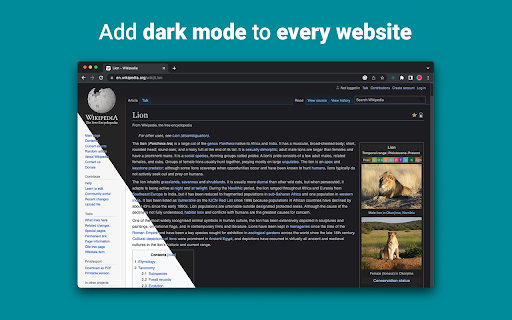
«Night Eye» дозволяє ввімкнути темний режим майже на всіх веб-сайтах, покращуючи читабельність і зменшуючи навантаження на очі в умовах слабкого освітлення. Він також пропонує параметри налаштування, такі як налаштування яскравості, контрасту та насиченості, а також фільтр синього світла для захисту очей. Крім того, завдяки можливості керувати вбудованими темними темами на підтримуваних веб-сайтах ви матимете повний контроль над роботою в Інтернеті.
«Night Eye», якому довіряють понад 1 000 000 користувачів у всіх основних браузерах, є правильним вибором для ваших очей. Розумне перетворення, без реклами, без аналізу даних, корисна підтримка!
Ми регулярно щомісяця оновлюємо розширення протягом останніх 5 років і плануємо робити це на дуже довгий час уперед.
Якщо веб-сайт має вбудовану темну тему, ви можете керувати нею безпосередньо з «Night Eye», а якщо її немає (наприклад, Gmail, Google Docs, Office Online, Github та мільйони інших), «Night Eye» перетворить кольори щоб забезпечити плавний і послідовний темний режим.
ДЛЯ ТИХ, ХТО СПІЛКУЄТЬСЯ ПРО КОНФІДЕНЦІЙНІСТЬ
Chrome попередить вас, що розширення може читати та змінювати всі ваші дані на веб-сайтах, які ви відвідуєте.
Ось і вся історія:
Це розширення аналізує кольори кожної веб-сторінки та перетворює їх, щоб надати вам плавний і послідовний темний режим. Немає іншого способу, яким розширення може перетворювати кольори без привілею доступу до них.
Однак ми ніколи не збираємо ваші дані. Наша бізнес-модель базується на підписках, а не на зберіганні та продажу ваших даних. І останнє, але не менш важливе: ми також користувачі Інтернету і не хочемо бути злими.
Починаючи з Chrome версії 86, усі нові розширення тепер приховано в меню «розширень» поруч із рядком URL-адрес. Щоб вивести піктограму «Night Eye», її потрібно закріпити. Щоб дізнатися більше, перегляньте знімки екрана вище.
Наше розширення повністю сумісне з останнім маніфестом V3. Є лише деякі обмеження.
Слідкуйте за нами у Twitter, щоб бути в курсі останніх новин про «Нічне око» та про те, що ми плануємо на майбутнє - https://twitter.com/nighteye_ext
————————
ЦІНОВІ ПЛАНИ
«Night Eye» Lite тут – абсолютно безкоштовна версія «Night Eye» назавжди.
Коротше кажучи, «Night Eye» Lite можна використовувати максимум на 5 веб-сайтах. Наприклад, Google.com, Gmail.com тощо. Ви можете будь-коли керувати списком цих 5 веб-сайтів. Без реклами, без прихованих речей – безкоштовно назавжди.
Детальніше можна знайти тут - https://nighteye.app/lite-free-dark-mode-extension/
Перш ніж перейти до Lite, ми хотіли б запросити вас випробувати «Night Eye» Pro безкоштовно протягом 3 місяців — без використання кредитної картки та оплати — просто встановіть і спробуйте.
Після закінчення пробного періоду «Night Eye» Pro вам буде запропоновано заплатити, щоб продовжити користуватися нею, або перейдіть за повністю безкоштовною версією «Night Eye» Lite.
Детальніше про наші ціни - https://nighteye.app/how-to-start/
————————
ДЕЯКІ ОСОБЛИВОСТІ
➤ Інтеграція кольорової схеми ОС/браузера — синхронізуйте «Night Eye» із темними темами macOS/Windows
➤ Глибока інтеграція з веб-сайтами, які мають власні вбудовані темні теми.
➤ Заплануйте ввімкнення та вимкнення темного режиму
➤ Спеціальний темний режим для PDF-файлів
➤ Експорт/імпорт даних між вашими браузерами
————————
ЖУРНАЛ ЗМІН
Ми прагнемо надати вам найкращий досвід у темному режимі. У цьому оновленні ми зробили кілька покращень і додали одну важливу функцію – інтеграцію кольорової схеми ОС/браузера.
Ви можете стежити за всіма нашими оновленнями та тим, що ми робимо, на сторінці https://nighteye.app/changelog
————————
ДОСТУПНІ РЕЖИМИ
Розширення дозволяє швидко перемикати три доступні режими
➤ Темний - перейдіть у повний темний режим. Усі кольори, невеликі зображення та піктограми буде перетворено, щоб отримати максимально плавне темне зображення.
➤ Відфільтровано – кольори веб-сайтів не будуть змінені, але ви все одно можете налаштувати яскравість, контрастність, теплоту тощо.
➤ Звичайний - повернутися до звичайного перегляду.
————————
ПАРАМЕТРИ НАЛАШТУВАННЯ
Будь-які внесені вами зміни, наприклад налаштування рівня контрастності, фільтр синього світла тощо, можна застосувати до одного веб-сайту або глобально.
➤ Зображення - «Night Eye» аналізує та перетворює лише невеликі зображення та піктограми на веб-сайті, щоб забезпечити вам ще більш плавну роботу. Повідомлення у Facebook та інші важливі засоби масової інформації не конвертуються.
➤ Яскравість / Насиченість / Контраст - Налаштуйте яскравість, контрастність і насиченість відповідно до рекомендованих здорових рівнів і захистіть свої очі. Значення за замовчуванням для кожного становить 50%, але ви можете налаштувати кожен до бажаного рівня
➤ Блакитне світло - подбайте про свої очі, усунувши синє світло, що надходить від екрана. Настійно рекомендується, особливо під час перегляду пізно ввечері. Просто посуньте до бажаного рівня тепла.
➤ Dim - надзвичайно корисний, якщо ви працюєте в темному просторі/кімнаті, а екран є єдиним джерелом світла в кімнаті. За замовчуванням встановлено значення 50%, але ви можете налаштувати його на свій розсуд.
————————
ЗАВЖДИ ДОСТУПНА ПІДТРИМКА
Вбудована система підтримки - ми пишаємося тим, що готові забезпечити надійну підтримку та допомогти вам у вирішенні будь-яких проблем або проблем, які можуть виникнутиз розширенням.
————————
ДОСТУПНІ НА
«Нічне око» зараз працює в Google Chrome, Mozilla Firefox, Safari, Microsoft Edge, Opera, Vivaldi, Brave, Yandex та всіх інших браузерах на основі Chromium.
————————
МИ ПІКУЄМОСЯ ПРО КОНФІДЕНЦІЙНІСТЬ
Замість того, щоб просто вказувати вам на нашу політику конфіденційності. Ми хотіли б торкнутися цієї теми максимально зрозумілою мовою.
Під час використання розширення ми НЕ збираємо анонімні дані про використання за допомогою галузевих стандартів третьої сторони (Google Analytics).
Ми зберігаємо лише збережені налаштування для кожного відвіданого веб-сайту кожного користувача «Night Eye» у його локальному сховищі (на вашому комп’ютері). Це стосується всіх налаштувань, зроблених користувачем для покращення досвіду перегляду за допомогою «Night Eye». Існує 7 типів налаштувань: кольори, зображення, яскравість, контрастність, насиченість, холодний/теплий і затемнений.
Іншими словами, ми зберігаємо лише будь-які візуальні налаштування, які ви зробили під час перегляду веб-сторінок. Ми зберігаємо їх не на наших серверах, а у вашому локальному сховищі (на вашому комп’ютері).
————————
Не забудьте поставити лайк і підписатися на нас:
Facebook - https://facebook.com/night.eye.extension/
Twitter - https://twitter.com/nighteye_ext
Pinterest -https://pinterest.com/nighteyeextension/
Latest reviews
- Pixelbass
- Genuinely the best solution to custom dark mode settings on a per-site basis that I've found online so far—especially for Google Sheets with it's horrendously bright white glare. I've been using it for several months now, and they're also pretty generous with the trial & extensions to your trial, after which I'll certainly be subscribing to continue availing of its features.
- Mohamed Khaled
- Really don't have any complaints. One of the better dark mode extension on Chrome.
- Deshan Sameera
- good extenstion
- Dean Otsyeno
- I have tried several extensions for enabling dark mode, but Night Eye is the best. The way it is easy to enable and disable but the click of a button, and how it makes every page still viewable is just the best.
- Prismo PC
- My eyes are much less tired than before.
- Chatree Ithipathachai
- It's cool, I guess.
- captnsaveahoee
- Really don't have any complaints. One of the better dark mode extension on Chrome.
- César
- A great tool, really like it!!!!
- Mazen Ayman
- It's the best. Just get it and don't waste your time looking for alternatives. It doesn't lag and does the job
- Onibut sussy
- The best app I've ever seen for automatic transformation of any website to dark mode, the instant dark mode conversion and their unique dark mode setup for each website, is way beyond description. I would highly recommend this program for anyone. Thank you!
- Ashley
- The app is amazing, I can finally have dark mode google docs without any issues!
- Sandeep Yadav
- this extension is wonderful, it helps me while using laptop at night and at dark places. it reduces the contrast automatically and protects eyes .I really liked this and I would recommend people who wants an extension for night reading
- Gary Finn
- ""Offers in-app purchases". What this means is after a month, you pay! Not just once, a subscription. Just find a free dark mode.
- J Widdicombe
- Great app for anyone who prefers browsing in dark mode! Dark Mode - Night Eye does a solid job of applying a smooth, consistent dark theme across websites, even ones that don’t support it natively. It’s easy to use, works reliably, and really helps reduce eye strain during late-night sessions. Definitely worth installing if you spend a lot of time on your phone or tablet
- GM Zeyad Gouda
- Really smooth experience overall — no lag, no glitches, nothing uncomfortable. The dark mode colors are well-balanced and easy on the eyes. Does exactly what it promises without getting in the way. Recommended!
- Devansh Lath
- Excellent
- Cuenta Lan
- great app, love it
- Ryan Pakieser
- This is one of the better night mode extensions out there. It is relatively smooth transitioning between various websites and has an intuitive extension plug in.
- Evan Christopher Tschaja
- Pay for dark mode? Are you kidding me?
- Aleksa Markovic
- Amazing App
- Ibrahim walid
- Great extension, very useful in most apps.
- Jaydin Wilson
- I have been using this extension for my work computer and it works amazingly. Especially being up early in the morning and looking at a screen all day. Would definitely recommend. Great work Night Eye!
- Julian Marthinsen
- Been using this extension on my home pc and work laptop since 2019. Couldn't be more happier, some small bugs on a few sites but easily solved with tweaking settings
- Vijay
- the screen gets slower and sometimes the font is also turned black with the background, but overall its good
- Samir Alakbarov
- it is not free. Just gives one month trial. I didnt know about this in advance
- Sara Milosavljević
- Great extension, flexible for modifications
- Scott Smith
- This extension has saved me a lot of trouble. After 7 eye surgeries, I really needed the functionality that this extension has to offer. Thanks, Night Eye!!! Scott
- Lee Lee
- Good Extension very usefull, highly recommended :)
- Alan WW
- good
- Wrex
- Great extension.
- Ong Jin Yong Jace
- Night eye the best chrome dark mode extension after trying out multiple others, highly recommended
- Lukas Hohl
- Good Extension very usfull ^^
- Илья Шмелёв
- Easy solution for all my tabs in the Chrome browser to be in dark mode. I like this extension cause it works for different types of web sites I browse. I cannot remember an examlpe of a site which is not in dark mode with this extension.
- Light theKnight
- It's not free for long.
- Chris
- This is a much more clean approach to Dark/Light mode than any tool I have used so far!
- Zango
- it's free to use and works like wonder. highly recommended :)
- En Force
- Honestly this extension is amazing because it just works better then others who hog up the system resources. Would recommend it surely.
- WildBear
- The extensions works on websites that other extensions did not. It been helping me with eye strain while reading at night.
- RoyalRain
- I have been using this for over a year, and it has made browsing the web so easy on my eyes. It only inverts certain parts of a page rather than the entire thing so you get dark mode without things looking weird all over the place. Highly recommend.
- BreakFreeFromDesk
- Love the app. so helpful!
- Michael GC
- This extension rocks! big help!
- don cassi
- This extension works on more sites than the other extension I used. Recommended if you have sites where other dark readers fail.
- Ogeid Aevir
- Awesome extension! Helps my eyes at night and it is very clear and smooth. I love it! Recommended!
- Alex P
- Great extension. It does exactly what you expect/ Clean, comfortable dark mode across every site. I especially like that it doesn’t mess with websites that already have their own dark theme. Everything just works automatically and feels well thought out. I’m usually pretty picky with tools like this, but honestly I don’t even have suggestions for improvement. Thanks to the team for a really solid product!
- Raeesa Khan
- As someone with astigmatism this has really helped my eyes feel at ease when looking at dark screens for extended hours
- Jakson Pedreira
- Night Eye is one of the best dark mode extensions I’ve used. It works smoothly across almost all websites and the color conversion looks natural instead of just inverting colors. It significantly reduces eye strain, especially when browsing at night. The customization options like brightness, contrast, and blue light filtering make the experience even better. Highly recommended for anyone who spends many hours in front of the screen.
- Carol Cumberland
- PERFECTION! Thank you for this! I get chronic migraines and the bright screens are torture. This is a huge help!
- Jacob Mira
- Great Dark Mode Extension – Works Smoothly Night Eye is one of the best dark mode extensions I’ve tried. It automatically converts bright websites into a comfortable dark theme, which makes browsing much easier on the eyes, especially at night. The extension is simple to install and works instantly on most websites without breaking the layout. I also like that it allows customization like brightness, contrast, and blue light filtering. It runs smoothly in the background and doesn’t slow down the browser. Overall, it's a great tool for anyone who spends long hours browsing and wants to reduce eye strain. Highly recommended for daily use.
- Wayne Anderson
- I am in front of the computer for hours every day. I thought my eyes were going bad. I stumbled across Night Eye and it was the next best thing to sliced bread!! I love this product!!!!!
- Oof Iff
- no better than this!