Dark Mode - Night Eye
Extension Actions
- Extension status: Featured
- Extension status: In-App Purchases
Dark Mode: Switch to dark reading for night & day browsing. More than dark theme style, it ensures optimal eye protection.
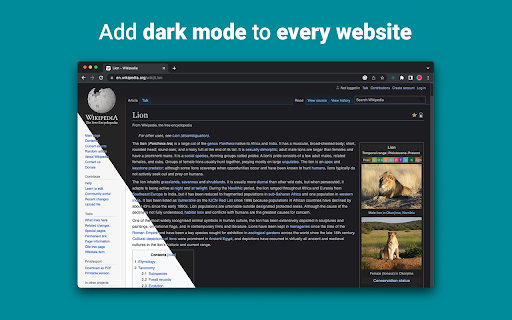
The best dark mode extension for Chrome. Enable dark theme on any website and protect your eyes.
With Night Eye, you can effortlessly enable dark mode on any website, ensuring optimal readability and reducing eye strain, especially in low light environments. Offering a range of customization options, including brightness, contrast, and saturation adjustments, as well as a blue light filter for added eye protection, Night Eye empowers you to personalize your browsing experience. Moreover, with the ability to control built-in dark themes on supported websites, Night Eye grants you complete control over your online journey.
Trusted by over 1,000,000 users across all major browsers, Night Eye stands as the preferred choice for those seeking unparalleled eye comfort. Rest assured, Night Eye is dedicated to providing a seamless experience, with no ads or data mining, and a responsive support team.
With regular updates for the past five years and ongoing commitment to future enhancements, Night Eye is the definitive solution for achieving a smooth and consistent dark mode on any website.
YOUR PRIVACY, OUR PRIORITY: A Transparent Look at How Our Extension Works
When you install our extension, Chrome will warn you that it can read and change your data on the websites you visit. But let's break it down:
Our extension works like a pair of sunglasses for your browser. It looks at the colors on a webpage and tweaks them to create a smooth, eye-friendly dark mode. Just like sunglasses need to 'see' the light to filter it, our extension needs to 'see' the webpage colors to adjust them.
But here's the key point: we don't collect or store any of your data. Think of us like a paid TV service. You subscribe, enjoy the service (in our case, a great dark mode experience), and that's it. We don't sell your data - your privacy stays intact.
Follow us on Twitter to keep up with the latest news around Night Eye and what we are planning ahead - https://twitter.com/nighteye_ext
————————
PRICING
Meet Night Eye Lite, our forever-free version of Night Eye. It offers dark mode for up to 5 websites of your choice, such as Google.com or Gmail.com, with no ads or hidden charges.
For more details, visit: [https://nighteye.app/lite-free-dark-mode-extension/](https://nighteye.app/lite-free-dark-mode-extension/)
We also offer a free 3-month trial of Night Eye Pro. No credit card or payment required - just install and explore. After the trial, you can opt for Night Eye Pro at $9/year, Pro Max at $14/year for power users, or stick with the free Night Eye Lite.
For those seeking a one-time purchase, we have the Ultimate plan at $40.
For a comprehensive overview of our pricing, visit: [https://nighteye.app/how-to-start/](https://nighteye.app/how-to-start/)
————————
SOME FEATURES
➤ OS/Browser Color scheme integration - sync Night Eye with your macOS/Windows dark themes
➤ Deep integration with websites that have their own built-in dark themes.
➤ Schedule dark mode to turn on and off
➤ Custom dark mode for PDFs
➤ Export/Import data between your browsers
————————
AVAILABLE MODES
The extension allows you to quickly switch the three available modes
➤ Dark - Go into complete dark mode. All colors, small images and icons will be converted to give you the smoothest dark experience possible.
➤ Filtered - The websites’ colors will not be changed, but you can still adjust brightness, contrast, warmth and more.
➤ Normal - Get back to the normal browsing experience.
————————
CUSTOMIZATION OPTIONS
Any modifications you make such as contrast level adjustment, blue light filter and etc. can be applied to a single website or globally.
➤ Images - Night Eye analyses and converts only the small images and icons in a website to give you even smoother experience. Facebook posts and other significant media is not converted.
➤ Brightness / Saturation / Contrast - Adjust the brightness, the contrast and the saturation to match the recommended healthy levels and protect your eyes. The default setting for each is 50%, but you can customize each to the preferred levels
➤ Blue Light - Take care of your eyes by eliminating the blue light coming from your screen. Highly recommended especially during late night browsing. Simply slide to the preferred level of warmth.
➤ Dim - Extremely useful if you are working in dark space/room and the screen is the only source of light in the room. The default setting is set to 50%, but you can customize it as you please.
————————
ALWAYS AVAILABLE SUPPORT
Built-in support system - we take pride into being available to provide reliable support and help you with any problems or issues you might experience with the extension.
————————
CHANGELOG
We strive to bring you the best possible dark mode experience. In this update we’ve made several improvements and added one major feature - OS/Browser color scheme integration.
You can monitor all our updates and what we do at https://nighteye.app/changelog
————————
PRIVACY MATTERS: Here's How We Handle Your Data
We believe in transparency and want to explain our approach to privacy in the simplest terms. We don't use third-party analytics like Google Analytics to collect anonymous usage data when you're using our extension.
What we do store are your personalized settings for each website you visit using Night Eye. These settings are saved locally on your computer (localStorage), not on our servers. These settings include any adjustments you've made to enhance your browsing experience with Night Eye, such as changes to Colors, Images, Brightness, Contrast, Saturation, Cold/Warm, and Dim.
In essence, we only keep track of your visual preferences while you surf the web. These preferences are stored on your computer, ensuring that your data remains in your control.
————————
Don’t forget to like & Follow Us:
Facebook - https://facebook.com/night.eye.extension/
Twitter - https://twitter.com/nighteye_ext
Pinterest -https://pinterest.com/nighteyeextension/
Latest reviews
- Tanmay Giramkar
- best extension and supports all sites
- Christian Hernandez
- Dark Mode - Night Eye is the best extension in google chrome store!!!!
- מבצר הדומינו של תום
- really amazing because most websites do not have dark mode and this extention helps me in everysingle website that is not dark by deffault it really helps me that when i see my screen my eyes dont feel hard working
- Jack Therouhs
- It was very helpful, it helps my eyes strain less and it doesn't allow my monitors lights to reflect as hard on tabs when im recording.
- Elfilay
- I like spending a lot of time on Instagram, but I never knew I can enable dark on it. Now that I use Instagram dark mode, I feel reborn I recommend!
- Abhinav Sharma
- I have used a ton of Dark mode extensions but so far Night Eye is the best. Definitely recommend this.
- Arkinee Sahoo
- honestly great to not burn my eyes off anymore. it's not glitchy and doesn't mess with a site's interface, will recommend!!
- Riya Rattish 17DPGA0005
- Amazing
- Retro TBG
- Paid plans for dark mode themes?? Really??
- Pixelbass
- Genuinely the best solution to custom dark mode settings on a per-site basis that I've found online so far—especially for Google Sheets with it's horrendously bright white glare. I've been using it for several months now, and they're also pretty generous with the trial & extensions to your trial, after which I'll certainly be subscribing to continue availing of its features.
- Mohamed Khaled
- Really don't have any complaints. One of the better dark mode extension on Chrome.
- Deshan Sameera
- good extenstion
- Dean Otsyeno
- I have tried several extensions for enabling dark mode, but Night Eye is the best. The way it is easy to enable and disable but the click of a button, and how it makes every page still viewable is just the best.
- Prismo PC
- My eyes are much less tired than before.
- Chatree Ithipathachai
- It's cool, I guess.
- captnsaveahoee
- Really don't have any complaints. One of the better dark mode extension on Chrome.
- César
- A great tool, really like it!!!!
- Mazen Ayman
- It's the best. Just get it and don't waste your time looking for alternatives. It doesn't lag and does the job
- Onibut sussy
- The best app I've ever seen for automatic transformation of any website to dark mode, the instant dark mode conversion and their unique dark mode setup for each website, is way beyond description. I would highly recommend this program for anyone. Thank you!
- Ashley
- The app is amazing, I can finally have dark mode google docs without any issues!
- Sandeep Yadav
- this extension is wonderful, it helps me while using laptop at night and at dark places. it reduces the contrast automatically and protects eyes .I really liked this and I would recommend people who wants an extension for night reading
- Gary Finn
- ""Offers in-app purchases". What this means is after a month, you pay! Not just once, a subscription. Just find a free dark mode.
- J Widdicombe
- Great app for anyone who prefers browsing in dark mode! Dark Mode - Night Eye does a solid job of applying a smooth, consistent dark theme across websites, even ones that don’t support it natively. It’s easy to use, works reliably, and really helps reduce eye strain during late-night sessions. Definitely worth installing if you spend a lot of time on your phone or tablet
- GM Zeyad Gouda
- Really smooth experience overall — no lag, no glitches, nothing uncomfortable. The dark mode colors are well-balanced and easy on the eyes. Does exactly what it promises without getting in the way. Recommended!
- Devansh Lath
- Excellent
- Cuenta Lan
- great app, love it
- Ryan Pakieser
- This is one of the better night mode extensions out there. It is relatively smooth transitioning between various websites and has an intuitive extension plug in.
- Evan Christopher Tschaja
- Pay for dark mode? Are you kidding me?
- Aleksa Markovic
- Amazing App
- Ibrahim walid
- Great extension, very useful in most apps.
- Jaydin Wilson
- I have been using this extension for my work computer and it works amazingly. Especially being up early in the morning and looking at a screen all day. Would definitely recommend. Great work Night Eye!
- Julian Marthinsen
- Been using this extension on my home pc and work laptop since 2019. Couldn't be more happier, some small bugs on a few sites but easily solved with tweaking settings
- Vijay
- the screen gets slower and sometimes the font is also turned black with the background, but overall its good
- Samir Alakbarov
- it is not free. Just gives one month trial. I didnt know about this in advance
- Sara Milosavljević
- Great extension, flexible for modifications
- Scott Smith
- This extension has saved me a lot of trouble. After 7 eye surgeries, I really needed the functionality that this extension has to offer. Thanks, Night Eye!!! Scott
- Lee Lee
- Good Extension very usefull, highly recommended :)
- Alan WW
- good
- Wrex
- Great extension.
- Ong Jin Yong Jace
- Night eye the best chrome dark mode extension after trying out multiple others, highly recommended
- Lukas Hohl
- Good Extension very usfull ^^
- Илья Шмелёв
- Easy solution for all my tabs in the Chrome browser to be in dark mode. I like this extension cause it works for different types of web sites I browse. I cannot remember an examlpe of a site which is not in dark mode with this extension.
- Light theKnight
- It's not free for long.
- Chris
- This is a much more clean approach to Dark/Light mode than any tool I have used so far!
- Zango
- it's free to use and works like wonder. highly recommended :)
- En Force
- Honestly this extension is amazing because it just works better then others who hog up the system resources. Would recommend it surely.
- WildBear
- The extensions works on websites that other extensions did not. It been helping me with eye strain while reading at night.
- RoyalRain
- I have been using this for over a year, and it has made browsing the web so easy on my eyes. It only inverts certain parts of a page rather than the entire thing so you get dark mode without things looking weird all over the place. Highly recommend.
- BreakFreeFromDesk
- Love the app. so helpful!
- Michael GC
- This extension rocks! big help!