
Тъмен режим - Нощно око
Extension Actions
- Extension status: Featured
- Extension status: In-App Purchases
Превключете всеки уебсайт на тъмен режим / светъл режим, както желаете. Погрижете се за очите си с Night Eye.
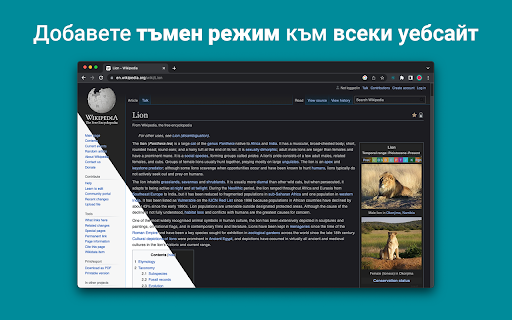
Night Eye ви позволява да активирате тъмен режим на почти всички уебсайтове, подобрявайки четливостта и намалявайки напрежението на очите в среда със слаба светлина. Той също така предлага опции за персонализиране като настройки на яркостта, контраста и наситеността, както и филтър за синя светлина за защита на очите. Плюс това, с възможността да контролирате вградените тъмни теми на поддържаните уебсайтове, вие ще имате пълен контрол върху вашето онлайн изживяване.
Използван от повече от 1 000 000 потребители във всички основни браузъри, Night Eye е правилният избор за вашите очи. Интелигентно преобразуване, без реклами, без извличане на данни, полезна поддръжка!
Ние актуализираме разширенията редовно на месечна база през последните 5 години и планираме да правим това за много дълго време напред.
Ако уебсайтът има вградена тъмна тема, можете да я управлявате директно от Night Eye, а ако няма (като Gmail, Google Docs, Office Online, Github и милиони други), Night Eye ще преобразува цветовете, за да ви предостави плавен и последователен тъмен режим.
ЗА ТЕЗИ, КОИТО СА ЗАГРИЖЕНИ ЗА ПОВЕРИТЕЛНОСТТА
Chrome ще ви предупреди, че разширението може да прочете и промени всичките ви данни на уебсайтовете, които посещавате.
Ето и цялата история:
Това разширение анализира цветовете на всяка уеб страница и ги преобразува, за да ви даде плавен и последователен тъмен режим. Няма друг начин разширението да преобразува цветовете без привилегията за достъп до тях.
Ние обаче никога не събираме вашите данни. Нашият бизнес модел разчита на абонаменти, а не на съхраняване и продажба на вашите данни. Не на последно място, ние също сме потребители на интернет и не искаме да бъдем зли.
От версия 86 на Chrome всички нови разширения вече са скрити в менюто „разширения“ до лентата с URL адреси. За да изведете иконата на Night Eye, трябва да я закачите. За повече подробности вижте екранните снимки по-горе.
Нашето разширение е напълно съвместимо с най-новия манифест V3.
Следвайте ни в Twitter, за да сте в крак с последните новини около Night Eye и какво планираме занапред - https://twitter.com/nighteye_ext
————————
ЦЕНОВИ ПЛАНОВЕ
Night Eye Lite е тук - напълно безплатна завинаги версия на Night Eye.
С две думи - Night Eye Lite може да се използва на до 5 уебсайта. Например - Google.com, Gmail.com и т.н. Можете да управлявате списъка с тези 5 уебсайта по всяко време. Без реклами, без скрити неща - безплатно завинаги.
Повече подробности можете да намерите тук - https://nighteye.app/lite-free-dark-mode-extension/
Преди да преминете към Lite, бихме искали да ви поканим да изпробвате Night Eye Pro безплатно за 3 месеца - без кредитна карта, без плащане - просто го инсталирайте и изпробвайте.
След като изтече пробният период на Night Eye Pro, ще бъдете помолени да платите, за да продължите да го използвате, или да преминете към напълно безплатната версия - Night Eye Lite.
Повече подробности за нашите цени - https://nighteye.app/how-to-start/
————————
НЯКОИ ХАРАКТЕРИСТИКИ
➤ Интегриране на цветна схема на OS/браузър - синхронизирайте Night Eye с вашите macOS/Windows тъмни теми
➤ Дълбока интеграция с уебсайтове, които имат свои собствени вградени тъмни теми.
➤ Планирайте включване и изключване на тъмен режим
➤ Персонализиран тъмен режим за PDF файлове
➤ Експортиране/импортиране на данни между вашите браузъри
————————
ДНЕВНИК НА ПРОМЕНИТЕ
Стремим се да ви предоставим възможно най-доброто изживяване в тъмен режим. В тази актуализация направихме няколко подобрения и добавихме една основна функция - интегриране на цветовата схема на OS/браузър.
Можете да наблюдавате всички наши актуализации и какво правим на https://nighteye.app/changelog
————————
НАЛИЧНИ РЕЖИМИ
Разширението ви позволява бързо да превключвате между трите налични режима
➤ Тъмно - Преминете в напълно тъмен режим. Всички цветове, малки изображения и икони ще бъдат преобразувани, за да ви осигурят възможно най-гладкото тъмно изживяване.
➤ Филтриран - Цветовете на уебсайтовете няма да бъдат променени, но все пак можете да регулирате яркостта, контраста, топлината и др.
➤ Нормално - Върнете се към нормалното изживяване при сърфиране.
————————
ОПЦИИ ЗА ПЕРСОНАЛИЗИРАНЕ
Всички промени, които направите, като настройка на нивото на контраста, филтър за синя светлина и т.н., могат да бъдат приложени към един уебсайт или глобално.
➤ Изображения - Night Eye анализира и преобразува само малките изображения и икони в уебсайт, за да ви осигури още по-плавно изживяване. Публикации във Facebook и други значими медии не се конвертират.
➤ Яркост / Наситеност / Контраст - Регулирайте яркостта, контраста и наситеността, за да съответстват на препоръчаните здравословни нива и предпазете очите си. Настройката по подразбиране за всеки е 50%, но можете да персонализирате всеки до предпочитаните нива
➤ Синя светлина - Погрижете се за очите си, като елиминирате синята светлина, идваща от екрана. Силно препоръчително, особено по време на късно нощно сърфиране. Просто плъзнете до предпочитаното ниво на топлина.
➤ Dim - Изключително полезно, ако работите в тъмно пространство/стая и екранът е единственият източник на светлина в стаята. Настройката по подразбиране е зададена на 50%, но можете да я персонализирате, както желаете.
————————
ВИНАГИ ДОСТЪПНА ПОДДРЪЖКА
Вградена система за поддръжка - ние се гордеем, че сме на разположение, за да предоставим надеждна поддръжка и да ви помогнем при всякакви проблеми или проблеми, които може да срещнете с разширението.
——————
Не забравяйте да харесате и да ни последвате:
Facebook - https://facebook.com/night.eye.extension/
Twitter - https://twitter.com/nighteye_ext
Pinterest -https://pinterest.com/nighteyeextension/
Latest reviews
- David Orland Brown (Mr. Atlanta)
- If all I have to do is leave a simple rating, which seems to be well deserved to get unlimited dark website, and computer features… take me and my data.
- Ducky Lucky
- considered this useful until it was suddenly told to me the months i have been using it were just a "free trial" and basically doesn't work on most if not all sites now without being for a membership to use it
- Elijah Ajayi
- Excellent app. use it to limit screen brightness of web pages
- Evil Propel Bottle
- Works perfectly, all it does is change white pages to black, doesn't change or invert colors!
- Trey Laugherty
- this is by far the best app to use over dark reader is what i had this have better customization and better tweaks for each site
- Bunchhai Nat
- Work really well for most website
- Alexander Vasquez
- I respect their privacy policy and their product works seamlessly with most sites and the ability to tailor setting according to the page is also a huge asset.
- Damian Quientero
- It's just like Dark Reader. Extensions, Canva, Spotify, and ChatGPT are just like robots☺🌆🤖🪐
- Steven Wong Chee Hui
- One of the bast apps to go for dark mode
- G S
- This extension works for Amazon. The Video in the Web Store is full of Anti-Trump, Anti-American messages. Promoting Left Wing Ideas. Can't give them a good rating because of it.
- Tanmay Giramkar
- best extension and supports all sites
- Christian Hernandez
- Dark Mode - Night Eye is the best extension in google chrome store!!!!
- מבצר הדומינו של תום
- really amazing because most websites do not have dark mode and this extention helps me in everysingle website that is not dark by deffault it really helps me that when i see my screen my eyes dont feel hard working
- Jack Therouhs
- It was very helpful, it helps my eyes strain less and it doesn't allow my monitors lights to reflect as hard on tabs when im recording.
- Elfilay
- I like spending a lot of time on Instagram, but I never knew I can enable dark on it. Now that I use Instagram dark mode, I feel reborn I recommend!
- Abhinav Sharma
- I have used a ton of Dark mode extensions but so far Night Eye is the best. Definitely recommend this.
- Arkinee Sahoo
- honestly great to not burn my eyes off anymore. it's not glitchy and doesn't mess with a site's interface, will recommend!!
- Riya Rattish 17DPGA0005
- Amazing
- Retro TBG
- Paid plans for dark mode themes?? Really??
- Pixelbass
- Genuinely the best solution to custom dark mode settings on a per-site basis that I've found online so far—especially for Google Sheets with it's horrendously bright white glare. I've been using it for several months now, and they're also pretty generous with the trial & extensions to your trial, after which I'll certainly be subscribing to continue availing of its features.
- Mohamed Khaled
- Really don't have any complaints. One of the better dark mode extension on Chrome.
- Deshan Sameera
- good extenstion
- Dean Otsyeno
- I have tried several extensions for enabling dark mode, but Night Eye is the best. The way it is easy to enable and disable but the click of a button, and how it makes every page still viewable is just the best.
- Prismo PC
- My eyes are much less tired than before.
- Chatree Ithipathachai
- It's cool, I guess.
- captnsaveahoee
- Really don't have any complaints. One of the better dark mode extension on Chrome.
- César
- A great tool, really like it!!!!
- Mazen Ayman
- It's the best. Just get it and don't waste your time looking for alternatives. It doesn't lag and does the job
- Onibut sussy
- The best app I've ever seen for automatic transformation of any website to dark mode, the instant dark mode conversion and their unique dark mode setup for each website, is way beyond description. I would highly recommend this program for anyone. Thank you!
- Ashley
- The app is amazing, I can finally have dark mode google docs without any issues!
- Sandeep Yadav
- this extension is wonderful, it helps me while using laptop at night and at dark places. it reduces the contrast automatically and protects eyes .I really liked this and I would recommend people who wants an extension for night reading
- Gary Finn
- ""Offers in-app purchases". What this means is after a month, you pay! Not just once, a subscription. Just find a free dark mode.
- J Widdicombe
- Great app for anyone who prefers browsing in dark mode! Dark Mode - Night Eye does a solid job of applying a smooth, consistent dark theme across websites, even ones that don’t support it natively. It’s easy to use, works reliably, and really helps reduce eye strain during late-night sessions. Definitely worth installing if you spend a lot of time on your phone or tablet
- GM Zeyad Gouda
- Really smooth experience overall — no lag, no glitches, nothing uncomfortable. The dark mode colors are well-balanced and easy on the eyes. Does exactly what it promises without getting in the way. Recommended!
- Devansh Lath
- Excellent
- Cuenta Lan
- great app, love it
- Ryan Pakieser
- This is one of the better night mode extensions out there. It is relatively smooth transitioning between various websites and has an intuitive extension plug in.
- Evan Christopher Tschaja
- Pay for dark mode? Are you kidding me?
- Aleksa Markovic
- Amazing App
- Ibrahim walid
- Great extension, very useful in most apps.
- Jaydin Wilson
- I have been using this extension for my work computer and it works amazingly. Especially being up early in the morning and looking at a screen all day. Would definitely recommend. Great work Night Eye!
- Julian Marthinsen
- Been using this extension on my home pc and work laptop since 2019. Couldn't be more happier, some small bugs on a few sites but easily solved with tweaking settings
- Vijay
- the screen gets slower and sometimes the font is also turned black with the background, but overall its good
- Samir Alakbarov
- it is not free. Just gives one month trial. I didnt know about this in advance
- Sara Milosavljević
- Great extension, flexible for modifications
- Scott Smith
- This extension has saved me a lot of trouble. After 7 eye surgeries, I really needed the functionality that this extension has to offer. Thanks, Night Eye!!! Scott
- Lee Lee
- Good Extension very usefull, highly recommended :)
- Alan WW
- good
- Wrex
- Great extension.
- Ong Jin Yong Jace
- Night eye the best chrome dark mode extension after trying out multiple others, highly recommended