حالت تاریک - چشم شب
Extension Actions
- Extension status: Featured
- Extension status: In-App Purchases
- Live on Store
هر وب سایت را به صورت دلخواه به حالت تاریک / حالت روشن تغییر دهید. با چشم شب از چشمان خود مراقبت کنید.
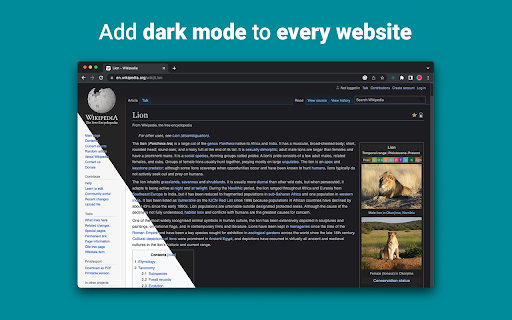
Night Eye به شما این امکان را می دهد تا حالت تاریک را تقریباً در همه وب سایت ها فعال کنید، خوانایی را بهبود می بخشد و فشار چشم را در محیط های کم نور کاهش می دهد. همچنین گزینه های سفارشی سازی مانند تنظیمات روشنایی، کنتراست و اشباع، و همچنین فیلتر نور آبی برای محافظت از چشم ها را ارائه می دهد. به علاوه، با توانایی کنترل تم های تاریک داخلی در وب سایت های پشتیبانی شده، کنترل کاملی بر تجربه آنلاین خود خواهید داشت.
چشم شب که توسط بیش از 1000000 کاربر در تمام مرورگرهای اصلی مورد اعتماد است، انتخاب مناسبی برای چشمان شماست. تبدیل هوشمند، بدون تبلیغات، بدون داده کاوی، پشتیبانی مفید!
ما برنامه های افزودنی را به طور منظم به صورت ماهانه برای 5 سال گذشته به روز می کنیم و برنامه ریزی می کنیم که این کار را برای مدت طولانی آینده انجام دهیم.
اگر وبسایت دارای تم تیره داخلی است، میتوانید آن را مستقیماً از Night Eye کنترل کنید و اگر اینطور نیست (مانند Gmail، Google Docs، Office Online، Github و میلیونها نفر دیگر)، Night Eye رنگها را برای ارائه به شما تبدیل میکند. حالت تاریک صاف و سازگار
برای کسانی که نگران حریم خصوصی هستند
Chrome به شما هشدار می دهد که برنامه افزودنی ممکن است تمام داده های شما را در وب سایت هایی که بازدید می کنید بخواند و تغییر دهد.
اینجا کل داستان است:
این افزونه رنگهای هر صفحه وب را تجزیه و تحلیل میکند و آنها را تبدیل میکند تا حالت تاریکی صاف و یکدستی به شما بدهد. هیچ راه دیگری وجود ندارد که افزونه بتواند رنگ ها را بدون دسترسی به آنها تبدیل کند.
با این حال، ما هرگز هیچ یک از داده های شما را جمع آوری نمی کنیم. مدل کسبوکار ما بر اشتراکها متکی است نه بر ذخیره و فروش دادههای شما. آخرین اما نه کماهمیت، ما نیز کاربر اینترنت هستیم و نمیخواهیم شرور باشیم.
از کروم نسخه 86، همه افزونههای جدید اکنون در منوی «افزونهها» در کنار نوار آدرس پنهان هستند. برای بیرون آوردن نماد Night Eye، باید آن را پین کنید. برای جزئیات بیشتر اسکرین شات های بالا را بررسی کنید.
برنامه افزودنی ما کاملاً با آخرین مانیفست V3 سازگار است. فقط برخی محدودیت ها وجود دارد.
ما را در توییتر دنبال کنید تا از آخرین اخبار در مورد Night Eye و آنچه در آینده برنامه ریزی می کنیم مطلع شوید - https://twitter.com/nighteye_ext
————————
طرح های قیمت گذاری
Night Eye Lite اینجاست - نسخه کاملاً رایگان برای همیشه از Night Eye.
به طور خلاصه - Night Eye Lite را می توان در حداکثر 5 وب سایت استفاده کرد. به عنوان مثال - Google.com، Gmail.com و غیره. شما می توانید لیست آن 5 وب سایت را در هر زمان مدیریت کنید. بدون تبلیغات، بدون چیزهای پنهان - رایگان برای همیشه.
جزئیات بیشتر را می توانید در اینجا پیدا کنید - https://nighteye.app/lite-free-dark-mode-extension/
قبل از رفتن به Lite، میخواهیم از شما دعوت کنیم که Night Eye Pro را بهمدت 3 ماه رایگان امتحان کنید - بدون کارت اعتباری، بدون پرداخت درخواست - فقط آن را نصب کنید و امتحان کنید.
پس از انقضای دوره آزمایشی Night Eye Pro، از شما خواسته میشود که برای ادامه استفاده از آن و یا استفاده از نسخه کاملا رایگان - Night Eye Lite، هزینه پرداخت کنید.
جزئیات بیشتر در مورد قیمت ما - https://nighteye.app/how-to-start/
————————
برخی از ویژگی ها
➤ ادغام طرح رنگ سیستم عامل/مرورگر - Night Eye را با تم های تاریک macOS/Windows خود همگام کنید
➤ ادغام عمیق با وب سایت هایی که تم های تاریک داخلی خود را دارند.
➤ برای روشن و خاموش کردن حالت تاریک برنامه ریزی کنید
➤ حالت تاریک سفارشی برای فایل های PDF
➤ داده ها را بین مرورگرهای خود صادر/وارد کنید
————————
تغییر
ما در تلاش هستیم تا بهترین تجربه حالت تاریک ممکن را برای شما به ارمغان بیاوریم. در این بهروزرسانی، ما چندین پیشرفت ایجاد کردهایم و یک ویژگی اصلی را اضافه کردهایم - یکپارچهسازی طرح رنگ سیستم عامل/مرورگر.
میتوانید تمام بهروزرسانیهای ما و کارهایی که ما انجام میدهیم را در https://nighteye.app/changelog نظارت کنید
————————
حالت های موجود
برنامه افزودنی به شما امکان می دهد تا به سرعت سه حالت موجود را تغییر دهید
➤ تاریک - به حالت تاریک کامل بروید. همه رنگ ها، تصاویر کوچک و نمادها تبدیل می شوند تا نرم ترین تجربه تاریک ممکن را به شما ارائه دهند.
➤ فیلتر شده - رنگ وب سایت ها تغییر نمی کند، اما همچنان می توانید روشنایی، کنتراست، گرما و موارد دیگر را تنظیم کنید.
➤ عادی - به تجربه مرور عادی بازگردید.
————————
گزینه های سفارشی سازی
هر گونه تغییری که انجام می دهید مانند تنظیم سطح کنتراست، فیلتر نور آبی و غیره را می توان در یک وب سایت واحد یا در سطح جهانی اعمال کرد.
➤ تصاویر - Night Eye تنها تصاویر کوچک و نمادهای یک وب سایت را تجزیه و تحلیل و تبدیل می کند تا تجربه ای روان تر را به شما ارائه دهد. پست های فیس بوک و سایر رسانه های مهم تبدیل نمی شود.
➤ روشنایی / اشباع / کنتراست - روشنایی، کنتراست و اشباع را برای مطابقت با سطوح سالم توصیه شده تنظیم کنید و از چشمان خود محافظت کنید. تنظیمات پیشفرض برای هر کدام 50% است، اما میتوانید هر کدام را در سطوح ترجیحی سفارشی کنید
➤ نور آبی - با حذف نور آبی که از صفحه نمایش شما می آید از چشمان خود مراقبت کنید. به ویژه در هنگام مرور اواخر شب بسیار توصیه می شود. به سادگی به سطح مطلوب گرما بلغزانید.
➤ کم نور - بسیار مفید است اگر در فضا/اتاق تاریک کار می کنید و صفحه نمایش تنها منبع نور در اتاق است. تنظیمات پیشفرض روی 50% تنظیم شده است، اما میتوانید آن را به دلخواه شخصیسازی کنید.
————————
پشتیبانی همیشه در دسترس
سیستم پشتیبانی داخلی - ما مفتخریم که در دسترس هستیم تا پشتیبانی قابل اعتمادی را ارائه دهیم و به شما در رفع هر گونه مشکل یا مشکلی که ممکن است با برنامه افزودنی مواجه شوید کمک کنیم.
————————
موجود در
Night Eye در حال حاضر روی Google Chrome، Mozilla Firefox، Safari، Microsoft Edge، Opera، Vivaldi، Brave، Yandex و سایر مرورگرهای مبتنی بر Chromium کار میکند.
————————
ما به حریم خصوصی اهمیت می دهیم
به جای اینکه شما را به سادگی به خط مشی رازداری ما راهنمایی کنیم. ما می خواهیم در اینجا به این موضوع با قابل فهم ترین زبان بپردازیم.
ما هنگام استفاده از برنامه افزودنی، داده های استفاده ناشناس را با استفاده از تجزیه و تحلیل های شخص ثالث استاندارد صنعتی (Google Analytics) جمع آوری نمی کنیم.
ما فقط تنظیمات ذخیره شده را برای هر وب سایت بازدید شده هر کاربر Night Eye در محلی ذخیره سازی (رایانه شما) ذخیره می کنیم. این مربوط به تمام تنظیماتی است که کاربر برای بهبود تجربه مرور خود از طریق استفاده از Night Eye انجام داده است. 7 نوع تنظیم وجود دارد: رنگ ها، تصاویر، روشنایی، کنتراست، اشباع، سرد/گرم و کم نور.
به عبارت دیگر - ما فقط تنظیمات بصری را که هنگام مرور اینترنت انجام داده اید ذخیره می کنیم. ما آنها را در سرورهای خود ذخیره نمی کنیم، بلکه آنها را در محلی ذخیره سازی (رایانه شما) ذخیره می کنیم.
————————
لایک و دنبال کردن ما را فراموش نکنید:
فیس بوک - https://facebook.com/night.eye.extension/
توییتر - https://twitter.com/nighteye_ext
Pinterest -https://pinterest.com/nighteyeextension/
Latest reviews
- Pixelbass
- Genuinely the best solution to custom dark mode settings on a per-site basis that I've found online so far—especially for Google Sheets with it's horrendously bright white glare. I've been using it for several months now, and they're also pretty generous with the trial & extensions to your trial, after which I'll certainly be subscribing to continue availing of its features.
- Mohamed Khaled
- Really don't have any complaints. One of the better dark mode extension on Chrome.
- Deshan Sameera
- good extenstion
- Dean Otsyeno
- I have tried several extensions for enabling dark mode, but Night Eye is the best. The way it is easy to enable and disable but the click of a button, and how it makes every page still viewable is just the best.
- Prismo PC
- My eyes are much less tired than before.
- Chatree Ithipathachai
- It's cool, I guess.
- captnsaveahoee
- Really don't have any complaints. One of the better dark mode extension on Chrome.
- César
- A great tool, really like it!!!!
- Mazen Ayman
- It's the best. Just get it and don't waste your time looking for alternatives. It doesn't lag and does the job
- Onibut sussy
- The best app I've ever seen for automatic transformation of any website to dark mode, the instant dark mode conversion and their unique dark mode setup for each website, is way beyond description. I would highly recommend this program for anyone. Thank you!
- Ashley
- The app is amazing, I can finally have dark mode google docs without any issues!
- Sandeep Yadav
- this extension is wonderful, it helps me while using laptop at night and at dark places. it reduces the contrast automatically and protects eyes .I really liked this and I would recommend people who wants an extension for night reading
- Gary Finn
- ""Offers in-app purchases". What this means is after a month, you pay! Not just once, a subscription. Just find a free dark mode.
- J Widdicombe
- Great app for anyone who prefers browsing in dark mode! Dark Mode - Night Eye does a solid job of applying a smooth, consistent dark theme across websites, even ones that don’t support it natively. It’s easy to use, works reliably, and really helps reduce eye strain during late-night sessions. Definitely worth installing if you spend a lot of time on your phone or tablet
- GM Zeyad Gouda
- Really smooth experience overall — no lag, no glitches, nothing uncomfortable. The dark mode colors are well-balanced and easy on the eyes. Does exactly what it promises without getting in the way. Recommended!
- Devansh Lath
- Excellent
- Cuenta Lan
- great app, love it
- Ryan Pakieser
- This is one of the better night mode extensions out there. It is relatively smooth transitioning between various websites and has an intuitive extension plug in.
- Evan Christopher Tschaja
- Pay for dark mode? Are you kidding me?
- Aleksa Markovic
- Amazing App
- Ibrahim walid
- Great extension, very useful in most apps.
- Jaydin Wilson
- I have been using this extension for my work computer and it works amazingly. Especially being up early in the morning and looking at a screen all day. Would definitely recommend. Great work Night Eye!
- Julian Marthinsen
- Been using this extension on my home pc and work laptop since 2019. Couldn't be more happier, some small bugs on a few sites but easily solved with tweaking settings
- Vijay
- the screen gets slower and sometimes the font is also turned black with the background, but overall its good
- Samir Alakbarov
- it is not free. Just gives one month trial. I didnt know about this in advance
- Sara Milosavljević
- Great extension, flexible for modifications
- Scott Smith
- This extension has saved me a lot of trouble. After 7 eye surgeries, I really needed the functionality that this extension has to offer. Thanks, Night Eye!!! Scott
- Lee Lee
- Good Extension very usefull, highly recommended :)
- Alan WW
- good
- Wrex
- Great extension.
- Ong Jin Yong Jace
- Night eye the best chrome dark mode extension after trying out multiple others, highly recommended
- Lukas Hohl
- Good Extension very usfull ^^
- Илья Шмелёв
- Easy solution for all my tabs in the Chrome browser to be in dark mode. I like this extension cause it works for different types of web sites I browse. I cannot remember an examlpe of a site which is not in dark mode with this extension.
- Light theKnight
- It's not free for long.
- Chris
- This is a much more clean approach to Dark/Light mode than any tool I have used so far!
- Zango
- it's free to use and works like wonder. highly recommended :)
- En Force
- Honestly this extension is amazing because it just works better then others who hog up the system resources. Would recommend it surely.
- WildBear
- The extensions works on websites that other extensions did not. It been helping me with eye strain while reading at night.
- RoyalRain
- I have been using this for over a year, and it has made browsing the web so easy on my eyes. It only inverts certain parts of a page rather than the entire thing so you get dark mode without things looking weird all over the place. Highly recommend.
- BreakFreeFromDesk
- Love the app. so helpful!
- Michael GC
- This extension rocks! big help!
- don cassi
- This extension works on more sites than the other extension I used. Recommended if you have sites where other dark readers fail.
- Ogeid Aevir
- Awesome extension! Helps my eyes at night and it is very clear and smooth. I love it! Recommended!
- Alex P
- Great extension. It does exactly what you expect/ Clean, comfortable dark mode across every site. I especially like that it doesn’t mess with websites that already have their own dark theme. Everything just works automatically and feels well thought out. I’m usually pretty picky with tools like this, but honestly I don’t even have suggestions for improvement. Thanks to the team for a really solid product!
- Raeesa Khan
- As someone with astigmatism this has really helped my eyes feel at ease when looking at dark screens for extended hours
- Jakson Pedreira
- Night Eye is one of the best dark mode extensions I’ve used. It works smoothly across almost all websites and the color conversion looks natural instead of just inverting colors. It significantly reduces eye strain, especially when browsing at night. The customization options like brightness, contrast, and blue light filtering make the experience even better. Highly recommended for anyone who spends many hours in front of the screen.
- Carol Cumberland
- PERFECTION! Thank you for this! I get chronic migraines and the bright screens are torture. This is a huge help!
- Jacob Mira
- Great Dark Mode Extension – Works Smoothly Night Eye is one of the best dark mode extensions I’ve tried. It automatically converts bright websites into a comfortable dark theme, which makes browsing much easier on the eyes, especially at night. The extension is simple to install and works instantly on most websites without breaking the layout. I also like that it allows customization like brightness, contrast, and blue light filtering. It runs smoothly in the background and doesn’t slow down the browser. Overall, it's a great tool for anyone who spends long hours browsing and wants to reduce eye strain. Highly recommended for daily use.
- Wayne Anderson
- I am in front of the computer for hours every day. I thought my eyes were going bad. I stumbled across Night Eye and it was the next best thing to sliced bread!! I love this product!!!!!
- Oof Iff
- no better than this!