
Tryb ciemny — nocne oko
Extension Actions
- Extension status: Featured
- Extension status: In-App Purchases
- Live on Store
Przełącz każdą witrynę w tryb ciemny / tryb jasny zgodnie z potrzebami. Zadbaj o swoje oczy dzięki Night Eye.
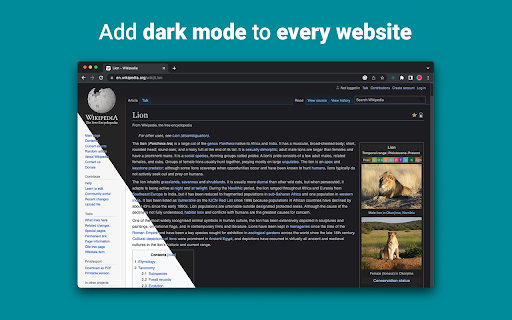
„Night Eye” umożliwia włączenie trybu ciemnego na prawie wszystkich stronach internetowych, poprawiając czytelność i zmniejszając zmęczenie oczu w warunkach słabego oświetlenia. Oferuje również opcje dostosowywania, takie jak regulacja jasności, kontrastu i nasycenia, a także filtr światła niebieskiego chroniący oczy. Ponadto dzięki możliwości kontrolowania wbudowanych ciemnych motywów w obsługiwanych witrynach internetowych będziesz mieć pełną kontrolę nad swoim doświadczeniem online.
Zaufało nam ponad 1 000 000 użytkowników we wszystkich głównych przeglądarkach, „Night Eye” to właściwy wybór dla Twoich oczu. Inteligentna konwersja, brak reklam, brak eksploracji danych, pomocne wsparcie!
Aktualizujemy rozszerzenia regularnie co miesiąc przez ostatnie 5 lat i planujemy to robić przez bardzo długi czas.
Jeśli witryna ma wbudowany ciemny motyw, możesz nim sterować bezpośrednio z „Night Eye”, a jeśli nie (jak Gmail, Dokumenty Google, Office Online, Github i miliony innych), „Night Eye” przekonwertuje kolory aby zapewnić płynny i spójny tryb ciemny.
DLA OSÓB, KTÓRE MAJĄ OBAWĘ O PRYWATNOŚĆ
Chrome poinformuje Cię, że rozszerzenie może odczytywać i zmieniać wszystkie Twoje dane w odwiedzanych witrynach.
Oto cała historia:
To rozszerzenie analizuje kolory każdej strony internetowej i konwertuje je, aby zapewnić płynny i spójny tryb ciemny. Nie ma innego sposobu, w jaki rozszerzenie może konwertować kolory bez uprawnień dostępu do nich.
Nigdy jednak nie gromadzimy żadnych Twoich danych. Nasz model biznesowy opiera się na subskrypcjach, a nie na przechowywaniu i sprzedaży Twoich danych. Wreszcie, jesteśmy również użytkownikami Internetu i nie chcemy być źli.
Od wersji Chrome 86 wszystkie nowe rozszerzenia są teraz ukryte w menu „rozszerzenia” obok paska adresu URL. Aby wydobyć ikonę „Night Eye”, musisz ją przypiąć. Aby uzyskać więcej informacji, sprawdź zrzuty ekranu powyżej.
Nasze rozszerzenie jest w pełni kompatybilne z najnowszym manifestem V3. Są tylko pewne ograniczenia.
Śledź nas na Twitterze, aby być na bieżąco z najnowszymi wiadomościami dotyczącymi „Night Eye” i tego, co planujemy na przyszłość - https://twitter.com/nighteye_ext
————————
PLANY CENOWE
„Night Eye” Lite jest tutaj - całkowicie darmowa, wieczna wersja „Night Eye”.
W skrócie - „Night Eye” Lite można używać na maksymalnie 5 stronach internetowych. Na przykład - Google.com, Gmail.com itp. Listą tych 5 witryn możesz zarządzać w dowolnym momencie. Bez reklam, bez ukrytych rzeczy - za darmo na zawsze.
Więcej szczegółów można znaleźć tutaj - https://nighteye.app/lite-free-dark-mode-extension/
Zanim przejdziesz do Lite, chcielibyśmy zaprosić Cię do wypróbowania „Night Eye” Pro za darmo przez 3 miesiące - bez karty kredytowej, bez płatności - po prostu zainstaluj i wypróbuj.
Po wygaśnięciu okresu próbnego „Night Eye” Pro zostaniesz poproszony o zapłacenie za dalsze korzystanie z niego lub skorzystanie z całkowicie darmowej wersji - „Night Eye” Lite.
Więcej szczegółów na temat naszych cen - https://nighteye.app/how-to-start/
————————
NIEKTÓRE FUNKCJE
➤ Integracja schematu kolorów systemu operacyjnego/przeglądarki — zsynchronizuj „Night Eye” z ciemnymi motywami systemu macOS/Windows
➤ Głęboka integracja ze stronami internetowymi, które mają wbudowane ciemne motywy.
➤ Zaplanuj włączanie i wyłączanie trybu ciemnego
➤ Niestandardowy tryb ciemny dla plików PDF
➤ Eksportuj/importuj dane między przeglądarkami
————————
DZIENNIK ZMIAN
Dokładamy wszelkich starań, aby zapewnić jak najlepsze wrażenia w trybie ciemnym. W tej aktualizacji wprowadziliśmy kilka ulepszeń i dodaliśmy jedną główną funkcję — integrację schematu kolorów systemu operacyjnego/przeglądarki.
Możesz monitorować wszystkie nasze aktualizacje i to, co robimy na https://nighteye.app/changelog
————————
DOSTĘPNE TRYBY
Rozszerzenie pozwala na szybkie przełączanie trzech dostępnych trybów
➤ Ciemny — przejdź do pełnego trybu ciemnego. Wszystkie kolory, małe obrazy i ikony zostaną przekonwertowane, aby zapewnić płynne wrażenia w ciemności.
➤ Filtrowane — kolory stron internetowych nie zostaną zmienione, ale nadal możesz dostosować jasność, kontrast, ciepło i więcej.
➤ Normalny — powrót do normalnego przeglądania.
————————
OPCJE DOSTOSOWANIA
Wszelkie modyfikacje, które wprowadzasz, takie jak regulacja poziomu kontrastu, filtr światła niebieskiego itp., Można zastosować na pojedynczej stronie internetowej lub globalnie.
➤ Obrazy - „Night Eye” analizuje i konwertuje tylko małe obrazy i ikony na stronie internetowej, aby zapewnić jeszcze płynniejsze działanie. Posty na Facebooku i inne ważne media nie są konwertowane.
➤ Jasność / Nasycenie / Kontrast - Dostosuj jasność, kontrast i nasycenie, aby odpowiadały zalecanym zdrowym poziomom i chroń oczy. Domyślne ustawienie dla każdego z nich to 50%, ale każdy z nich można dostosować do preferowanych poziomów
➤ Niebieskie światło - Zadbaj o swoje oczy, eliminując niebieskie światło pochodzące z ekranu. Gorąco polecam szczególnie podczas późnego nocnego przeglądania. Po prostu przesuń do preferowanego poziomu ciepła.
➤ Przyciemnienie — niezwykle przydatne, jeśli pracujesz w ciemnym miejscu/pokoju, a ekran jest jedynym źródłem światła w pomieszczeniu. Domyślne ustawienie to 50%, ale możesz je dostosować według własnego uznania.
————————
ZAWSZE DOSTĘPNE WSPARCIE
Wbudowany system wsparcia — jesteśmy dumni z tego, że jesteśmy dostępni, aby zapewnić niezawodne wsparcie i pomóc w rozwiązaniu wszelkich problemów lub problemów, które możesz napotkaćz rozszerzeniem.
————————
DOSTĘPNE NA
„Night Eye” działa obecnie w Google Chrome, Mozilla Firefox, Safari, Microsoft Edge, Opera, Vivaldi, Brave, Yandex i wszystkich innych przeglądarkach opartych na Chromium.
————————
DBAMY O PRYWATNOŚĆ
Zamiast po prostu odsyłać Cię do naszej polityki prywatności. Chcielibyśmy tutaj poruszyć ten temat w jak najbardziej zrozumiałym języku.
Podczas korzystania z rozszerzenia NIE gromadzimy anonimowych danych o użytkowaniu za pomocą standardowych w branży narzędzi analitycznych stron trzecich (Google Analytics).
Przechowujemy tylko zapisane ustawienia dla każdej odwiedzanej strony internetowej każdego użytkownika „Night Eye” w jego localStorage (Twój komputer). Odnosi się to do wszystkich dostosowań wprowadzonych przez użytkownika w celu poprawy komfortu przeglądania za pomocą „Night Eye”. Dostępnych jest 7 rodzajów regulacji: kolory, obrazy, jasność, kontrast, nasycenie, zimno/ciepło i przyciemnienie.
Innymi słowy - przechowujemy tylko wszelkie korekty wizualne, których dokonałeś podczas przeglądania Internetu. Nie przechowujemy ich na naszych serwerach, ale raczej w twoim localStorage (twój komputer).
————————
Nie zapomnij polubić i obserwować nas:
Facebook - https://facebook.com/night.eye.extension/
Twittera - https://twitter.com/nighteye_ext
Pinterest - https://pinterest.com/nighteyeextension/
Latest reviews
- Pixelbass
- Genuinely the best solution to custom dark mode settings on a per-site basis that I've found online so far—especially for Google Sheets with it's horrendously bright white glare. I've been using it for several months now, and they're also pretty generous with the trial & extensions to your trial, after which I'll certainly be subscribing to continue availing of its features.
- Mohamed Khaled
- Really don't have any complaints. One of the better dark mode extension on Chrome.
- Deshan Sameera
- good extenstion
- Dean Otsyeno
- I have tried several extensions for enabling dark mode, but Night Eye is the best. The way it is easy to enable and disable but the click of a button, and how it makes every page still viewable is just the best.
- Prismo PC
- My eyes are much less tired than before.
- Chatree Ithipathachai
- It's cool, I guess.
- captnsaveahoee
- Really don't have any complaints. One of the better dark mode extension on Chrome.
- César
- A great tool, really like it!!!!
- Mazen Ayman
- It's the best. Just get it and don't waste your time looking for alternatives. It doesn't lag and does the job
- Onibut sussy
- The best app I've ever seen for automatic transformation of any website to dark mode, the instant dark mode conversion and their unique dark mode setup for each website, is way beyond description. I would highly recommend this program for anyone. Thank you!
- Ashley
- The app is amazing, I can finally have dark mode google docs without any issues!
- Sandeep Yadav
- this extension is wonderful, it helps me while using laptop at night and at dark places. it reduces the contrast automatically and protects eyes .I really liked this and I would recommend people who wants an extension for night reading
- Gary Finn
- ""Offers in-app purchases". What this means is after a month, you pay! Not just once, a subscription. Just find a free dark mode.
- J Widdicombe
- Great app for anyone who prefers browsing in dark mode! Dark Mode - Night Eye does a solid job of applying a smooth, consistent dark theme across websites, even ones that don’t support it natively. It’s easy to use, works reliably, and really helps reduce eye strain during late-night sessions. Definitely worth installing if you spend a lot of time on your phone or tablet
- GM Zeyad Gouda
- Really smooth experience overall — no lag, no glitches, nothing uncomfortable. The dark mode colors are well-balanced and easy on the eyes. Does exactly what it promises without getting in the way. Recommended!
- Devansh Lath
- Excellent
- Cuenta Lan
- great app, love it
- Ryan Pakieser
- This is one of the better night mode extensions out there. It is relatively smooth transitioning between various websites and has an intuitive extension plug in.
- Evan Christopher Tschaja
- Pay for dark mode? Are you kidding me?
- Aleksa Markovic
- Amazing App
- Ibrahim walid
- Great extension, very useful in most apps.
- Jaydin Wilson
- I have been using this extension for my work computer and it works amazingly. Especially being up early in the morning and looking at a screen all day. Would definitely recommend. Great work Night Eye!
- Julian Marthinsen
- Been using this extension on my home pc and work laptop since 2019. Couldn't be more happier, some small bugs on a few sites but easily solved with tweaking settings
- Vijay
- the screen gets slower and sometimes the font is also turned black with the background, but overall its good
- Samir Alakbarov
- it is not free. Just gives one month trial. I didnt know about this in advance
- Sara Milosavljević
- Great extension, flexible for modifications
- Scott Smith
- This extension has saved me a lot of trouble. After 7 eye surgeries, I really needed the functionality that this extension has to offer. Thanks, Night Eye!!! Scott
- Lee Lee
- Good Extension very usefull, highly recommended :)
- Alan WW
- good
- Wrex
- Great extension.
- Ong Jin Yong Jace
- Night eye the best chrome dark mode extension after trying out multiple others, highly recommended
- Lukas Hohl
- Good Extension very usfull ^^
- Илья Шмелёв
- Easy solution for all my tabs in the Chrome browser to be in dark mode. I like this extension cause it works for different types of web sites I browse. I cannot remember an examlpe of a site which is not in dark mode with this extension.
- Light theKnight
- It's not free for long.
- Chris
- This is a much more clean approach to Dark/Light mode than any tool I have used so far!
- Zango
- it's free to use and works like wonder. highly recommended :)
- En Force
- Honestly this extension is amazing because it just works better then others who hog up the system resources. Would recommend it surely.
- WildBear
- The extensions works on websites that other extensions did not. It been helping me with eye strain while reading at night.
- RoyalRain
- I have been using this for over a year, and it has made browsing the web so easy on my eyes. It only inverts certain parts of a page rather than the entire thing so you get dark mode without things looking weird all over the place. Highly recommend.
- BreakFreeFromDesk
- Love the app. so helpful!
- Michael GC
- This extension rocks! big help!
- don cassi
- This extension works on more sites than the other extension I used. Recommended if you have sites where other dark readers fail.
- Ogeid Aevir
- Awesome extension! Helps my eyes at night and it is very clear and smooth. I love it! Recommended!
- Alex P
- Great extension. It does exactly what you expect/ Clean, comfortable dark mode across every site. I especially like that it doesn’t mess with websites that already have their own dark theme. Everything just works automatically and feels well thought out. I’m usually pretty picky with tools like this, but honestly I don’t even have suggestions for improvement. Thanks to the team for a really solid product!
- Raeesa Khan
- As someone with astigmatism this has really helped my eyes feel at ease when looking at dark screens for extended hours
- Jakson Pedreira
- Night Eye is one of the best dark mode extensions I’ve used. It works smoothly across almost all websites and the color conversion looks natural instead of just inverting colors. It significantly reduces eye strain, especially when browsing at night. The customization options like brightness, contrast, and blue light filtering make the experience even better. Highly recommended for anyone who spends many hours in front of the screen.
- Carol Cumberland
- PERFECTION! Thank you for this! I get chronic migraines and the bright screens are torture. This is a huge help!
- Jacob Mira
- Great Dark Mode Extension – Works Smoothly Night Eye is one of the best dark mode extensions I’ve tried. It automatically converts bright websites into a comfortable dark theme, which makes browsing much easier on the eyes, especially at night. The extension is simple to install and works instantly on most websites without breaking the layout. I also like that it allows customization like brightness, contrast, and blue light filtering. It runs smoothly in the background and doesn’t slow down the browser. Overall, it's a great tool for anyone who spends long hours browsing and wants to reduce eye strain. Highly recommended for daily use.
- Wayne Anderson
- I am in front of the computer for hours every day. I thought my eyes were going bad. I stumbled across Night Eye and it was the next best thing to sliced bread!! I love this product!!!!!
- Oof Iff
- no better than this!