Modo Escuro - Olho Noturno
Extension Actions
- Extension status: Featured
- Extension status: In-App Purchases
- Live on Store
Alterne cada site para o modo escuro/modo claro conforme desejado. Cuide dos seus olhos com Night Eye.
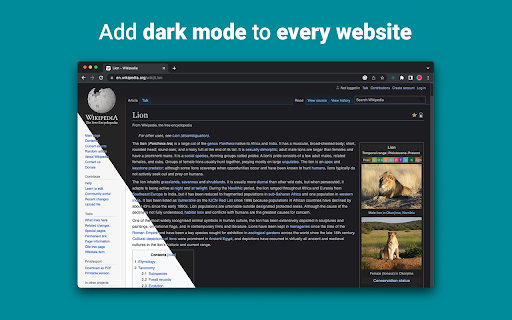
"Night Eye" permite ativar o modo escuro em quase todos os sites, melhorando a legibilidade e reduzindo o cansaço visual em ambientes com pouca luz. Ele também oferece opções de personalização, como ajustes de brilho, contraste e saturação, além de um filtro de luz azul para proteger os olhos. Além disso, com a capacidade de controlar temas escuros integrados em sites compatíveis, você terá controle total sobre sua experiência online.
Com a confiança de mais de 1.000.000 de usuários em todos os principais navegadores, "Night Eye" é a escolha certa para seus olhos. Conversão inteligente, sem anúncios, sem mineração de dados, suporte útil!
Atualizamos as extensões regularmente mensalmente nos últimos 5 anos e planejamos fazer isso por muito tempo.
Se o site tiver um tema escuro integrado, você poderá controlá-lo diretamente de "Night Eye" e, se não tiver (como Gmail, Google Docs, Office Online, Github e milhões de outros), "Night Eye" converterá as cores para fornecer um modo escuro suave e consistente.
PARA AQUELES QUE PREOCUPAM-SE COM A PRIVACIDADE
O Chrome irá alertá-lo de que a extensão pode ler e alterar todos os seus dados nos sites que você visita.
Aqui está toda a história:
Esta extensão analisa as cores de cada página da web e as converte para fornecer um modo escuro suave e consistente. Não há outra maneira de a extensão converter as cores sem o privilégio de acessá-las.
No entanto, nunca coletamos nenhum dos seus dados. Nosso modelo de negócios depende de assinaturas e não de armazenar e vender seus dados. Por último, mas não menos importante, também somos usuários da Internet e não queremos ser maus.
A partir da versão 86 do Chrome, todas as novas extensões agora estão ocultas no menu “extensões” ao lado da barra de URL. Para trazer o ícone de "Night Eye", você precisa fixá-lo. Para mais detalhes, verifique as capturas de tela acima.
Nossa extensão é totalmente compatível com o mais recente manifesto V3. Há apenas algumas restrições.
Siga-nos no Twitter para acompanhar as últimas notícias sobre "Night Eye" e o que estamos planejando para o futuro - https://twitter.com/nighteye_ext
————————
PLANOS DE PREÇOS
"Night Eye" Lite está aqui - versão totalmente gratuita para sempre de "Night Eye".
Resumindo - "Night Eye" Lite pode ser usado em até 5 sites. Por exemplo - Google.com, Gmail.com e etc. Você pode gerenciar a lista desses 5 sites a qualquer momento. Sem anúncios, sem coisas escondidas - grátis para sempre.
Mais detalhes podem ser encontrados aqui - https://nighteye.app/lite-free-dark-mode-extension/
Antes de ir para o Lite, gostaríamos de convidá-lo a experimentar o "Night Eye" Pro gratuitamente por 3 meses - sem cartão de crédito, sem cobrança - basta instalar e experimentar.
Depois que o período de teste do "Night Eye" Pro expirar, você será solicitado a pagar para continuar usando ou usar a versão totalmente gratuita - "Night Eye" Lite.
Mais detalhes sobre nossos preços - https://nighteye.app/how-to-start/
————————
ALGUMAS FUNCIONALIDADES
➤ Integração do esquema de cores do SO/Navegador - sincronize "Night Eye" com seus temas escuros do macOS/Windows
➤ Integração profunda com sites que possuem seus próprios temas escuros integrados.
➤ Programe o modo escuro para ligar e desligar
➤ Modo escuro personalizado para PDFs
➤ Exportar/importar dados entre seus navegadores
————————
LOG DE ALTERAÇÕES
Nós nos esforçamos para oferecer a melhor experiência possível no modo escuro. Nesta atualização, fizemos várias melhorias e adicionamos um recurso importante - integração do esquema de cores do sistema operacional/navegador.
Você pode monitorar todas as nossas atualizações e o que fazemos em https://nighteye.app/changelog
————————
MODOS DISPONÍVEIS
A extensão permite alternar rapidamente entre os três modos disponíveis
➤ Escuro - Entre no modo escuro completo. Todas as cores, imagens pequenas e ícones serão convertidos para proporcionar a experiência escura mais suave possível.
➤ Filtrado - As cores dos sites não serão alteradas, mas você ainda pode ajustar brilho, contraste, calor e muito mais.
➤ Normal - Volte para a experiência de navegação normal.
————————
OPÇÕES DE PERSONALIZAÇÃO
Quaisquer modificações que você fizer, como ajuste do nível de contraste, filtro de luz azul e etc., podem ser aplicadas a um único site ou globalmente.
➤ Imagens - "Night Eye" analisa e converte apenas as pequenas imagens e ícones em um site para proporcionar uma experiência ainda mais suave. As postagens do Facebook e outras mídias significativas não são convertidas.
➤ Brilho / Saturação / Contraste - Ajuste o brilho, o contraste e a saturação para corresponder aos níveis saudáveis recomendados e proteger seus olhos. A configuração padrão para cada um é 50%, mas você pode personalizar cada um para os níveis preferidos
➤ Luz Azul - Cuide dos seus olhos eliminando a luz azul que vem da sua tela. Altamente recomendado, especialmente durante a navegação noturna. Basta deslizar para o nível preferido de calor.
➤ Dim - Extremamente útil se você estiver trabalhando em um espaço/sala escuro e a tela for a única fonte de luz na sala. A configuração padrão é de 50%, mas você pode personalizá-la como quiser.
————————
SUPORTE SEMPRE DISPONÍVEL
Sistema de suporte integrado - temos orgulho de estar disponíveis para fornecer suporte confiável e ajudá-lo com quaisquer problemas ou questões que você possa enfrentarcom a extensão.
————————
DISPONÍVEL EM
"Night Eye" está atualmente funcionando no Google Chrome, Mozilla Firefox, Safari, Microsoft Edge, Opera, Vivaldi, Brave, Yandex e todos os outros navegadores baseados em Chromium.
————————
NOS PREOCUPAMOS COM A PRIVACIDADE
Em vez de simplesmente apontar para nossa política de privacidade. Gostaríamos de abordar este tópico na linguagem mais compreensível aqui.
NÃO coletamos dados de uso anônimos usando uma análise de terceiros padrão do setor (Google Analytics) ao usar a extensão.
Armazenamos apenas as configurações salvas para cada site visitado de cada usuário "Night Eye" em seu localStorage (seu computador). Refere-se a todos os ajustes feitos pelo usuário para melhorar sua experiência de navegação através do uso do "Night Eye". Existem 7 tipos de ajustes: Cores, Imagens, Brilho, Contraste, Saturação, Frio/Quente e Dim.
Em outras palavras - nós apenas armazenamos quaisquer ajustes visuais que você fez enquanto navegava na internet. Não os armazenamos em nossos servidores, mas sim em seu localStorage (seu computador).
————————
Não se esqueça de curtir e nos seguir:
Facebook - https://facebook.com/night.eye.extension/
Twitter - https://twitter.com/nighteye_ext
Pinterest - https://pinterest.com/nighteyeextension/
Latest reviews
- Pixelbass
- Genuinely the best solution to custom dark mode settings on a per-site basis that I've found online so far—especially for Google Sheets with it's horrendously bright white glare. I've been using it for several months now, and they're also pretty generous with the trial & extensions to your trial, after which I'll certainly be subscribing to continue availing of its features.
- Mohamed Khaled
- Really don't have any complaints. One of the better dark mode extension on Chrome.
- Deshan Sameera
- good extenstion
- Dean Otsyeno
- I have tried several extensions for enabling dark mode, but Night Eye is the best. The way it is easy to enable and disable but the click of a button, and how it makes every page still viewable is just the best.
- Prismo PC
- My eyes are much less tired than before.
- Chatree Ithipathachai
- It's cool, I guess.
- captnsaveahoee
- Really don't have any complaints. One of the better dark mode extension on Chrome.
- César
- A great tool, really like it!!!!
- Mazen Ayman
- It's the best. Just get it and don't waste your time looking for alternatives. It doesn't lag and does the job
- Onibut sussy
- The best app I've ever seen for automatic transformation of any website to dark mode, the instant dark mode conversion and their unique dark mode setup for each website, is way beyond description. I would highly recommend this program for anyone. Thank you!
- Ashley
- The app is amazing, I can finally have dark mode google docs without any issues!
- Sandeep Yadav
- this extension is wonderful, it helps me while using laptop at night and at dark places. it reduces the contrast automatically and protects eyes .I really liked this and I would recommend people who wants an extension for night reading
- Gary Finn
- ""Offers in-app purchases". What this means is after a month, you pay! Not just once, a subscription. Just find a free dark mode.
- J Widdicombe
- Great app for anyone who prefers browsing in dark mode! Dark Mode - Night Eye does a solid job of applying a smooth, consistent dark theme across websites, even ones that don’t support it natively. It’s easy to use, works reliably, and really helps reduce eye strain during late-night sessions. Definitely worth installing if you spend a lot of time on your phone or tablet
- GM Zeyad Gouda
- Really smooth experience overall — no lag, no glitches, nothing uncomfortable. The dark mode colors are well-balanced and easy on the eyes. Does exactly what it promises without getting in the way. Recommended!
- Devansh Lath
- Excellent
- Cuenta Lan
- great app, love it
- Ryan Pakieser
- This is one of the better night mode extensions out there. It is relatively smooth transitioning between various websites and has an intuitive extension plug in.
- Evan Christopher Tschaja
- Pay for dark mode? Are you kidding me?
- Aleksa Markovic
- Amazing App
- Ibrahim walid
- Great extension, very useful in most apps.
- Jaydin Wilson
- I have been using this extension for my work computer and it works amazingly. Especially being up early in the morning and looking at a screen all day. Would definitely recommend. Great work Night Eye!
- Julian Marthinsen
- Been using this extension on my home pc and work laptop since 2019. Couldn't be more happier, some small bugs on a few sites but easily solved with tweaking settings
- Vijay
- the screen gets slower and sometimes the font is also turned black with the background, but overall its good
- Samir Alakbarov
- it is not free. Just gives one month trial. I didnt know about this in advance
- Sara Milosavljević
- Great extension, flexible for modifications
- Scott Smith
- This extension has saved me a lot of trouble. After 7 eye surgeries, I really needed the functionality that this extension has to offer. Thanks, Night Eye!!! Scott
- Lee Lee
- Good Extension very usefull, highly recommended :)
- Alan WW
- good
- Wrex
- Great extension.
- Ong Jin Yong Jace
- Night eye the best chrome dark mode extension after trying out multiple others, highly recommended
- Lukas Hohl
- Good Extension very usfull ^^
- Илья Шмелёв
- Easy solution for all my tabs in the Chrome browser to be in dark mode. I like this extension cause it works for different types of web sites I browse. I cannot remember an examlpe of a site which is not in dark mode with this extension.
- Light theKnight
- It's not free for long.
- Chris
- This is a much more clean approach to Dark/Light mode than any tool I have used so far!
- Zango
- it's free to use and works like wonder. highly recommended :)
- En Force
- Honestly this extension is amazing because it just works better then others who hog up the system resources. Would recommend it surely.
- WildBear
- The extensions works on websites that other extensions did not. It been helping me with eye strain while reading at night.
- RoyalRain
- I have been using this for over a year, and it has made browsing the web so easy on my eyes. It only inverts certain parts of a page rather than the entire thing so you get dark mode without things looking weird all over the place. Highly recommend.
- BreakFreeFromDesk
- Love the app. so helpful!
- Michael GC
- This extension rocks! big help!
- don cassi
- This extension works on more sites than the other extension I used. Recommended if you have sites where other dark readers fail.
- Ogeid Aevir
- Awesome extension! Helps my eyes at night and it is very clear and smooth. I love it! Recommended!
- Alex P
- Great extension. It does exactly what you expect/ Clean, comfortable dark mode across every site. I especially like that it doesn’t mess with websites that already have their own dark theme. Everything just works automatically and feels well thought out. I’m usually pretty picky with tools like this, but honestly I don’t even have suggestions for improvement. Thanks to the team for a really solid product!
- Raeesa Khan
- As someone with astigmatism this has really helped my eyes feel at ease when looking at dark screens for extended hours
- Jakson Pedreira
- Night Eye is one of the best dark mode extensions I’ve used. It works smoothly across almost all websites and the color conversion looks natural instead of just inverting colors. It significantly reduces eye strain, especially when browsing at night. The customization options like brightness, contrast, and blue light filtering make the experience even better. Highly recommended for anyone who spends many hours in front of the screen.
- Carol Cumberland
- PERFECTION! Thank you for this! I get chronic migraines and the bright screens are torture. This is a huge help!
- Jacob Mira
- Great Dark Mode Extension – Works Smoothly Night Eye is one of the best dark mode extensions I’ve tried. It automatically converts bright websites into a comfortable dark theme, which makes browsing much easier on the eyes, especially at night. The extension is simple to install and works instantly on most websites without breaking the layout. I also like that it allows customization like brightness, contrast, and blue light filtering. It runs smoothly in the background and doesn’t slow down the browser. Overall, it's a great tool for anyone who spends long hours browsing and wants to reduce eye strain. Highly recommended for daily use.
- Wayne Anderson
- I am in front of the computer for hours every day. I thought my eyes were going bad. I stumbled across Night Eye and it was the next best thing to sliced bread!! I love this product!!!!!
- Oof Iff
- no better than this!